Skip to content
OnMSFT.com
  • Home
  • About
  • Contact
  • Windows
  • Surface
  • Xbox
  • How-To
  • OnPodcast
  • Edge
  • Teams
  • Gaming
Menu
  • Home
  • About
  • Contact
  • Windows
  • Surface
  • Xbox
  • How-To
  • OnPodcast
  • Edge
  • Teams
  • Gaming
  1. Home
  2. News
  3. Having problems getting to Microsoft sites on Chrome? Try clearing your cookies

Having problems getting to Microsoft sites on Chrome? Try clearing your cookies

Kip Kniskern Kip Kniskern
August 26, 2016
2 min read

While this isn’t something that’s been a problem for me, a number of users across the web have been running across problems visiting some Microsoft.com sites in Chrome, getting 400 Bad Request errors, which certainly can be annoying.

However there’s a fairly simple fix, and that’s to clear your cookies. Mary Jo Foley posted a link to a quick video on how to do just that, and it’s cleared up the problem (apparently some corrupted cookies) for her:

@pbojkowski yep. so i found a fix. go in and delete all your https://t.co/1Rk4MPCDpH cookies. https://t.co/pB1dNLaw5L

— Mary Jo Foley (@maryjofoley) July 6, 2016

As you might expect, there are a number of ways to clear your cookies in Chrome (and in all other major browsers, varying a bit with each one). You can go to Settings>Advanced Settings, and under Privacy either just clear all your cookies (might not be a bad idea) or drill down into Content settings and only clear cookies for the sites that are giving you problems.

You can reach the Clear Browsing Data dialog box quickly by clicking on the hamburger menu and finding it under More tools, or you can even navigate to a site that’s giving you trouble, open up the Developer Tools (again under More tools), click on Application, and get a granular dialog for clearing data on a per site level:
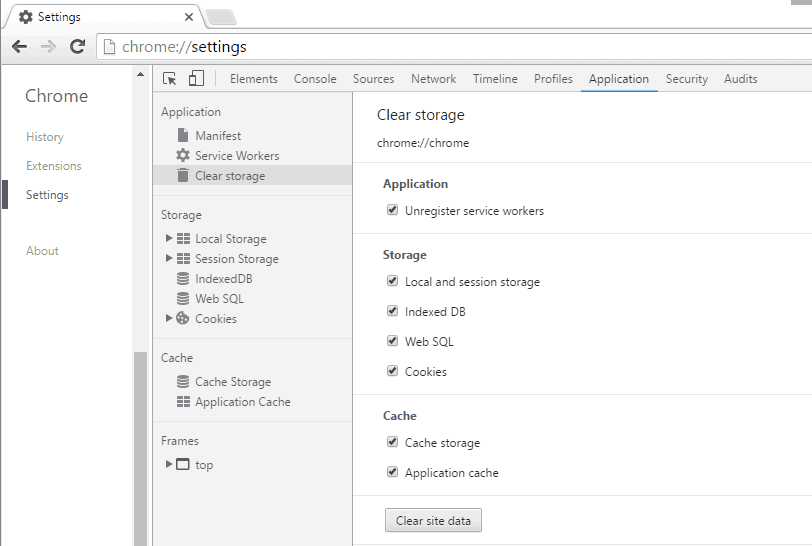
Chrome Dev Tools

Chrome Dev Tools

Are you having problems with Microsoft sites in Chrome? Does clearing your cookies help? Let us know in the comments below.

Further reading: Chrome

Share this article:
Tags:
Chrome
Previous Article Cortana on Xbox One comes to France, Italy, Germany and Spain in latest Preview update Next Article There’s a new ToeJam & Earl video game coming to Xbox One in 2017

Related Articles

Chrome and Gemini icons representing Gemini Live voice assistant integration in Chrome

Chrome tests Gemini Live voice assistant in a floating overlay panel

March 14, 2026

Chrome’s Organizer feature may sync Gemini and AI conversations across devices

March 14, 2026

After Chrome, Edge tests launching the browser automatically when you sign into Windows

March 13, 2026

Leave a Comment Cancel reply

Your email address will not be published. Required fields are marked *

Recent Posts

  • Chrome tests Gemini Live voice assistant in a floating overlay panel
  • Chrome’s Organizer feature may sync Gemini and AI conversations across devices
  • After Chrome, Edge tests launching the browser automatically when you sign into Windows
  • iPhone Fold Latest Rumors: Display, Cameras, RAM and Price Details Revealed
  • Samsung fears first mobile operating loss due to memory price surge

Recent Comments

No comments to show.
OnMSFT.com

OnMSFT.com covers Microsoft news, reviews, and how-to guides. Formerly known as WinBeta, we have been your source for Microsoft news since 1998.

Categories

  • Windows
  • Surface
  • Xbox
  • How-To
  • OnPodcast
  • Gaming
  • Edge
  • Teams

Recent Posts

  • Chrome tests Gemini Live voice assistant in a floating overlay panel
  • Chrome’s Organizer feature may sync Gemini and AI conversations across devices
  • After Chrome, Edge tests launching the browser automatically when you sign into Windows
  • iPhone Fold Latest Rumors: Display, Cameras, RAM and Price Details Revealed
  • Samsung fears first mobile operating loss due to memory price surge

Quick Links

  • About OnMSFT.com
  • Contact OnMSFT
  • Join Our Team
  • Privacy Policy
© 2010–2026 OnMSFT.com LLC. All rights reserved.
About OnMSFT.comContact OnMSFTPrivacy Policy

