Skip to content
OnMSFT.com
  • Home
  • About
  • Contact
  • Windows
  • Surface
  • Xbox
  • How-To
  • OnPodcast
  • Edge
  • Teams
  • Gaming
Menu
  • Home
  • About
  • Contact
  • Windows
  • Surface
  • Xbox
  • How-To
  • OnPodcast
  • Edge
  • Teams
  • Gaming
  1. Home
  2. News
  3. Outlook for Windows will soon get new options for managing large Teams meetings

Outlook for Windows will soon get new options for managing large Teams meetings

Rabia Noureen Rabia Noureen
January 7, 2021
1 min read

Outlook for Windows is about to receive a new handy feature that will help users in managing large Teams meetings. According to the Microsoft 365 roadmap, the Teams meeting options are currently set to roll out later this month.

Once this feature rolls out, Microsoft Teams users will automatically see a notification to set meeting options while scheduling large meetings in the Outlook desktop client. The change applies to meetings with more than 40 participants or 10 distribution lists. In the meeting options window, the meeting organizer will be able to configure different settings, including allow attendees to unmute, and options to record the meeting automatically.
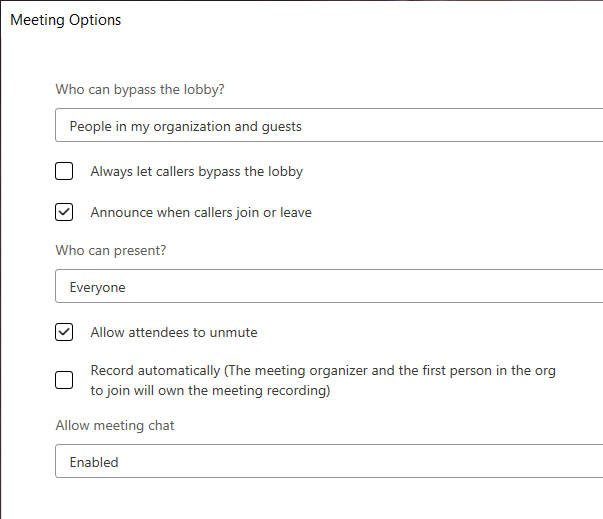
Settings

It is important to note that there is also an option to set Teams meeting options before or during the meeting. To do this, users will need to click the “Now Now” on the prompt to use the default tenant meeting options in the upcoming Teams meeting.

The new capability is likely to be a welcome addition for people who need to create back to back meetings. As a reminder, these updates are rolled out gradually, so it could be a while till all users begin seeing the feature.


Share This Post:

Tags: Microsoft | Microsoft 365 | Microsoft Teams | Office 365 | Outlook
Share this article:
Tags:
Microsoft Microsoft 365 Microsoft Teams Office 365 Outlook
Previous Article CES 2021: Dell unloads sleek new mobile workstations, 4K touch monitors and more during CES Next Article Here’s why Microsoft keeps shipping Xbox controllers with AA batteries

Related Articles

Chrome and Gemini icons representing Gemini Live voice assistant integration in Chrome

Chrome tests Gemini Live voice assistant in a floating overlay panel

March 14, 2026

Chrome’s Organizer feature may sync Gemini and AI conversations across devices

March 14, 2026

After Chrome, Edge tests launching the browser automatically when you sign into Windows

March 13, 2026

Leave a Comment Cancel reply

Your email address will not be published. Required fields are marked *

Recent Posts

  • Chrome tests Gemini Live voice assistant in a floating overlay panel
  • Chrome’s Organizer feature may sync Gemini and AI conversations across devices
  • After Chrome, Edge tests launching the browser automatically when you sign into Windows
  • iPhone Fold Latest Rumors: Display, Cameras, RAM and Price Details Revealed
  • Samsung fears first mobile operating loss due to memory price surge

Recent Comments

No comments to show.
OnMSFT.com

OnMSFT.com covers Microsoft news, reviews, and how-to guides. Formerly known as WinBeta, we have been your source for Microsoft news since 1998.

Categories

  • Windows
  • Surface
  • Xbox
  • How-To
  • OnPodcast
  • Gaming
  • Edge
  • Teams

Recent Posts

  • Chrome tests Gemini Live voice assistant in a floating overlay panel
  • Chrome’s Organizer feature may sync Gemini and AI conversations across devices
  • After Chrome, Edge tests launching the browser automatically when you sign into Windows
  • iPhone Fold Latest Rumors: Display, Cameras, RAM and Price Details Revealed
  • Samsung fears first mobile operating loss due to memory price surge

Quick Links

  • About OnMSFT.com
  • Contact OnMSFT
  • Join Our Team
  • Privacy Policy
© 2010–2026 OnMSFT.com LLC. All rights reserved.
About OnMSFT.comContact OnMSFTPrivacy Policy
