Skip to content
OnMSFT.com
  • Home
  • About
  • Contact
  • Windows
  • Surface
  • Xbox
  • How-To
  • OnPodcast
  • Edge
  • Teams
  • Gaming
Menu
  • Home
  • About
  • Contact
  • Windows
  • Surface
  • Xbox
  • How-To
  • OnPodcast
  • Edge
  • Teams
  • Gaming
  1. Home
  2. News
  3. Outlook for Windows is getting text predictions in January

Outlook for Windows is getting text predictions in January

Rabia Noureen Rabia Noureen
December 11, 2020
1 min read

Microsoft is working on a new text prediction feature for Outlook for Windows that is similar to the web version of the app. The company has announced through the Microsoft 365 Admin center that the feature will begin rolling out to users in late January.

As the name suggests, text predictions will suggest words and phrases while the user is composing an email in English. Outlook users will be able to accept suggestions by pressing the tab or the right arrow key. If they continue to type while ignoring the suggestions, the text predictions will disappear automatically.
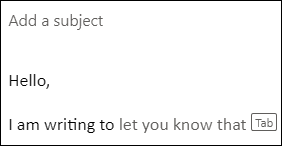
Suggestions

At launch, the feature will be on by default, and users will be able to turn off the text predictions by heading to the Mail options in Outlook for Windows. “Disabling this feature in Outlook for Windows will not affect text predictions in Outlook on the web or Outlook for iOS. Eventually, text predictions will support additional languages, which will not require an update to the application or settings.” the company explained.

The addition of text predictions will be a welcome one for Outlook users, and it’s handy for people who deal with a large volume of emails. Do you think that the new experience will help you to be more productive? Let us know in the comments down below.


 

Share This Post:

Tags: Microsoft | Microsoft Outlook | Outlook | Windows 10
Share this article:
Tags:
Microsoft Microsoft Outlook Outlook Windows 10
Previous Article Microsoft Lists – How to create a new list from scratch Next Article Microsoft announces more Xbox Game Pass games for December including Code Vein and Moto GP 20

Related Articles

Chrome and Gemini icons representing Gemini Live voice assistant integration in Chrome

Chrome tests Gemini Live voice assistant in a floating overlay panel

March 14, 2026

Chrome’s Organizer feature may sync Gemini and AI conversations across devices

March 14, 2026

After Chrome, Edge tests launching the browser automatically when you sign into Windows

March 13, 2026

Leave a Comment Cancel reply

Your email address will not be published. Required fields are marked *

Recent Posts

  • Chrome tests Gemini Live voice assistant in a floating overlay panel
  • Chrome’s Organizer feature may sync Gemini and AI conversations across devices
  • After Chrome, Edge tests launching the browser automatically when you sign into Windows
  • iPhone Fold Latest Rumors: Display, Cameras, RAM and Price Details Revealed
  • Samsung fears first mobile operating loss due to memory price surge

Recent Comments

No comments to show.
OnMSFT.com

OnMSFT.com covers Microsoft news, reviews, and how-to guides. Formerly known as WinBeta, we have been your source for Microsoft news since 1998.

Categories

  • Windows
  • Surface
  • Xbox
  • How-To
  • OnPodcast
  • Gaming
  • Edge
  • Teams

Recent Posts

  • Chrome tests Gemini Live voice assistant in a floating overlay panel
  • Chrome’s Organizer feature may sync Gemini and AI conversations across devices
  • After Chrome, Edge tests launching the browser automatically when you sign into Windows
  • iPhone Fold Latest Rumors: Display, Cameras, RAM and Price Details Revealed
  • Samsung fears first mobile operating loss due to memory price surge

Quick Links

  • About OnMSFT.com
  • Contact OnMSFT
  • Join Our Team
  • Privacy Policy
© 2010–2026 OnMSFT.com LLC. All rights reserved.
About OnMSFT.comContact OnMSFTPrivacy Policy
