Skip to content
OnMSFT.com
  • Home
  • About
  • Contact
  • Windows
  • Surface
  • Xbox
  • How-To
  • OnPodcast
  • Edge
  • Teams
  • Gaming
Menu
  • Home
  • About
  • Contact
  • Windows
  • Surface
  • Xbox
  • How-To
  • OnPodcast
  • Edge
  • Teams
  • Gaming
  1. Home
  2. News
  3. Microsoft add a new feature to the Polls app in Teams, Multi-Question polls – OnMSFT.com

Microsoft add a new feature to the Polls app in Teams, Multi-Question polls – OnMSFT.com

Kevin Okemwa Kevin Okemwa
December 14, 2022
2 min read

It’s barely a week since Microsoft announced that they will be adding a new capability to its Polls app in Teams, Instant polls which is designed to quickly engage with the audience and collect feedback from them.

\n

And now, yet again, the company announced that it is making another addition to the Polls app in Teams. This time the feature is Multi-Question polls which is currently available to all Business and Education subscribers. It is designed to help the user “to collect a broader range and volume of feedback more quickly and effectively.”

\n

\n

\n

\n

\n

\n

\n

\n

\n

\n

\n

\n

\n

\n

At some point, you must have interacted with the Polls app in Teams in one way or the other. If not, the app is essentially used to drive engagement and alignment during meetings. What’s more, with the recently added Instant polls feature, you can also use it to collect feedback for the audience.

\n

Microsoft has now released a new feature that will enhance this experience. Instead of creating multiple polls before the meeting and having to dish them out at different times while the meeting is in progress, you can now use the new feature, Multi-Questions polls to bundle up all the polls you’ve created. What’s more, you can launch all of them simultaneously.

\n

Using this new feature, you’ll now be able “to gather different types of feedback about the same topic or feedback about different but related topics”. It is worth noting that, you can only include a maximum of 9 questions using the Multi-questions poll.

\n

To access the feature as the meeting organizer, click Polls> New Poll, and then click Add question at the bottom of the Polls window. You can also quickly switch question types by clicking on the current question drop-down arrow and then selecting the one you want. You can also delete a poll question by clicking on the trash can icon in the top right corner.

\n

\n

\n

\n

\n

\n

\n

\n

\n

\n

\n

\n

\n

\n

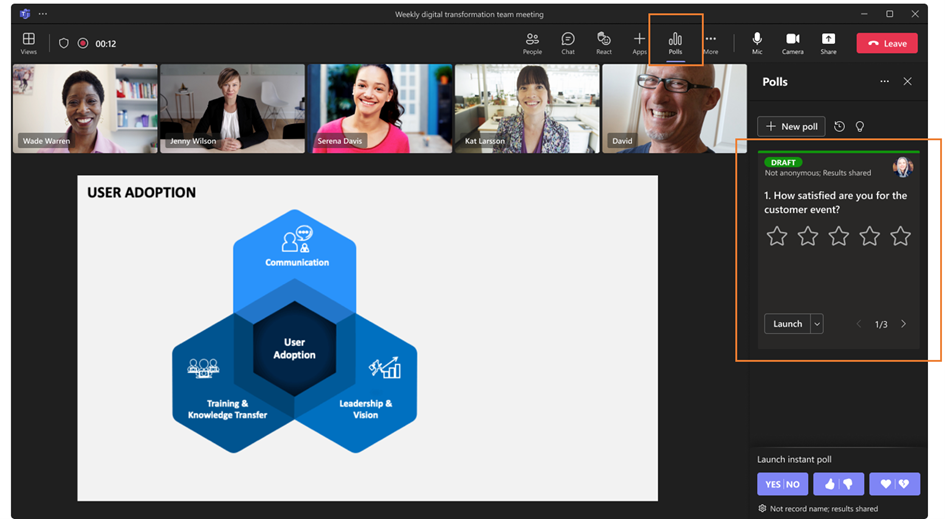
Once you have the questions set up, you can now launch a Multi-Question poll during a Teams meeting by clicking the Launch button in the Polls pane. Here is a glimpse of the feature:
\n

Launch Multi-Question Poll from the Polls Pane

\n

The meeting attendees will be required to answer all the questions in the Multi-Question poll one after the other, then click on the Submit button when they are done. You can only make a submission of your responses if you have answered all the questions in the poll. Moreover, if you are joining the meeting using your phone, you can use it to respond to the poll questions.

\n

Meeting organizers can review the poll results by clicking on the arrows at the bottom of the page to move through. Attendees can also reply to poll questions or review poll results in the chat by checking the Chat window and clicking the View poll button.

\n

\n

\n

\n

\n

\n

\n

\n

\n

\n

\n

\n

\n

\n

Share your thoughts with us about this feature below.

\n

via: Microsoft

\n

Share This Post:

Share this article:
Tags:
Microsoft Teams
Kevin Okemwa
Written by

Kevin Okemwa

Hardworking, young, and full of life. His goal is to make your life easier by deciphering the latest in gadgets and trends. At OnMSFT.com, he covers How-to guides, breaking news, and featured stories.

Previous Article How to check and download the latest updates for all your Surface devices – OnMSFT.com Next Article Teams Rooms on Android now features new touch and collaboration experiences – OnMSFT.com

Related Articles

Windows 11

Windows 11 26H1 KB5077239 adds Cross-Device Resume, File Explorer tweaks, and more

March 2, 2026

PowerToys 0.75 released; Environment Variables editor is here

October 31, 2023

Former Halo developer Bungie announces layoffs in wake of game delays

October 31, 2023

Leave a Comment Cancel reply

Your email address will not be published. Required fields are marked *

Recent Posts

  • Windows 11 26H1 KB5077239 adds Cross-Device Resume, File Explorer tweaks, and more
  • PowerToys 0.75 released; Environment Variables editor is here
  • Former Halo developer Bungie announces layoffs in wake of game delays
  • Siemens and Microsoft partner to bring GenAI to industries worldwide
  • Here is what’s coming to (and leaving) Xbox Game Pass soon

Recent Comments

No comments to show.

Archives

  • March 2026
  • October 2023
  • September 2023
  • August 2023
  • July 2023
  • June 2023
  • May 2023
  • April 2023
  • March 2023
  • February 2023
  • January 2023
  • December 2022
  • November 2022
  • October 2022
  • September 2022
  • August 2022
  • July 2022
  • June 2022
  • May 2022
  • April 2022
  • March 2022
  • February 2022
  • January 2022
  • December 2021
  • November 2021
  • October 2021
  • September 2021
  • August 2021
  • July 2021
  • June 2021
  • May 2021
  • April 2021
  • March 2021
  • February 2021
  • January 2021
  • December 2020
  • November 2020
  • October 2020
  • September 2020
  • August 2020
  • July 2020
  • June 2020
  • May 2020
  • April 2020
  • March 2020
  • February 2020
  • January 2020
  • December 2019
  • November 2019
  • October 2019
  • September 2019
  • August 2019
  • July 2019
  • June 2019
  • May 2019
  • April 2019
  • March 2019
  • February 2019
  • January 2019
  • December 2018
  • November 2018
  • October 2018
  • September 2018
  • August 2018
  • July 2018
  • June 2018
  • May 2018
  • April 2018
  • March 2018
  • February 2018
  • January 2018
  • December 2017
  • November 2017
  • October 2017
  • September 2017
  • August 2017
  • July 2017
  • June 2017
  • May 2017
  • April 2017
  • March 2017
  • February 2017
  • January 2017
  • December 2016
  • November 2016
  • October 2016
  • September 2016
  • August 2016
  • July 2016
  • June 2016
  • May 2016
  • April 2016
  • March 2016
  • February 2016
  • January 2016
  • December 2015
  • November 2015
  • October 2015
  • September 2015
  • August 2015
  • July 2015
  • June 2015
  • May 2015
  • April 2015
  • March 2015
  • February 2015
  • January 2015
  • December 2014
  • November 2014
  • October 2014
  • September 2014
  • August 2014
  • July 2014
  • June 2014
  • May 2014
  • April 2014
  • March 2014
  • February 2014
  • January 2014
  • December 2013
  • November 2013
  • October 2013
  • September 2013
  • August 2013
  • July 2013
  • June 2013
  • May 2013
  • April 2013
  • March 2013
  • February 2013
  • January 2013
  • December 2012
  • November 2012
  • October 2012
  • September 2012
  • August 2012
  • July 2012
  • June 2012
  • May 2012
  • April 2012
  • March 2012
  • February 2012
  • January 2012
  • December 2011
  • November 2011
  • October 2011
  • September 2011
  • August 2011
  • July 2011
  • June 2011
  • May 2011
  • April 2011
  • March 2011
  • February 2011
  • January 2011
  • December 2010
  • November 2010
  • October 2010
  • September 2010

Categories

  • Announcements
  • Deals
  • Developer
  • Editorial
  • Feature
  • Feature stories
  • Hero-post
  • Hotdeals
  • How-to
  • Latest news
  • Microsoft / office 365
  • News
  • Office 365
  • Onpodcast
  • Opinion
  • Our featured post
  • Polls
  • Review
  • Reviews
  • Videos
OnMSFT.com

OnMSFT.com covers Microsoft news, reviews, and how-to guides. Formerly known as WinBeta, we have been your source for Microsoft news since 1998.

Categories

  • Windows
  • Surface
  • Xbox
  • How-To
  • OnPodcast
  • Gaming
  • Edge
  • Teams

Recent Posts

  • Windows 11 26H1 KB5077239 adds Cross-Device Resume, File Explorer tweaks, and more
  • PowerToys 0.75 released; Environment Variables editor is here
  • Former Halo developer Bungie announces layoffs in wake of game delays
  • Siemens and Microsoft partner to bring GenAI to industries worldwide
  • Here is what’s coming to (and leaving) Xbox Game Pass soon

Quick Links

  • About OnMSFT.com
  • Contact OnMSFT
  • Join Our Team
© 2010–2026 OnMSFT.com LLC. All rights reserved.
About OnMSFT.comContact OnMSFT


