Skip to content
OnMSFT.com
  • Home
  • About
  • Contact
  • Windows
  • Surface
  • Xbox
  • How-To
  • OnPodcast
  • Edge
  • Teams
  • Gaming
Menu
  • Home
  • About
  • Contact
  • Windows
  • Surface
  • Xbox
  • How-To
  • OnPodcast
  • Edge
  • Teams
  • Gaming
  1. Home
  2. News
  3. Microsoft’s SwiftKey Keyboard on Android gets new cursor control with latest beta update

Microsoft’s SwiftKey Keyboard on Android gets new cursor control with latest beta update

Rabia Noureen Rabia Noureen
August 18, 2020
1 min read

Microsoft has released a new update for the beta version of its SwiftKey keyboard app on Android. The recent update (version 7.6.2.4) comes with a new feature called cursor control.

The beta testers of the app will be able to enable the new cursor control feature by tapping and holding on the space bar. The keyboard will then enter the cursor control mode (as shown in the screenshot below), and users will be able to navigate the text field by simply moving their finger on the keyboard area.

Here’s the full release notes:

  • We’ve added cursor control to your Microsoft SwiftKey Keyboard. Try it out by tapping and holding the spacebar to move the cursor We hope you’ll love it!
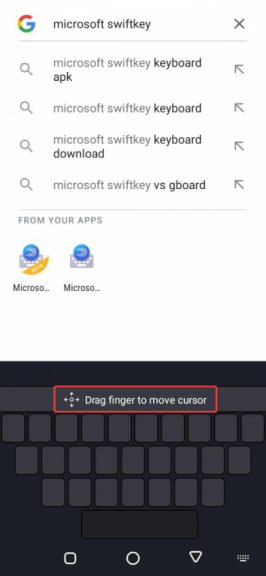
Microsoft Swiftkey Beta Cursor Control

The feature is already available to the iOS users for a while now, and it’s pretty useful when users need to correct a spelling mistake without wanting to delete some parts of the text. At the moment, the cursor control functionlaity is only available in the latest SwiftKey beta for Android, but it shouldn’t be long before the update starts rolling out to the stable version of the app.


Microsoft SwiftKey Beta
Download
QR-Code
Microsoft SwiftKey Beta
Developer:
SwiftKey
Price:
Free


Share This Post:

Tags: Android | Apps | Swiftkey | SwiftKey for Android
Share this article:
Tags:
Android Apps Swiftkey SwiftKey for Android
Previous Article Lenovo Looking To Reinvigorate Its Consumer Lineup This Fall With Yoga Slim 7 Devices – onmsft.com Next Article Windows 10 May 2020 Update can now be installed on the Surface Pro X and Laptop 3

Related Articles

Chrome and Gemini icons representing Gemini Live voice assistant integration in Chrome

Chrome tests Gemini Live voice assistant in a floating overlay panel

March 14, 2026

Chrome’s Organizer feature may sync Gemini and AI conversations across devices

March 14, 2026

After Chrome, Edge tests launching the browser automatically when you sign into Windows

March 13, 2026

Leave a Comment Cancel reply

Your email address will not be published. Required fields are marked *

Recent Posts

  • Chrome tests Gemini Live voice assistant in a floating overlay panel
  • Chrome’s Organizer feature may sync Gemini and AI conversations across devices
  • After Chrome, Edge tests launching the browser automatically when you sign into Windows
  • iPhone Fold Latest Rumors: Display, Cameras, RAM and Price Details Revealed
  • Samsung fears first mobile operating loss due to memory price surge

Recent Comments

No comments to show.
OnMSFT.com

OnMSFT.com covers Microsoft news, reviews, and how-to guides. Formerly known as WinBeta, we have been your source for Microsoft news since 1998.

Categories

  • Windows
  • Surface
  • Xbox
  • How-To
  • OnPodcast
  • Gaming
  • Edge
  • Teams

Recent Posts

  • Chrome tests Gemini Live voice assistant in a floating overlay panel
  • Chrome’s Organizer feature may sync Gemini and AI conversations across devices
  • After Chrome, Edge tests launching the browser automatically when you sign into Windows
  • iPhone Fold Latest Rumors: Display, Cameras, RAM and Price Details Revealed
  • Samsung fears first mobile operating loss due to memory price surge

Quick Links

  • About OnMSFT.com
  • Contact OnMSFT
  • Join Our Team
  • Privacy Policy
© 2010–2026 OnMSFT.com LLC. All rights reserved.
About OnMSFT.comContact OnMSFTPrivacy Policy

