Skip to content
OnMSFT.com
  • Home
  • About
  • Contact
  • Windows
  • Surface
  • Xbox
  • How-To
  • OnPodcast
  • Edge
  • Teams
  • Gaming
Menu
  • Home
  • About
  • Contact
  • Windows
  • Surface
  • Xbox
  • How-To
  • OnPodcast
  • Edge
  • Teams
  • Gaming
  1. Home
  2. News
  3. Microsoft To Do now auto populates tasks due today in the My Day list – onmsft.com

Microsoft To Do now auto populates tasks due today in the My Day list – onmsft.com

Kevin Okemwa Kevin Okemwa
December 7, 2022
1 min read

If you’re not conversant with Microsoft To Do, it is an app that can help you increase your productivity by helping you remember the tasks you need to accomplish each day. Building upon this premise, Microsoft has announced that it is adding support auto population of tasks due today in the My Day list.

How does this feature work? Well, it automatically populates your tasks in My Day on their due dates. This is an important and useful addition to the app because it will assist users to stay on track and plan their days accordingly. It is also more efficient and effective compared to the previous approach where users needed to add the tasks manually in My Day.
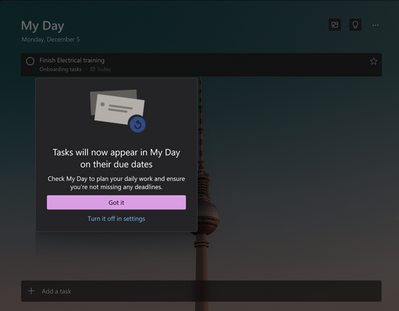
thumbnail image 1 of blog post titled Microsoft To Do now supports auto population of tasks due today in the My Day list!

If you want to make use of this feature, simply launch the app and click on the My Day list. You’ll then be able to view a list that contains all of your tasks due today. This is inclusive of any tasks that were previously added to your lists and are due today.

Microsoft has stated that it has rolled out this feature to 5% of its audience already. The feature is expected to hit general availability in the coming weeks. If you are just learning about Microsoft To Do, be sure to check out our expert guide that will help you get started.

Via: Microsoft

Share This Post:

Share this article:
Tags:
Microsoft To Do
Previous Article Cameyo adds support for Linux apps to their Cloud Desktops – onmsft.com Next Article PowerToys v0.65.0 is now available, features a bunch of fixes and improvements – onmsft.com

Related Articles

Chrome and Gemini icons representing Gemini Live voice assistant integration in Chrome

Chrome tests Gemini Live voice assistant in a floating overlay panel

March 14, 2026

Chrome’s Organizer feature may sync Gemini and AI conversations across devices

March 14, 2026

After Chrome, Edge tests launching the browser automatically when you sign into Windows

March 13, 2026

Leave a Comment Cancel reply

Your email address will not be published. Required fields are marked *

Recent Posts

  • Chrome tests Gemini Live voice assistant in a floating overlay panel
  • Chrome’s Organizer feature may sync Gemini and AI conversations across devices
  • After Chrome, Edge tests launching the browser automatically when you sign into Windows
  • iPhone Fold Latest Rumors: Display, Cameras, RAM and Price Details Revealed
  • Samsung fears first mobile operating loss due to memory price surge

Recent Comments

No comments to show.
OnMSFT.com

OnMSFT.com covers Microsoft news, reviews, and how-to guides. Formerly known as WinBeta, we have been your source for Microsoft news since 1998.

Categories

  • Windows
  • Surface
  • Xbox
  • How-To
  • OnPodcast
  • Gaming
  • Edge
  • Teams

Recent Posts

  • Chrome tests Gemini Live voice assistant in a floating overlay panel
  • Chrome’s Organizer feature may sync Gemini and AI conversations across devices
  • After Chrome, Edge tests launching the browser automatically when you sign into Windows
  • iPhone Fold Latest Rumors: Display, Cameras, RAM and Price Details Revealed
  • Samsung fears first mobile operating loss due to memory price surge

Quick Links

  • About OnMSFT.com
  • Contact OnMSFT
  • Join Our Team
  • Privacy Policy
© 2010–2026 OnMSFT.com LLC. All rights reserved.
About OnMSFT.comContact OnMSFTPrivacy Policy

