Skip to content
OnMSFT.com
  • Home
  • About
  • Contact
  • Windows
  • Surface
  • Xbox
  • How-To
  • OnPodcast
  • Edge
  • Teams
  • Gaming
Menu
  • Home
  • About
  • Contact
  • Windows
  • Surface
  • Xbox
  • How-To
  • OnPodcast
  • Edge
  • Teams
  • Gaming
  1. Home
  2. News
  3. Microsoft Teams calls get end-to-end encryption support in public preview – onmsft.com

Microsoft Teams calls get end-to-end encryption support in public preview – onmsft.com

Rabia Noureen Rabia Noureen
October 22, 2021
2 min read

Microsoft unveiled its plans to bring end-to-end encryption (E2EE) support to Teams in March at its Ignite Spring 2021 event. The company has recently announced that the E2EE service is finally available for 1:1 unscheduled Teams calls in public preview.

The End-to-end encryption feature in Teams works by encrypting information from source to destination, and it’s primarily useful for confidential conversations within an organization. “When both parties in a one-to-one call turn on E2EE, the communication between those two parties in the call is encrypted from end-to-end. No other party, including Microsoft, has access to the decrypted conversation,” the company explained in the blog post.
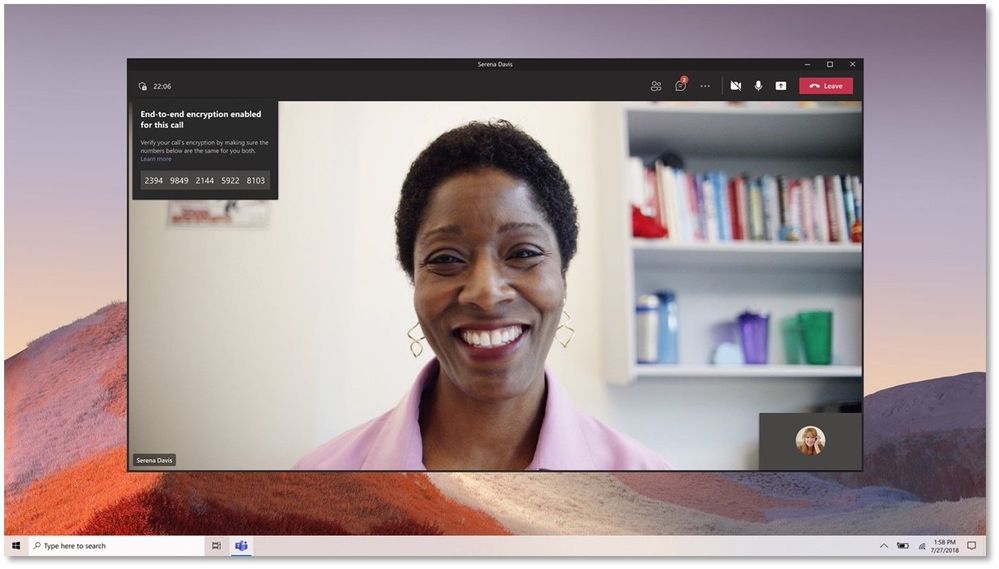
Thumbnail image 3 of blog post titled use end-to-end encryption for one-to-one microsoft teams calls

To enable end-to-end encryption, IT admins will first need to enable it in the Teams admin center. Once enabled, Microsoft Teams desktop users will go to Settings >> Privacy and then turn on the “end-to-end encrypted calls” toggle button. On mobile, head to Settings >> Calling, enable the “End-to-end encrypted calls” option available under the Encryption section.

If a Microsoft Teams call is E2EE encrypted, both participants should see a shield with a lock icon in the top left corner of the screen. The app will also show a 20-digit security code by hovering over the E2EE icon. Users will be able to verify the encryption status of their ongoing call by ensuring that the same security code is visible to both parties.

It is important to note that the initial preview of this feature is currently limited to 1:1 unscheduled calls, and PSTN calls are not supported just yet. Microsoft says that support for scheduled calls and meetings is coming in a future update. Moreover, some advanced calling capabilities aren’t supported when E2EE is enabled in a Teams call. The list includes call transfer, Call Park, Call Merge, Call Companion, call recording, as well as live captions and transcription.

The end-to-end encryption experience is currently available in the Microsoft Teams desktop app as well as in the latest version of the Android or iOS app. Microsoft will keep listening to feedback while the feature is in preview, and we hope to see E2EE land soon in group calls and meetings.


Share This Post:

Share this article:
Tags:
Microsoft 365 Microsoft Teams
Previous Article GTA Remastered trilogy to be released on November 11, with GTA: San Andreas coming to Xbox Game Pass Next Article Microsoft Edge 95 reaches Stable channel new Efficiency mode and PDF improvements

Related Articles

Chrome and Gemini icons representing Gemini Live voice assistant integration in Chrome

Chrome tests Gemini Live voice assistant in a floating overlay panel

March 14, 2026

Chrome’s Organizer feature may sync Gemini and AI conversations across devices

March 14, 2026

After Chrome, Edge tests launching the browser automatically when you sign into Windows

March 13, 2026

Leave a Comment Cancel reply

Your email address will not be published. Required fields are marked *

Recent Posts

  • Chrome tests Gemini Live voice assistant in a floating overlay panel
  • Chrome’s Organizer feature may sync Gemini and AI conversations across devices
  • After Chrome, Edge tests launching the browser automatically when you sign into Windows
  • iPhone Fold Latest Rumors: Display, Cameras, RAM and Price Details Revealed
  • Samsung fears first mobile operating loss due to memory price surge

Recent Comments

No comments to show.
OnMSFT.com

OnMSFT.com covers Microsoft news, reviews, and how-to guides. Formerly known as WinBeta, we have been your source for Microsoft news since 1998.

Categories

  • Windows
  • Surface
  • Xbox
  • How-To
  • OnPodcast
  • Gaming
  • Edge
  • Teams

Recent Posts

  • Chrome tests Gemini Live voice assistant in a floating overlay panel
  • Chrome’s Organizer feature may sync Gemini and AI conversations across devices
  • After Chrome, Edge tests launching the browser automatically when you sign into Windows
  • iPhone Fold Latest Rumors: Display, Cameras, RAM and Price Details Revealed
  • Samsung fears first mobile operating loss due to memory price surge

Quick Links

  • About OnMSFT.com
  • Contact OnMSFT
  • Join Our Team
  • Privacy Policy
© 2010–2026 OnMSFT.com LLC. All rights reserved.
About OnMSFT.comContact OnMSFTPrivacy Policy
