Skip to content
OnMSFT.com
  • Home
  • About
  • Contact
  • Windows
  • Surface
  • Xbox
  • How-To
  • OnPodcast
  • Edge
  • Teams
  • Gaming
Menu
  • Home
  • About
  • Contact
  • Windows
  • Surface
  • Xbox
  • How-To
  • OnPodcast
  • Edge
  • Teams
  • Gaming
  1. Home
  2. News
  3. Microsoft Edge gets a big History update, includes syncing across devices

Microsoft Edge gets a big History update, includes syncing across devices

Rabia Noureen Rabia Noureen
November 17, 2020
2 min read

Microsoft Edge Insiders can now try out the new history and open tabs sync feature. The company announced today that the feature, which was previously available for select Insiders, is now generally available in the Dev and Canary channels.

The company has also made some improvements to the way users access history in the browser. Just like the favorites menu, a pop-up window will now appear as soon as a user opens the browser’s history. The history window comes with a couple of pivots including history, recently closed tabs, as well as tabs opened on other devices. Microsoft Edge will remember the pivot which was last used for faster access next time.

“The new history experience is designed to simplify this process by opening on top of the current webpage. From here, you can simply click through your history and watch as the page loads in the background. When you find the page you want, simply click anywhere outside of the history menu to close it,” explained William Devereux from the Edge team.
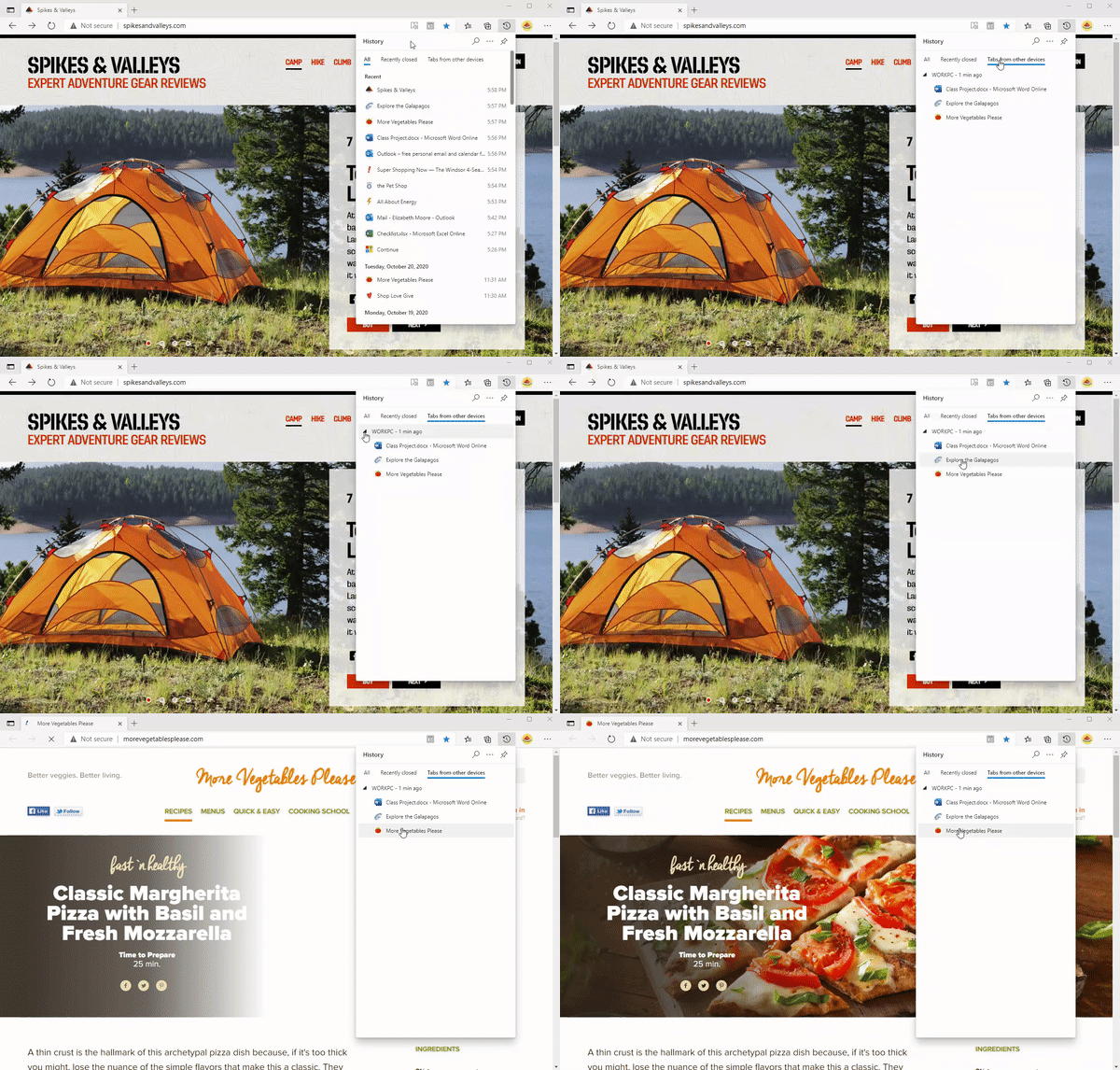
History 3.gif

With the new history experience, users will be able to add the history icon to the toolbar next to the Collections and favorites buttons for quick access. To do this, head to the history menu, and click the history menu (. . .) button, and then select “Show history button in toolbar.”

Users can easily show/hide the history button anytime they want, and they can also customize their toolbar from the Appearance page in Settings. There’s also an option to pin the history to the side of the screen.

History 4.gif

Lastly, the browser now remembers the last 25 tabs and windows the user has closed in the past session, making it a bit easier to return later. It is worth noting that this feature is currently under development, and the company will keep listening to feedback while it is in preview. We hope that the new history experience will soon make its way to the stable channel in an upcoming release.


Share This Post:

Share this article:
Previous Article Xbox Series S Review: An Affordable Next-gen Experience With Some Compromises – onmsft.com Next Article Cyberpunk 2077 gets its first gameplay trailer on Xbox One X and Xbox Series X

Related Articles

Chrome and Gemini icons representing Gemini Live voice assistant integration in Chrome

Chrome tests Gemini Live voice assistant in a floating overlay panel

March 14, 2026

Chrome’s Organizer feature may sync Gemini and AI conversations across devices

March 14, 2026

After Chrome, Edge tests launching the browser automatically when you sign into Windows

March 13, 2026

Leave a Comment Cancel reply

Your email address will not be published. Required fields are marked *

Recent Posts

  • Chrome tests Gemini Live voice assistant in a floating overlay panel
  • Chrome’s Organizer feature may sync Gemini and AI conversations across devices
  • After Chrome, Edge tests launching the browser automatically when you sign into Windows
  • iPhone Fold Latest Rumors: Display, Cameras, RAM and Price Details Revealed
  • Samsung fears first mobile operating loss due to memory price surge

Recent Comments

No comments to show.
OnMSFT.com

OnMSFT.com covers Microsoft news, reviews, and how-to guides. Formerly known as WinBeta, we have been your source for Microsoft news since 1998.

Categories

  • Windows
  • Surface
  • Xbox
  • How-To
  • OnPodcast
  • Gaming
  • Edge
  • Teams

Recent Posts

  • Chrome tests Gemini Live voice assistant in a floating overlay panel
  • Chrome’s Organizer feature may sync Gemini and AI conversations across devices
  • After Chrome, Edge tests launching the browser automatically when you sign into Windows
  • iPhone Fold Latest Rumors: Display, Cameras, RAM and Price Details Revealed
  • Samsung fears first mobile operating loss due to memory price surge

Quick Links

  • About OnMSFT.com
  • Contact OnMSFT
  • Join Our Team
  • Privacy Policy
© 2010–2026 OnMSFT.com LLC. All rights reserved.
About OnMSFT.comContact OnMSFTPrivacy Policy
