Skip to content
OnMSFT.com
  • Home
  • About
  • Contact
  • Windows
  • Surface
  • Xbox
  • How-To
  • OnPodcast
  • Edge
  • Teams
  • Gaming
Menu
  • Home
  • About
  • Contact
  • Windows
  • Surface
  • Xbox
  • How-To
  • OnPodcast
  • Edge
  • Teams
  • Gaming
  1. Home
  2. News
  3. Microsoft details new Fluent Design updates for its Edge browser

Microsoft details new Fluent Design updates for its Edge browser

Rabia Noureen Rabia Noureen
November 18, 2020
2 min read

It’s been a week now since some Edge Insiders started to see new rounded corner icons, and the company has now officially unveiled new Fluent Design updates for its Edge browser. Microsoft says that it has begun rolling out the first phase of the new icons, giving Edge a bit of a refresh.

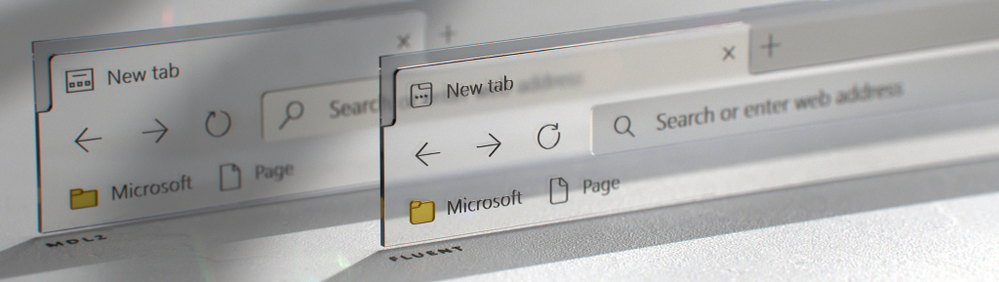
“The new Fluent iconography system provides functional optimizations for user experience as each icon is based on a standard keyline and grid. This will improve scannability as you browse menus and navigation. We’ve also seen optimized rendering across platforms and devices so no matter which device you’re browsing the web on the icons will appear sharp and easy to read,” the Microsoft Edge team explained yesterday.

Microsoft has been working to overhaul the look and feel of all Windows 10 apps and services for quite some time. As a part of the redesign, the company is planning to bring its Fluent Design language into the new Edge browser, making all form components look more like their counterparts in UWP apps. However, unlike all other apps, the Edge Insider Team is adding Fluent Design elements in more subtle ways.

In the blog post yesterday, Microsoft explained that the new Fluent icon updates will arrive in two phases. The first phase, which is currently rolling out, will only focus on the address bar, tabs, navigational bar, and more. With this change, the company plans to refresh the flat and monochromatic icons by adding new ones with more rounded corners.
IrinaL_4-1605637011237.png

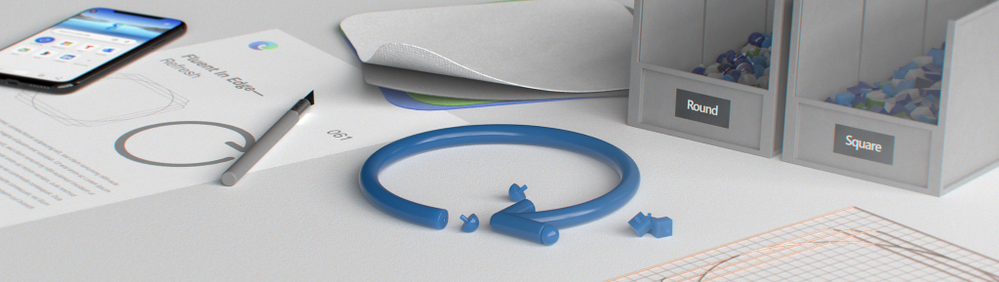
Similarly, the second phase of these Fluent icon updates will cover some advanced settings such as Developer Tools (Inspect Element), the Extensions experience, and more.
IrinaL_5-1605637011243.png

Until now, we haven’t seen what the Microsoft Edge team has planned to update the icons with a touch of Fluent Design. With this announcement, we’re expecting Microsoft Edge’s Fluent Design icons to finally show up in the Stable channel in the coming months.


Share This Post:

Tags: Edge | Fluent Design | Fluent Design System | icons | Microsoft | Microsoft Edge
Share this article:
Tags:
Edge Fluent Design Fluent Design System icons Microsoft Microsoft Edge
Previous Article Microsoft’s Remote Desktop app updates with full support for Android TV and Windows Virtual Desktop Next Article Google promises big performance improvements with latest Chrome update

Related Articles

Chrome and Gemini icons representing Gemini Live voice assistant integration in Chrome

Chrome tests Gemini Live voice assistant in a floating overlay panel

March 14, 2026

Chrome’s Organizer feature may sync Gemini and AI conversations across devices

March 14, 2026

After Chrome, Edge tests launching the browser automatically when you sign into Windows

March 13, 2026

Leave a Comment Cancel reply

Your email address will not be published. Required fields are marked *

Recent Posts

  • Chrome tests Gemini Live voice assistant in a floating overlay panel
  • Chrome’s Organizer feature may sync Gemini and AI conversations across devices
  • After Chrome, Edge tests launching the browser automatically when you sign into Windows
  • iPhone Fold Latest Rumors: Display, Cameras, RAM and Price Details Revealed
  • Samsung fears first mobile operating loss due to memory price surge

Recent Comments

No comments to show.
OnMSFT.com

OnMSFT.com covers Microsoft news, reviews, and how-to guides. Formerly known as WinBeta, we have been your source for Microsoft news since 1998.

Categories

  • Windows
  • Surface
  • Xbox
  • How-To
  • OnPodcast
  • Gaming
  • Edge
  • Teams

Recent Posts

  • Chrome tests Gemini Live voice assistant in a floating overlay panel
  • Chrome’s Organizer feature may sync Gemini and AI conversations across devices
  • After Chrome, Edge tests launching the browser automatically when you sign into Windows
  • iPhone Fold Latest Rumors: Display, Cameras, RAM and Price Details Revealed
  • Samsung fears first mobile operating loss due to memory price surge

Quick Links

  • About OnMSFT.com
  • Contact OnMSFT
  • Join Our Team
  • Privacy Policy
© 2010–2026 OnMSFT.com LLC. All rights reserved.
About OnMSFT.comContact OnMSFTPrivacy Policy
