Skip to content
OnMSFT.com
  • Home
  • About
  • Contact
  • Windows
  • Surface
  • Xbox
  • How-To
  • OnPodcast
  • Edge
  • Teams
  • Gaming
Menu
  • Home
  • About
  • Contact
  • Windows
  • Surface
  • Xbox
  • How-To
  • OnPodcast
  • Edge
  • Teams
  • Gaming
  1. Home
  2. News
  3. Microsoft announces plans to enable SharePoint content collaboration in Teams

Microsoft announces plans to enable SharePoint content collaboration in Teams

Rabia Noureen Rabia Noureen
December 14, 2020
2 min read

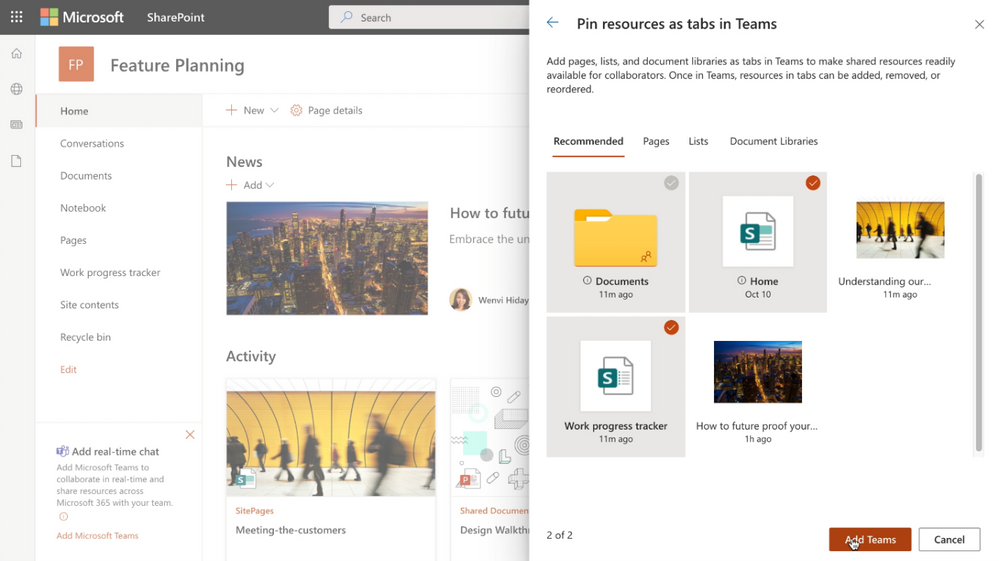
Microsoft has announced some important updates for its Teams collaboration platform today. The first new feature that the company highlighted today is an improved experience for bringing SharePoint content into Teams. The feature will make it easier for users to collaborate on the shared content with their colleagues.

“We’ll make it easy to choose lists, libraries and pages that you want to bring into Teams as tabs. When you’ve selected what you need, click the Add Team button to make it happen. By default, your team site home page will be selected, you can change it to suit your needs, and you can fully navigate primary document library from the Files tab – just follow the folder breadcrumbs. ” the company explained
Pin as tab in Teams.png

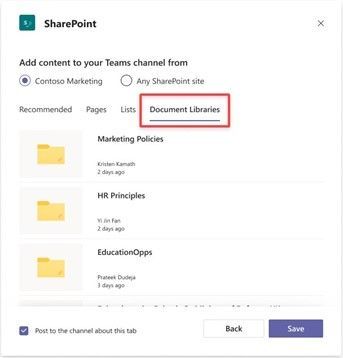
In addition, the company has also detailed an improved SharePoint tab experience in Microsoft Teams. Thanks to this update, users can now easily pin any page, or document library news, or list as a separate tab in their Teams channel. To do this, click the “+” button in a channel, choose SharePoint, and pin the content.
Add Content.jpg

Furthermore, the SharePoint tab in Teams is also getting a new “Recommended” section. With this section, users will be able to find relevant content from their SharePoint site and pin it in Teams channels.

Last but not least, Microsoft also announced today that it made some improvements to the SharePoint pages app in Teams. “The updated experience makes it easier to choose pages from the connected SharePoint team site and you can also add a page from any SharePoint site link and then paste the URL of the page, or news post, that you want to add as a tab,” Microsoft explained. You can see how it will work on the image below:

SharePoint pages.jpg

Microsoft says that this update starts rolling out today, and it should be available to all Teams users in the next few days. As you probably know, Microsoft Teams enjoys a deep integration with SharePoint in Office 365, and these updates will make Teams and SharePoint content collaboration even better. This announcement comes at a time when Microsoft SharePoint has more than 200 million daily active users.


Share This Post:

Tags: Microsoft | Microsoft 365 | Microsoft Teams | Office 365
Share this article:
Tags:
Microsoft Microsoft 365 Microsoft Teams Office 365
Previous Article Xbox teams up with PlayStation and Nintendo to promote safer gaming Next Article Office 365 admins can now exclude specific files from OneDrive sync

Related Articles

Chrome and Gemini icons representing Gemini Live voice assistant integration in Chrome

Chrome tests Gemini Live voice assistant in a floating overlay panel

March 14, 2026

Chrome’s Organizer feature may sync Gemini and AI conversations across devices

March 14, 2026

After Chrome, Edge tests launching the browser automatically when you sign into Windows

March 13, 2026

Leave a Comment Cancel reply

Your email address will not be published. Required fields are marked *

Recent Posts

  • Chrome tests Gemini Live voice assistant in a floating overlay panel
  • Chrome’s Organizer feature may sync Gemini and AI conversations across devices
  • After Chrome, Edge tests launching the browser automatically when you sign into Windows
  • iPhone Fold Latest Rumors: Display, Cameras, RAM and Price Details Revealed
  • Samsung fears first mobile operating loss due to memory price surge

Recent Comments

No comments to show.
OnMSFT.com

OnMSFT.com covers Microsoft news, reviews, and how-to guides. Formerly known as WinBeta, we have been your source for Microsoft news since 1998.

Categories

  • Windows
  • Surface
  • Xbox
  • How-To
  • OnPodcast
  • Gaming
  • Edge
  • Teams

Recent Posts

  • Chrome tests Gemini Live voice assistant in a floating overlay panel
  • Chrome’s Organizer feature may sync Gemini and AI conversations across devices
  • After Chrome, Edge tests launching the browser automatically when you sign into Windows
  • iPhone Fold Latest Rumors: Display, Cameras, RAM and Price Details Revealed
  • Samsung fears first mobile operating loss due to memory price surge

Quick Links

  • About OnMSFT.com
  • Contact OnMSFT
  • Join Our Team
  • Privacy Policy
© 2010–2026 OnMSFT.com LLC. All rights reserved.
About OnMSFT.comContact OnMSFTPrivacy Policy
