Skip to content
OnMSFT.com
  • Home
  • About
  • Contact
  • News
  • How-to
  • Feature stories
  • Deals
  • Microsoft / office 365
  • Reviews
Menu
  • Home
  • About
  • Contact
  • News
  • How-to
  • Feature stories
  • Deals
  • Microsoft / office 365
  • Reviews
  1. Home
  2. News
  3. Kobo eBooks becomes a Universal Windows 10 app

Kobo eBooks becomes a Universal Windows 10 app

Vu Anh Nguyen Vu Anh Nguyen
December 9, 2015
2 min read

Another day, another Universal Windows App show up. As Microsoft allegedly makes bold steps to push adoption of Windows 10, developers seemingly are warming up to the company’s vision for a unified app model, with the latest joining the ranks being eBook distributor Kobo.

A direct competitor to Amazon in the eBook space, Japanese-owned Toronto-based Kobo Inc. sells everything eBook related, from e-Ink eReaders, to waterproof eReaders, to Tablets, and of course, books. Kobo currently has more than 4 million titles in its stock for 16 countries; it even offers a self-publishing platform. Kobo has both a desktop app and a Modern app for Windows, the latter of which was updated to version 5.0 and a Universal Windows App (UWA), introducing many unique functionalities to Windows 10.

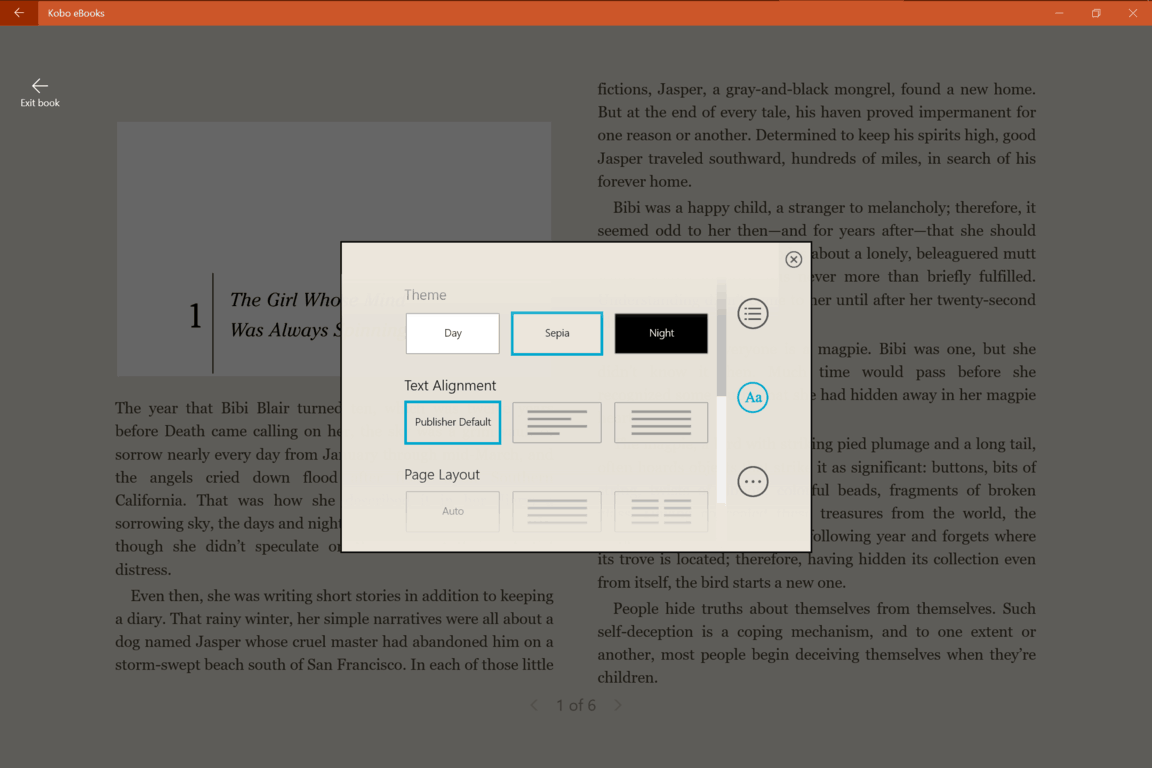
Kobo eBooks main interface Kobo eBooks reading text Kobo eBooks reading


The user interface is clean, almost spartan. Interestingly, while the developer touts it as ‘optimized for Windows 10,’ the UX still retains many elements from Windows 8’s design guidelines, with horizontal main menu (even with a hamburger up top) and horizontal swiping navigations. The reading experience is satisfactory with all the basic optimization options in place. As with the Kobo eReader, users are not limited to the book store for their reading materials: importing ePUBs is but a drag-and-drop away.

Kobo eBooks Cortana integration

The benefit of the UWA model shows in two new functionalities include integration with Cortana and support for Continuum if you are using the app on the phone. Just a call to Cortana and a simple command, a book you are reading or the bookstore will be magically opened for you. With Continuum, the reading experience becomes desktop-like once a supported phone is attached to a screen, either wirelessly or through the Microsoft Display Dock.

Overall, the app should be welcomed by existing Kobo users, book lovers, or people simply looking for a functional ePUB reader on Windows devices.


Kobo Books
Kobo Books
Download
QR-Code
Kobo Books
Developer:
‪Kobo Inc‬
Price:
Free+

Share This Post:

Tags: Microsoft | Windows 10
Share this article:
Tags:
Microsoft Windows 10
Previous Article Select Dell Products Are Up To 40% Off With Today’s 12 Days Of Deals – onmsft.com Next Article Microsoft releases Cortana for iPhone and Android, now available on all major platforms

Related Articles

Chrome tests Google Drive file uploads in the AI Mode compose box

April 14, 2026
Gemini image creation using right click desktop Chrome

Chrome lets you remake images with Gemini on desktop using just a right-click

April 13, 2026
Samsung Display crosses 5 million QD-OLED monitor shipments as demand grows fast, with new panels and strong premium market expansion worldwide.

Samsung Display Ships 5 Million QD-OLED Monitor Panels in Four Years

April 9, 2026

Leave a Comment Cancel reply

Your email address will not be published. Required fields are marked *

Recent Posts

  • Chrome tests Google Drive file uploads in the AI Mode compose box
  • Chrome lets you remake images with Gemini on desktop using just a right-click
  • Samsung Display Ships 5 Million QD-OLED Monitor Panels in Four Years
  • Intel Arc Pro B70 Teardown Reveals Blower Cooler and Early Board Design Details
  • Users Modify RTX 5090 Lightning Z Hardware to Unlock MSI’s Restricted 2500W BIOS

Recent Comments

  1. XxRIVTYxX on Intel Says It Tried to Help Before Crimson Desert Dropped Arc Support
  2. Gaurav Kumar on Chrome Prepares Nudge to ‘Move Tabs to the Side’ as Vertical Tabs Near Release
OnMSFT.com

The Tech News Site

Categories

  • Windows
  • Surface
  • Xbox
  • How-To
  • OnPodcast
  • Gaming
  • Edge
  • Teams

Recent Posts

  • Chrome tests Google Drive file uploads in the AI Mode compose box
  • Chrome lets you remake images with Gemini on desktop using just a right-click
  • Samsung Display Ships 5 Million QD-OLED Monitor Panels in Four Years
  • Intel Arc Pro B70 Teardown Reveals Blower Cooler and Early Board Design Details
  • Users Modify RTX 5090 Lightning Z Hardware to Unlock MSI’s Restricted 2500W BIOS

Quick Links

  • About OnMSFT.com
  • Contact OnMSFT
  • Join Our Team
  • Privacy Policy
© 2010–2026 OnMSFT.com LLC. All rights reserved.
About OnMSFT.comContact OnMSFTPrivacy Policy