
(Update: a “nevermind” is in order, and yes I did miss something. This is the return of Sync Notifications, not Messaging Anywhere. I apologize for the confusion, but yes I was confused. Thanks for the clarifications in the comments. Still, Sync notifications is back for my Windows phone, which has not worked for some time (or maybe it just got turned on), so there’s that).
Microsoft released Windows 10 Insider build 15025 for PC yesterday, and the same build number for Windows 10 Mobile this morning, but it wasn’t until I got home tonight and needed to log in to Gmail using 2 factor authentication that I realized an old friend looks like it’s made a reappearance: Messaging Everywhere.
Just as a refresher, we (meaning WinBeta at the time) first introduced you to Messaging Everywhere, the feature that brought SMS messaging from your phone to your desktop and back again, back in June last year. The feature seemed popular, but then in a note in the 14376 build announcement, Microsoft pulled the plug on Messaging Everywhere as a standalone service:
We have been testing with Windows Insiders a preview of the “Messaging everywhere” feature that allows you to receive and send text messages from your Windows 10 phone directly to and from your Windows 10 PC. The experience was well-received by Insiders however we believe we can deliver an even better experience through the Skype app. Because of this, we decided not to release this feature as part of the Windows 10 Anniversary Update this summer. Starting with Build 14376 and going forward, Insiders will no longer have the ability to reply to text messages from their phone via the Messaging app on their PCs. The ability to reply to text messages on your PC using Cortana is unaffected. Going forward, we will be working with the Skype Team on delivering a great “messaging everywhere” experience on your Windows 10 devices through the Skype app. We will share more details about this experience in the months ahead.
Users weren’t all that happy about the development, with many preferring to have the service work independently of Skype, but there you go. SMS messaging for Skype Preview was introduced with build 14926, and Skype Preview build 11.8.180, at least for some users.
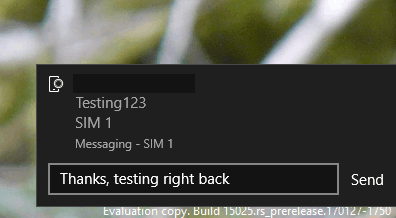
Fast forward to tonight, though, and when requesting the 2 factor auth code for Gmail, a message popped up on my Windows 10 build 15025 machine:
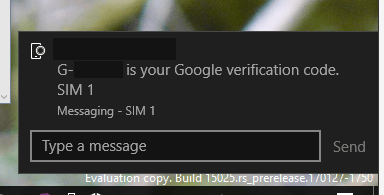 Hmm, that was surprising. I then checked through the release notes for build 15025 and didn’t find anything, or find any mention on the web. I then tried sending a text from a spare Lumia 635 I have laying around to my Lumia 950 XL, running 15025, and sure enough, a message popped up on my PC:
From there, I typed in a return message, to see if I could send from the PC back to the phones. Sure enough, the message went through:

Just a note, the Lumia 950 XL (the scratched up one on the left) is running 15025, and the Lumia 635 is running the latest Anniversary Update build, 14393.693. I did check, and SMS Sync is enabled in Skype Preview, but there’s “no phone connected,” and I haven’t had any messages pop up since 14376. I also just checked on my Surface Pro 3, also running 15025, and it did not receive any SMS messages.
After a bit of further checking, opening the messaging app on the SP3 shows the usual boilerplate message about what the app can do:
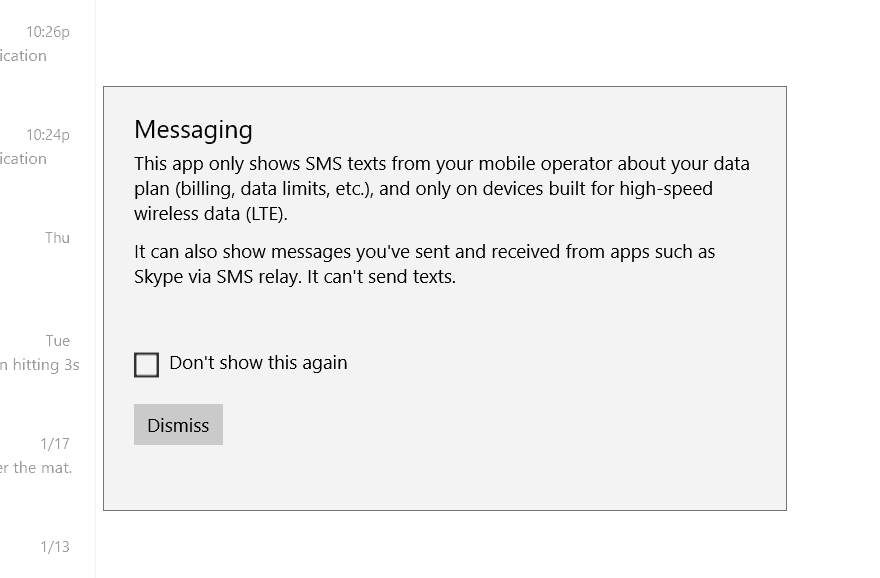 …but on the PC, trying to open the same app (on the same build, 15025) results in just a transparent box:

Hmmm. Hmmmm. Hmmm.
So, to conclude, it sure looks like Messaging Everywhere is back, in some form, at least some machines. For how long, or why, or if it’s coming back for everyone, who knows?
Are you seeing Messaging Everywhere? Is it just me? Did I miss something? Let us know in the comments below.
Further reading: build 15025, Messaging Everywhere, Windows 10, Windows 10 Mobile


