Skip to content
OnMSFT.com
  • Home
  • About
  • Contact
  • Windows
  • Surface
  • Xbox
  • How-To
  • OnPodcast
  • Edge
  • Teams
  • Gaming
Menu
  • Home
  • About
  • Contact
  • Windows
  • Surface
  • Xbox
  • How-To
  • OnPodcast
  • Edge
  • Teams
  • Gaming
  1. Home
  2. News
  3. Google completes Rooms to “spaces” rebrand rollout to better compete with Slack and Teams – onmsft.com

Google completes Rooms to “spaces” rebrand rollout to better compete with Slack and Teams – onmsft.com

Rabia Noureen Rabia Noureen
September 8, 2021
1 min read

Google has announced some important updates regarding Google Workspace, the company’s collection of productivity tools for enterprise users. The software giant has revealed that it’s rebranding “Rooms” in Chat to “spaces,” and this update is now generally available for all Workspace customers.

“With spaces, teams can share ideas, collaborate on documents, and manage tasks from a single place,” Sanaz Ahari, Senior Director of Product Management at Google explained (Hi Sanaz!). “Because all their work is preserved for future reference, team members can easily jump in and contribute at a time that works best for them, seeing a full history of the conversations, context, and content along the way.”
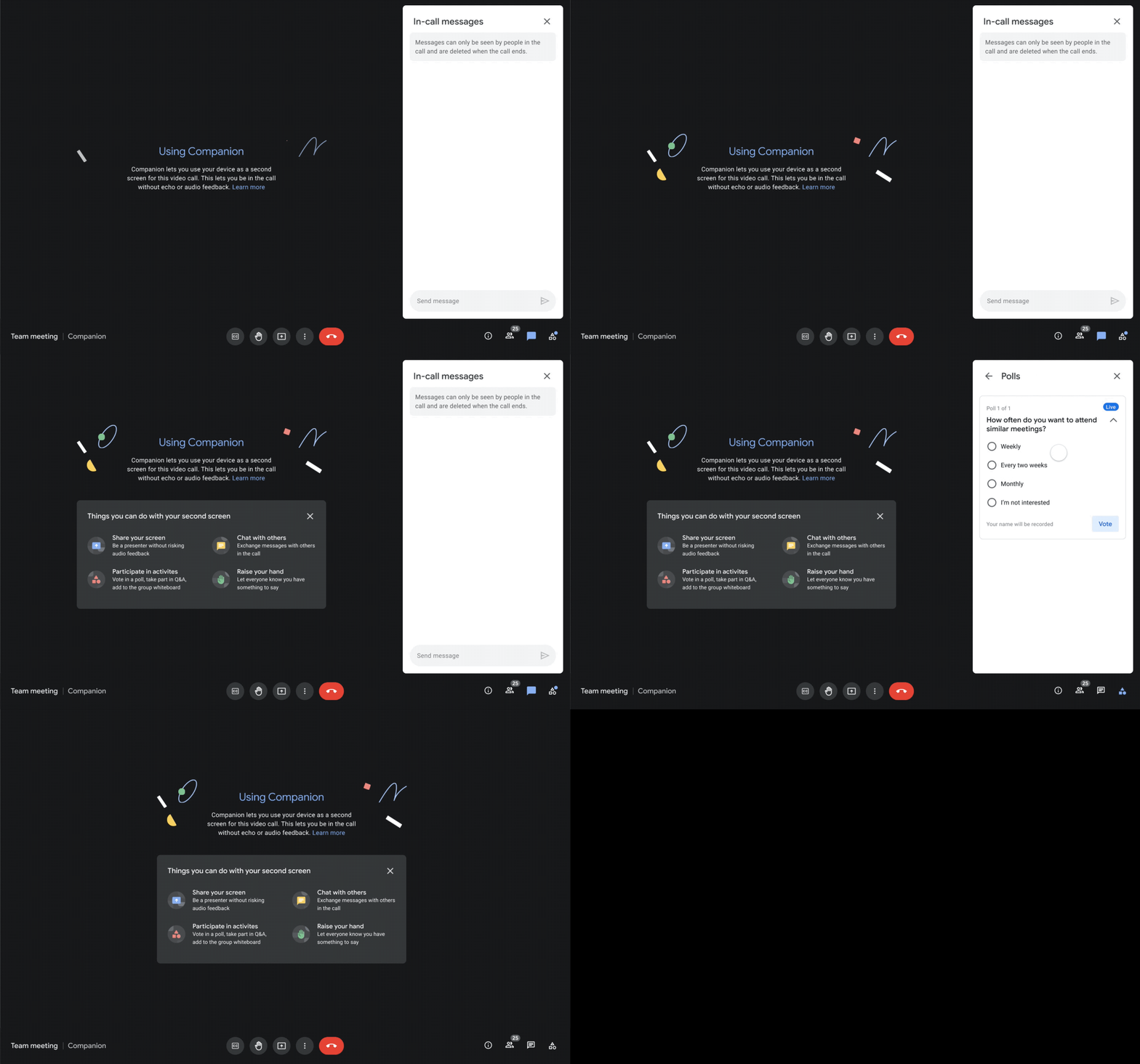
4 companion mode. Gif

In addition to this feature, Google is streamlining the UI of Gmail, allowing users to easily access their inbox, chats, meetings, and spaces from a single location. The firm is also planning to add a new Companion mode to Google Meet in November. Additionally, Google Meet will add a live-translated captions feature for all Workspace users later this year.

While Google Workspace was already great for enterprise collaboration, the company is continuing to make it more useful to support hybrid work. These new Workspace features should help Google Workspace better compete with Microsoft Teams and Slack.


Share This Post:

Share this article:
Tags:
Google Workspace Microsoft Teams Slack
Previous Article What is Microsoft Start? Tips & Tricks for the Experience Next Article Being creative using Windows: Clipchamp Review – onmsft.com

Related Articles

Chrome and Gemini icons representing Gemini Live voice assistant integration in Chrome

Chrome tests Gemini Live voice assistant in a floating overlay panel

March 14, 2026

Chrome’s Organizer feature may sync Gemini and AI conversations across devices

March 14, 2026

After Chrome, Edge tests launching the browser automatically when you sign into Windows

March 13, 2026

Leave a Comment Cancel reply

Your email address will not be published. Required fields are marked *

Recent Posts

  • Chrome tests Gemini Live voice assistant in a floating overlay panel
  • Chrome’s Organizer feature may sync Gemini and AI conversations across devices
  • After Chrome, Edge tests launching the browser automatically when you sign into Windows
  • iPhone Fold Latest Rumors: Display, Cameras, RAM and Price Details Revealed
  • Samsung fears first mobile operating loss due to memory price surge

Recent Comments

No comments to show.
OnMSFT.com

OnMSFT.com covers Microsoft news, reviews, and how-to guides. Formerly known as WinBeta, we have been your source for Microsoft news since 1998.

Categories

  • Windows
  • Surface
  • Xbox
  • How-To
  • OnPodcast
  • Gaming
  • Edge
  • Teams

Recent Posts

  • Chrome tests Gemini Live voice assistant in a floating overlay panel
  • Chrome’s Organizer feature may sync Gemini and AI conversations across devices
  • After Chrome, Edge tests launching the browser automatically when you sign into Windows
  • iPhone Fold Latest Rumors: Display, Cameras, RAM and Price Details Revealed
  • Samsung fears first mobile operating loss due to memory price surge

Quick Links

  • About OnMSFT.com
  • Contact OnMSFT
  • Join Our Team
  • Privacy Policy
© 2010–2026 OnMSFT.com LLC. All rights reserved.
About OnMSFT.comContact OnMSFTPrivacy Policy
