Skip to content
OnMSFT.com
  • Home
  • About
  • Contact
  • Windows
  • Surface
  • Xbox
  • How-To
  • OnPodcast
  • Edge
  • Teams
  • Gaming
Menu
  • Home
  • About
  • Contact
  • Windows
  • Surface
  • Xbox
  • How-To
  • OnPodcast
  • Edge
  • Teams
  • Gaming
  1. Home
  2. Feature
  3. Surface Pro 4 Type Cover is a serious improvement over its predecessor

Surface Pro 4 Type Cover is a serious improvement over its predecessor

Mark Coppock Mark Coppock
January 25, 2016
3 min read

Surface Pro 4 Type Cover\n

Through a combination of circumstances, I was able to migrate from a Surface Pro 3 to a shiny new Surface Pro 4. Other than the ongoing issues with sleep and display drivers, I couldn’t be happier. At the very least, the SP4’s screen is a marked improvement over its predecessor, with superior whites, awesome contrast, and colors that pop while remaining true to life.

\n

Using the SP3 Type Cover with the SP4

\n

At first, I was hoping to stick with my SP3 Type Cover to save a little bit of cash. It works with the SP4, of course. It connects the same way, and the keyboard and touchpad are perfectly functional. The Surface Pro 4 Type Cover is superior (more on that in a bit), but its predecessor worked well enough for me for about 18 months, and so I thought I’d be able to keep using it for a little while longer at least.

\n

However, there’s one major limitation with using the SP3 Type Cover on the SP4: it doesn’t fit well. The SP4’s bezel is thinner and the display is larger, within the same sized chassis, and so the SP3 Type Cover rests higher on the screen when snapped in place. It overlaps the lower edge of the screen on the SP4 and blocks roughly a third of the taskbar, just enough to make pressing on-screen buttons difficult. Also, the magnets don’t line up perfectly, and so the Type Cover isn’t as securely attached.

\n

Here’s a comparison, with the SP4 Type Cover on the left:

\n
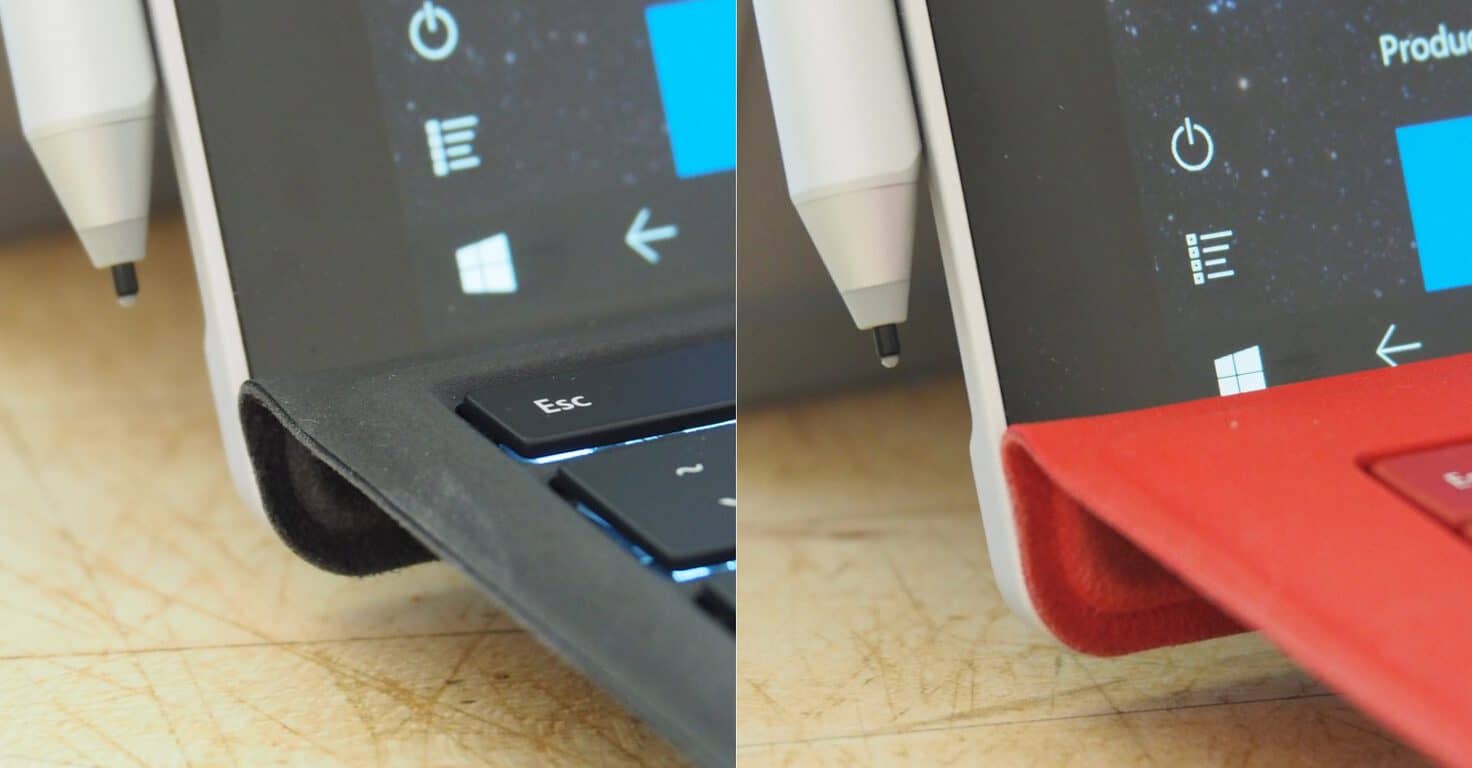
SP4 Type Cover vs SP3 Type Cover

\n

Ultimately, while the SP3 Type Cover works with the SP4, it’s just not the best experience. But is the newer model worth the $100-130 investment?

\n

So how much better is the SP4 Type Cover?

\n

And so, I decided to bite the bullet and grab an SP4 Type Cover. I stopped by a Microsoft Store last week, and was pleasantly surprised to learn that there’s apparently a $30 discount on the newest Type Cover that’s not advertised anywhere (including at the Microsoft Store online). I picked up a black version and headed home.

\n

Since using the newer Type Cover over the last few days, I have to say that I’m impressed. I can type between 80wpm and 100wpm, depending on the keyboard and how long I’ve been working, and I’m very sensitive to keyboard performance. I like keys with a light feel to them but a decent keystroke, and spacing is important to me.

\n

The SP3 Type Cover was merely adequate–I could maintain decent speed, but I was never particularly impressed. It was definitely just good enough. It was also quite loud, with a clackiness that would disturb my wife on occasion during late-night writing sessions. Finally, the Type Cover had significant give when attached to the screen–not a deal breaker, but always bothersome.

\n

Surface Pro 3 Type Cover

\n

Surface Pro 4 Type Cover

\n

The SP4 Type Cover, however, has a much better typing feel. It’s very close to the better keyboards I’ve used, in some ways better even than my previous gold standard, my 2012 MacBook Air. It’s a bit lighter than the Mac’s keyboard, and while not quite as deep is quite deep enough. I achieved my maximum typing speed almost immediately, and my accuracy is high. The SP4 Type Cover is also quieter that its predecessor, enough so that I don’t feel guilty typing at a fast clip while my wife is sleeping.

\n

Conclusion: a worthy upgrade

\n

The newer Type Cover still has significant give when inclined, and so that’s not dramatically improved. But it fits correctly on the SP4, leaving the taskbar buttons easily accessible and securing strongly to the screen. And, the touchpad is larger and more accurate, with perfectly smooth multitouch gestures.

\n

Ultimately, I’m convinced that the SP4 Type Cover is well worth the investment, particularly if you can score the $30 discount. Even if you’re using an SP3, the newer version offers a significantly improved typing experience and an improved touchpad.

\n\nFurther reading: Microsoft, Surface, Surface Pro 3, Surface Pro 4, Type Cover

Share this article:
Tags:
Microsoft Surface Surface Pro 3 Surface Pro 4 Type Cover
Previous Article Microsoft and smartwatch maker Olio strike new patent licensing agreement Next Article Windows 10 Messaging App Supports Advanced Messaging “typing…” And Read Indicators – OnMSFT.com

Related Articles

Here is our Xbox 2022 wrap up – OnMSFT.com

December 27, 2022

Xbox classics revisited vol.8: classic racing games – OnMSFT.com

December 20, 2022

Here are some Xbox Christmas gifts for that gamer on your list – OnMSFT.com

December 20, 2022

Leave a Comment Cancel reply

Your email address will not be published. Required fields are marked *

Recent Posts

  • Microsoft is no longer manufacturing the Windows RT powered Surface 2
  • Microsoft treats Windows Phone owners with extra 20GB of free SkyDrive storage for one year
  • Bing now showcases professional and celebrity Klout scores during search results
  • Bing now lets you search and browse for your friends’ Facebook photos
  • Bing now lets you explore free online courses and helps you find books to read

Recent Comments

No comments to show.

Archives

  • February 2026
  • December 2022
  • November 2022
  • October 2022
  • September 2022
  • August 2022
  • July 2022
  • June 2022
  • May 2022
  • April 2022
  • March 2022
  • February 2022
  • January 2022
  • December 2021
  • November 2021
  • October 2021
  • September 2021
  • August 2021
  • July 2021
  • June 2021
  • May 2021
  • April 2021
  • March 2021
  • February 2021
  • January 2021
  • December 2020
  • November 2020
  • October 2020
  • September 2020
  • August 2020
  • July 2020
  • June 2020
  • May 2020
  • April 2020
  • March 2020
  • February 2020
  • January 2020
  • December 2019
  • November 2019
  • October 2019
  • September 2019
  • August 2019
  • July 2019
  • June 2019
  • May 2019
  • April 2019
  • March 2019
  • February 2019
  • January 2019
  • December 2018
  • November 2018
  • October 2018
  • September 2018
  • August 2018
  • July 2018
  • June 2018
  • May 2018
  • April 2018
  • March 2018
  • February 2018
  • January 2018
  • December 2017
  • November 2017
  • October 2017
  • September 2017
  • August 2017
  • July 2017
  • June 2017
  • May 2017
  • April 2017
  • March 2017
  • February 2017
  • January 2017
  • December 2016
  • November 2016
  • October 2016
  • September 2016
  • August 2016
  • July 2016
  • June 2016
  • May 2016
  • April 2016
  • March 2016
  • February 2016
  • January 2016
  • December 2015
  • November 2015
  • October 2015
  • September 2015
  • August 2015
  • July 2015
  • June 2015
  • May 2015
  • April 2015
  • March 2015
  • February 2015
  • January 2015
  • December 2014
  • November 2014
  • October 2014
  • September 2014
  • August 2014
  • July 2014
  • June 2014
  • May 2014
  • April 2014
  • March 2014
  • February 2014
  • January 2014
  • December 2013
  • November 2013
  • October 2013
  • September 2013
  • August 2013
  • July 2013
  • June 2013
  • May 2013
  • April 2013
  • March 2013
  • February 2013
  • January 2013
  • December 2012
  • November 2012
  • October 2012
  • September 2012
  • August 2012
  • July 2012
  • June 2012
  • May 2012
  • April 2012
  • March 2012
  • February 2012
  • January 2012
  • December 2011
  • November 2011
  • October 2011
  • September 2011
  • August 2011
  • July 2011
  • June 2011
  • May 2011
  • April 2011
  • March 2011
  • February 2011
  • January 2011
  • December 2010
  • November 2010
  • October 2010
  • September 2010

Categories

  • Announcements
  • Deals
  • Developer
  • Editorial
  • Feature
  • Feature stories
  • Hero-post
  • Hotdeals
  • How-to
  • Latest news
  • Microsoft / office 365
  • News
  • Office 365
  • Onpodcast
  • Opinion
  • Our featured post
  • Polls
  • Review
  • Reviews
  • Videos
OnMSFT.com

OnMSFT.com covers Microsoft news, reviews, and how-to guides. Formerly known as WinBeta, we have been your source for Microsoft news since 1998.

Categories

  • Windows
  • Surface
  • Xbox
  • How-To
  • OnPodcast
  • Gaming
  • Edge
  • Teams

Recent Posts

  • Microsoft is no longer manufacturing the Windows RT powered Surface 2
  • Microsoft treats Windows Phone owners with extra 20GB of free SkyDrive storage for one year
  • Bing now showcases professional and celebrity Klout scores during search results
  • Bing now lets you search and browse for your friends’ Facebook photos
  • Bing now lets you explore free online courses and helps you find books to read

Quick Links

  • About OnMSFT.com
  • Contact OnMSFT
  • Join Our Team
© 2010–2026 OnMSFT.com LLC. All rights reserved.
About OnMSFT.comContact OnMSFT

