Skip to content
OnMSFT.com
  • Home
  • About
  • Contact
  • Windows
  • Surface
  • Xbox
  • How-To
  • OnPodcast
  • Edge
  • Teams
  • Gaming
Menu
  • Home
  • About
  • Contact
  • Windows
  • Surface
  • Xbox
  • How-To
  • OnPodcast
  • Edge
  • Teams
  • Gaming
  1. Home
  2. Editorial
  3. Quick unboxing and thoughts on Microsoft’s Surface Go

Quick unboxing and thoughts on Microsoft’s Surface Go

Arif Bacchus Arif Bacchus
August 2, 2018
4 min read

\n

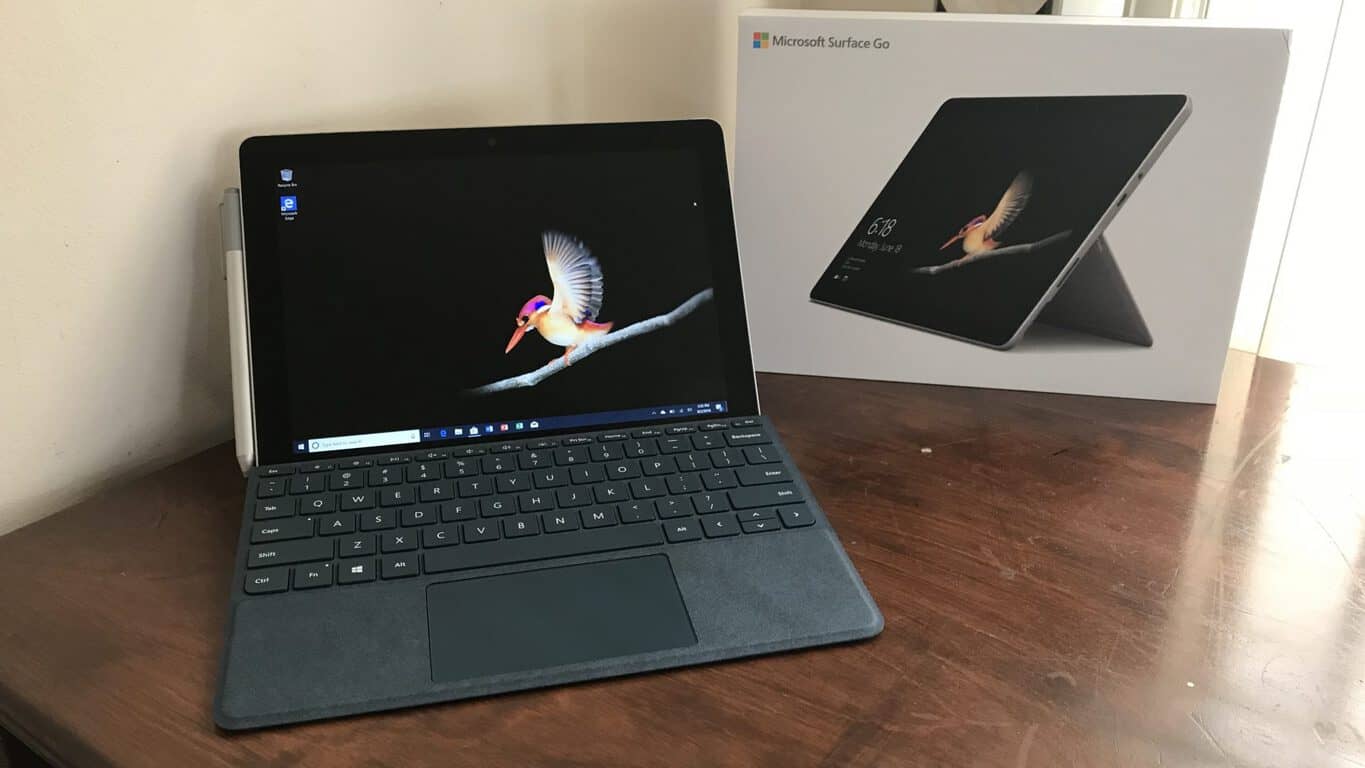
After waiting all day for FedEx to deliver my Surface Go, it has finally arrived. Instead of eagerly opening the box, I instead took to my Twitter to share the experience with everyone, and you can watch it via the link below in all its glory. Anyway, after unboxing and just spending an hour with my own Surface Go, I’ve got a few extra thoughts about the out of the box experience to add to my initial hands-on post, so be sure to read on.

\n

\n

Unboxing the #Microsoft #SurfaceGo https://t.co/4cu0H0O2Yp

\n

— Arif Bacchus (@abacjourn) August 2, 2018

\n

\n

Out of the Box

\n

As I opened up the box I was eager to jump right into Surface Go, but, I first needed to sit through all of Cortana’s usual nonsense before getting started. The Surface Go itself booted up nearly as fast as my Surface Pro 4, but Cortana interrupted me for a lot of information before I could have jumped into the action. I also got prompts for setting up the MSA, Windows Hello, Office 365, and more. Though annoying at first, I eventually found that it all helps makes things easier once you get into Windows 10 as you get to skip many trips to Settings pages.

\n

Anyway, once things booted up, I went through the usual process of customizing my colors and Start menu, verifying my Microsoft Account Identity. Doing this alone, the RAM usage was at 3.9/7.9 GB. It was obvious to me that Surface Go probably needed an update, so I manually triggered Windows Update before proceeding with customizing. A long list of updates was available, including new Surface drivers, and this month’s cumulative update (it comes running build 17134.112, from June.) It took the device a good 20 minutes to download everything, and an additional 3-5 minutes to install.

\n

Working on Updates… for 20 minutes?

\n

As a side, I noticed that the power brick for the Surface Go is a bit different. It’s all folded into one, and it ditched the USB A port. There’s also no cord between the plug and the brick, making it more compact. I kind of like this for traveling, but I think some people might have an issue with that.

\n

Downloading my apps

\n

After Windows Update finished, things seemed faster. The RAM usage was still at 2.2GB and I was able to download my apps from the Windows Store. Unfortunately, that was initially slow. Without me asking, the store was already busy installing its own set of updates, and I had to cancel some just to install my favorite apps. Once the store caught up, my apps installed in a breeze, just as they do on my Surface Pro 4. This initial slowdown could be due to the Intel Gold Y Series processors, but once I got the “busy work” out the way, Surface Go handled like my SP4 would.

\n

Fresh updates from the Microsoft Store

\n

About that bezel.. and customizing Windows for the Surface Go

\n

I mentioned this in my unboxing video, but a lot of people seemed to have an issue with the bezels on the Surface Go. I for one didn’t mind, as all Surface devices have huge bezels and are there for your comfort when in tablet mode. Anyway, to make up for the lack of screen space, one of the first things I did was heading to Settings and turn down the scaling. It’s set to 150% by default, but I tuned it down to 100% for a little more screen real-estate and multitasking space.

\n

Changing the display settings

\n

Revisiting the keyboard

\n

I initially complained about the Surface Go keyboard, but I typed this entire post on the Go without any typos or mistakes. I think the keyboard takes some time getting used to. The curved edges of the keyboard are also aesthetically pleasing, but I did have to keep my fingers in a more “up” position to get to the key caps.

\n

Another look at that keyboard

\n

Revisiting performance

\n

In terms of performance, I didn’t really feel any slow downs on Surface Go. Just as in my hands-on post, opening up Edge, etc, didn’t push the device over its limits. With Edge, the Store, YouTube, Periscope, and Twitter open, Nothing froze up and everything was smooth as butter, with RAM under 4.0 GB and CPU at 29%. Keep in mind, though, that I am still running Windows 10 in S mode on the Surface Go, which I think might make a performance difference.

\n
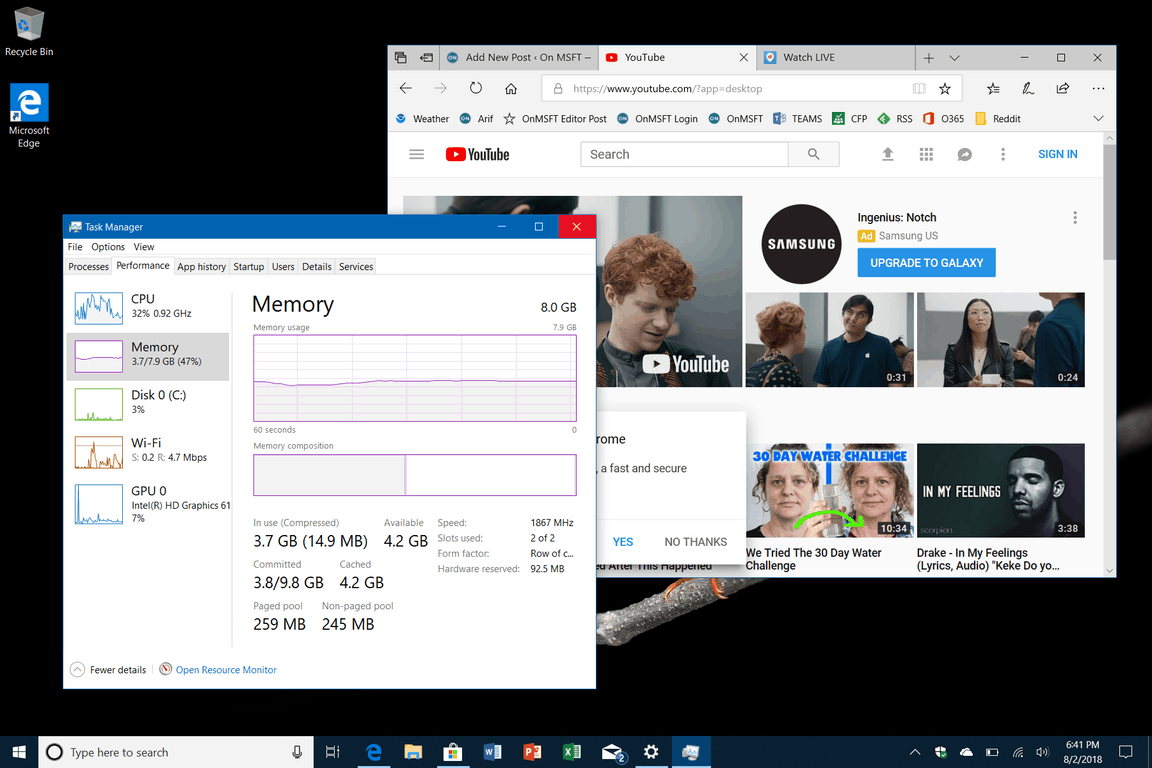
Performance

\n

After just spending an hour with Surface Go, fully updated, and running my apps, I feel pretty confident in the device. It initially felt slow at first, but after getting the latest drivers, Surface Go feels just like my Surface Pro 4. I’ll be spending more time with Surface Go this weekend, so be sure to keep tuned for more in the days ahead.

\n\nFurther reading: Microsoft, Surface, Surface Go

Share this article:
Tags:
Microsoft Surface Surface Go
Previous Article New Microsoft Launcher update brings more customization options, Android 8.0 support Next Article Microsoft To-Do app updates on Windows 10, iOS, and Android with new changes

Related Articles

Here is our Xbox 2022 wrap up – OnMSFT.com

December 27, 2022

Xbox classics revisited vol.8: classic racing games – OnMSFT.com

December 20, 2022

Here are some Xbox Christmas gifts for that gamer on your list – OnMSFT.com

December 20, 2022

Leave a Comment Cancel reply

Your email address will not be published. Required fields are marked *

Recent Posts

  • Microsoft is no longer manufacturing the Windows RT powered Surface 2
  • Microsoft treats Windows Phone owners with extra 20GB of free SkyDrive storage for one year
  • Bing now showcases professional and celebrity Klout scores during search results
  • Bing now lets you search and browse for your friends’ Facebook photos
  • Bing now lets you explore free online courses and helps you find books to read

Recent Comments

No comments to show.

Archives

  • February 2026
  • December 2022
  • November 2022
  • October 2022
  • September 2022
  • August 2022
  • July 2022
  • June 2022
  • May 2022
  • April 2022
  • March 2022
  • February 2022
  • January 2022
  • December 2021
  • November 2021
  • October 2021
  • September 2021
  • August 2021
  • July 2021
  • June 2021
  • May 2021
  • April 2021
  • March 2021
  • February 2021
  • January 2021
  • December 2020
  • November 2020
  • October 2020
  • September 2020
  • August 2020
  • July 2020
  • June 2020
  • May 2020
  • April 2020
  • March 2020
  • February 2020
  • January 2020
  • December 2019
  • November 2019
  • October 2019
  • September 2019
  • August 2019
  • July 2019
  • June 2019
  • May 2019
  • April 2019
  • March 2019
  • February 2019
  • January 2019
  • December 2018
  • November 2018
  • October 2018
  • September 2018
  • August 2018
  • July 2018
  • June 2018
  • May 2018
  • April 2018
  • March 2018
  • February 2018
  • January 2018
  • December 2017
  • November 2017
  • October 2017
  • September 2017
  • August 2017
  • July 2017
  • June 2017
  • May 2017
  • April 2017
  • March 2017
  • February 2017
  • January 2017
  • December 2016
  • November 2016
  • October 2016
  • September 2016
  • August 2016
  • July 2016
  • June 2016
  • May 2016
  • April 2016
  • March 2016
  • February 2016
  • January 2016
  • December 2015
  • November 2015
  • October 2015
  • September 2015
  • August 2015
  • July 2015
  • June 2015
  • May 2015
  • April 2015
  • March 2015
  • February 2015
  • January 2015
  • December 2014
  • November 2014
  • October 2014
  • September 2014
  • August 2014
  • July 2014
  • June 2014
  • May 2014
  • April 2014
  • March 2014
  • February 2014
  • January 2014
  • December 2013
  • November 2013
  • October 2013
  • September 2013
  • August 2013
  • July 2013
  • June 2013
  • May 2013
  • April 2013
  • March 2013
  • February 2013
  • January 2013
  • December 2012
  • November 2012
  • October 2012
  • September 2012
  • August 2012
  • July 2012
  • June 2012
  • May 2012
  • April 2012
  • March 2012
  • February 2012
  • January 2012
  • December 2011
  • November 2011
  • October 2011
  • September 2011
  • August 2011
  • July 2011
  • June 2011
  • May 2011
  • April 2011
  • March 2011
  • February 2011
  • January 2011
  • December 2010
  • November 2010
  • October 2010
  • September 2010

Categories

  • Announcements
  • Deals
  • Developer
  • Editorial
  • Feature
  • Feature stories
  • Hero-post
  • Hotdeals
  • How-to
  • Latest news
  • Microsoft / office 365
  • News
  • Office 365
  • Onpodcast
  • Opinion
  • Our featured post
  • Polls
  • Review
  • Reviews
  • Videos
OnMSFT.com

OnMSFT.com covers Microsoft news, reviews, and how-to guides. Formerly known as WinBeta, we have been your source for Microsoft news since 1998.

Categories

  • Windows
  • Surface
  • Xbox
  • How-To
  • OnPodcast
  • Gaming
  • Edge
  • Teams

Recent Posts

  • Microsoft is no longer manufacturing the Windows RT powered Surface 2
  • Microsoft treats Windows Phone owners with extra 20GB of free SkyDrive storage for one year
  • Bing now showcases professional and celebrity Klout scores during search results
  • Bing now lets you search and browse for your friends’ Facebook photos
  • Bing now lets you explore free online courses and helps you find books to read

Quick Links

  • About OnMSFT.com
  • Contact OnMSFT
  • Join Our Team
© 2010–2026 OnMSFT.com LLC. All rights reserved.
About OnMSFT.comContact OnMSFT

