Skip to content
OnMSFT.com
  • Home
  • About
  • Contact
  • Windows
  • Surface
  • Xbox
  • How-To
  • OnPodcast
  • Edge
  • Teams
  • Gaming
Menu
  • Home
  • About
  • Contact
  • Windows
  • Surface
  • Xbox
  • How-To
  • OnPodcast
  • Edge
  • Teams
  • Gaming
  1. Home
  2. Feature
  3. Quick hands-on with Sets, the new feature (for some) in Windows 10 Insider build 17063

Quick hands-on with Sets, the new feature (for some) in Windows 10 Insider build 17063

Laurent Giret Laurent Giret
December 20, 2017
3 min read

\n

If you installed the freshly-released Windows 10 Insider build 17063, you may already have early access to Windows Sets, a new feature that adds a tabbed interface to UWP apps. Microsoft previously explained that not all Windows Insiders will get this feature at first, as the company wants to “compare the usage and satisfaction of these features versus people who don’t.”

\n

Sets may not make it to the upcoming Redstone 4 update, but it already looks something that could definitely change how you use your Windows 10 PC. Brandon LeBlanc, Senior Program Manager on the Windows Insider Program Team penned a blog post yesterday to explain how Sets can make you more productive in several ways.

\n

“Sets help you keep webpages, documents, files, and apps connected, while remaining just one click away,” LeBlanc explained. “When you close a file that includes a group of tabs, we’ll help you bring those tabs back to life the next time you open it,” he continued.

\n

\n

We were lucky enough to get early access to Sets on one of our Windows Insider PCs (are you as lucky? let us know in our poll on Sets), and the feature is currently pretty basic compared to what you can see in the video above. For now, you can add web tabs to UWP apps by clicking the “+” button in an app, just like you do in your web browser. The new tab page only allows you to search the web, access frequently visited websites, or browse a personalized news feed.

\n
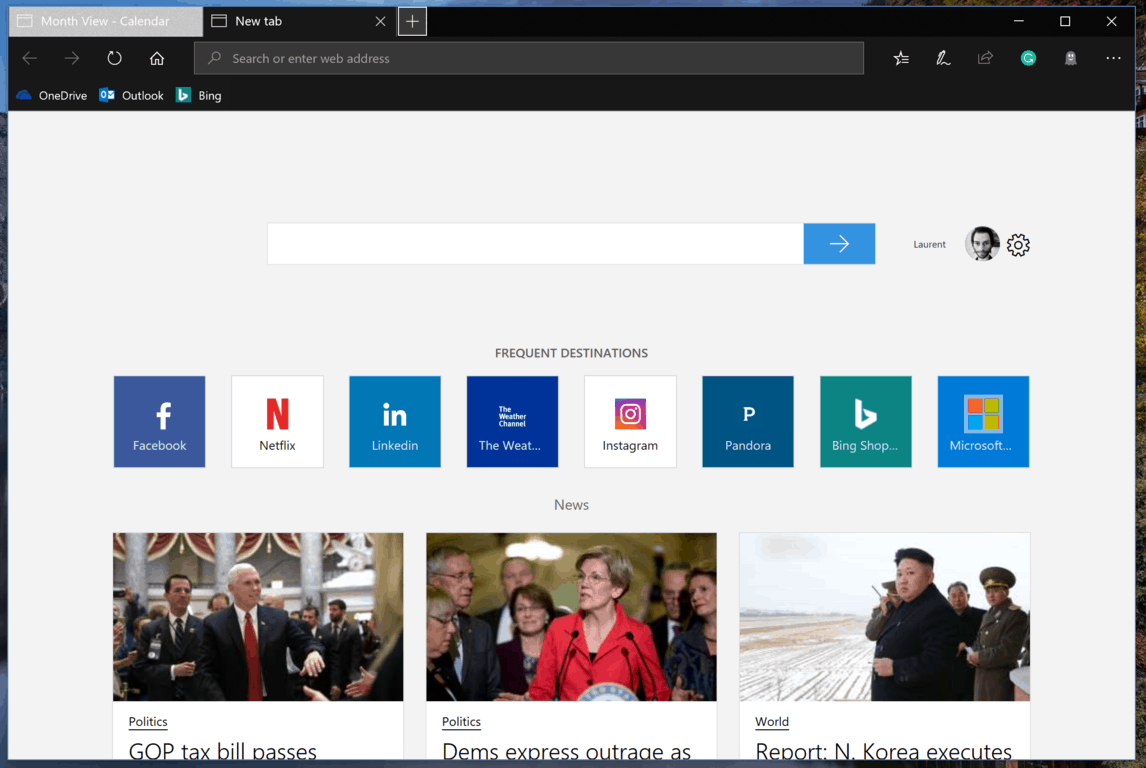
You can only add web tabs for now.

\n

In some apps like Microsoft’s Outlook Mail app or the Office Mobile apps, clicking an url will automatically open it in a new tab, which is quite handy. LeBlanc said that Sets of tabs should automatically restore when you reopen UWP apps, but we haven’t been able to make this work so far.

\n

Clicking a link in OneNote and other apps will automatically open the url in a new tab.

\n

To navigate between all your tabs in a Set, you can also use the following keyboard shortcuts

\n

\n

\n

\n

\n

\n

\n

\n

\n

\n

\n

\n

\n

\n

\n

\n

\n

\n

\n

\n

\n

\n

\n

\n

\n

\n

\n

\n

\n

\n

\n

\n

Shortcuts Action
Win+Ctrl+Tab Switch to the next tab
Win+Ctrl+Shift+Tab Switch to the previous tab
Win+Ctrl+W Close the active tab
Win+Ctrl+1 through 8 Switch to a specific tab
Win+Ctrl+9 Switch to the last tab
Win+Ctrl+T Open a new tab

\n

Sets are pretty limited in this first release, but LeBlanc explained that app tabs are coming soon, in addition to tab support for File Explorer and Win32 apps. Here’s everything that’s currently in the pipeline for future releases:

\n

\n

    \n

  • Narrator support soon and screen-reader functionality
  • \n

  • Desktop apps and File Explorer will be able to add tabs
  • \n

  • Tabs can be merged together
  • \n

  • Web tabs can be dragged out of a Set
  • \n

  • You will be able to control what tabs you restore when launching a Set
  • \n

  • Timeline integration
  • \n

  • The new tab page will allow local search, show frequently visited apps, and include additional feeds
  • \n

  • The new tab page will be able to launch apps in a new tab
  • \n

\n

\n

It’s also worth noting that Sets can be turned off if you just prefer to do things old-school. To deactivate the feature, you have to open the Settings app and go to System > Multitasking and then uncheck “Tabs in apps.”

\n

You can turn off Sets in the Settings app.

\n

“This is new territory for us, so we’re excited to get your feedback from the start,” explains LeBlanc. “Your input will play a key role in how we’ll craft this experience and we’re looking forward to seeing where this collaboration takes us.” If you already have access to Sets, you can provide your feedback to the Windows Insider team by completing dedicated Quests in the Feedback Hub.

\n

\n\nFurther reading: build 17063, Sets, Windows 10, Windows Insider

Share this article:
Tags:
build 17063 Sets Windows 10 Windows Insider
Previous Article Microsoft offers big savings on Surface, Xbox and more ahead of Countdown to 2018 sale Next Article Microsoft launches new Favorites Lock Screen app on Android | On MSFT

Related Articles

Here is our Xbox 2022 wrap up – OnMSFT.com

December 27, 2022

Xbox classics revisited vol.8: classic racing games – OnMSFT.com

December 20, 2022

Here are some Xbox Christmas gifts for that gamer on your list – OnMSFT.com

December 20, 2022

Leave a Comment Cancel reply

Your email address will not be published. Required fields are marked *

Recent Posts

  • Bethesda’s Redfall may get pushed back to a May 2023 release – OnMSFT.com
  • Activision Blizzard deal approved in Chile, Japan may be next in line – OnMSFT.com
  • Xbox Games with Gold January 2023 lineup announced – OnMSFT.com
  • Activision Blizzard studio Proletariat becomes the latest game developer to unionize – OnMSFT.com
  • How to Fix the Phone Link App Not Working on Windows 11 – OnMSFT.com

Recent Comments

No comments to show.

Archives

  • December 2022
  • November 2022
  • October 2022
  • September 2022
  • August 2022
  • July 2022
  • June 2022
  • May 2022
  • April 2022
  • March 2022
  • February 2022
  • January 2022
  • December 2021
  • November 2021
  • October 2021
  • September 2021
  • August 2021
  • July 2021
  • June 2021
  • May 2021
  • April 2021
  • March 2021
  • February 2021
  • January 2021
  • December 2020
  • November 2020
  • October 2020
  • September 2020
  • August 2020
  • July 2020
  • June 2020
  • May 2020
  • April 2020
  • March 2020
  • February 2020
  • January 2020
  • December 2019
  • November 2019
  • October 2019
  • September 2019
  • August 2019
  • July 2019
  • June 2019
  • May 2019
  • April 2019
  • March 2019
  • February 2019
  • January 2019
  • December 2018
  • November 2018
  • October 2018
  • September 2018
  • August 2018
  • July 2018
  • June 2018
  • May 2018
  • April 2018
  • March 2018
  • February 2018
  • January 2018
  • December 2017
  • November 2017
  • October 2017
  • September 2017
  • August 2017
  • July 2017
  • June 2017
  • May 2017
  • April 2017
  • March 2017
  • February 2017
  • January 2017
  • December 2016
  • November 2016
  • October 2016
  • September 2016
  • August 2016
  • July 2016
  • June 2016
  • May 2016
  • April 2016
  • March 2016
  • February 2016
  • January 2016
  • December 2015
  • November 2015
  • October 2015
  • September 2015
  • August 2015
  • July 2015
  • June 2015
  • May 2015
  • April 2015
  • March 2015
  • February 2015
  • January 2015
  • December 2014
  • November 2014
  • October 2014
  • September 2014
  • August 2014
  • July 2014
  • June 2014
  • May 2014
  • April 2014
  • March 2014
  • February 2014
  • January 2014
  • December 2013
  • November 2013
  • October 2013
  • September 2013
  • August 2013
  • July 2013
  • June 2013
  • May 2013
  • April 2013
  • March 2013
  • February 2013
  • January 2013
  • December 2012
  • November 2012
  • October 2012
  • September 2012
  • August 2012
  • July 2012
  • June 2012
  • May 2012
  • April 2012
  • March 2012
  • February 2012
  • January 2012
  • December 2011
  • November 2011
  • October 2011
  • September 2011
  • August 2011
  • July 2011
  • June 2011
  • May 2011
  • April 2011
  • March 2011
  • February 2011
  • January 2011
  • December 2010
  • November 2010
  • October 2010
  • September 2010

Categories

  • Announcements
  • Deals
  • Developer
  • Editorial
  • Feature
  • Feature stories
  • Hero-post
  • Hotdeals
  • How-to
  • Latest news
  • Microsoft / office 365
  • News
  • Office 365
  • Onpodcast
  • Opinion
  • Our featured post
  • Polls
  • Review
  • Reviews
  • Videos
OnMSFT.com

OnMSFT.com covers Microsoft news, reviews, and how-to guides. Formerly known as WinBeta, we have been your source for Microsoft news since 1998.

Categories

  • Windows
  • Surface
  • Xbox
  • How-To
  • OnPodcast
  • Gaming
  • Edge
  • Teams

Recent Posts

  • Bethesda's Redfall may get pushed back to a May 2023 release - OnMSFT.com
  • Activision Blizzard deal approved in Chile, Japan may be next in line - OnMSFT.com
  • Xbox Games with Gold January 2023 lineup announced - OnMSFT.com
  • Activision Blizzard studio Proletariat becomes the latest game developer to unionize - OnMSFT.com
  • How to Fix the Phone Link App Not Working on Windows 11 - OnMSFT.com

Quick Links

  • About OnMSFT.com
  • Contact OnMSFT
  • Join Our Team
© 2010–2026 OnMSFT.com LLC. All rights reserved.
About OnMSFT.comContact OnMSFT

