Skip to content
OnMSFT.com
  • Home
  • About
  • Contact
  • Windows
  • Surface
  • Xbox
  • How-To
  • OnPodcast
  • Edge
  • Teams
  • Gaming
Menu
  • Home
  • About
  • Contact
  • Windows
  • Surface
  • Xbox
  • How-To
  • OnPodcast
  • Edge
  • Teams
  • Gaming
  1. Home
  2. News
  3. Office 365 Planner, a simple and highly visual way to organize teamwork

Office 365 Planner, a simple and highly visual way to organize teamwork

Oliver Fuh Oliver Fuh
September 23, 2015
3 min read

\n

Alongside the official release of the long-awaited Office 2016, Microsoft is also shaking things up with the release of a whole new product: Office 365 Planner.

\n

Planner is a web app integrated into the Office 365 platform that offers organizations a highly visual way to organize teamwork. It makes it easy for the organization to create new plans, organize and assign tasks, share files, discuss, and easily receive and disperse updates.

\n

Planner is highly versatile and can be used for all sorts of projects to varying degrees of precision. It can be used to tightly manage a marketing event, for example. It can be used for something much looser, like gathering a team together to brainstorm new product ideas.

\n

The magic behind Planner is that it organizes the team’s work visually.

\n

Introducing Office 365 Planner-2

\n

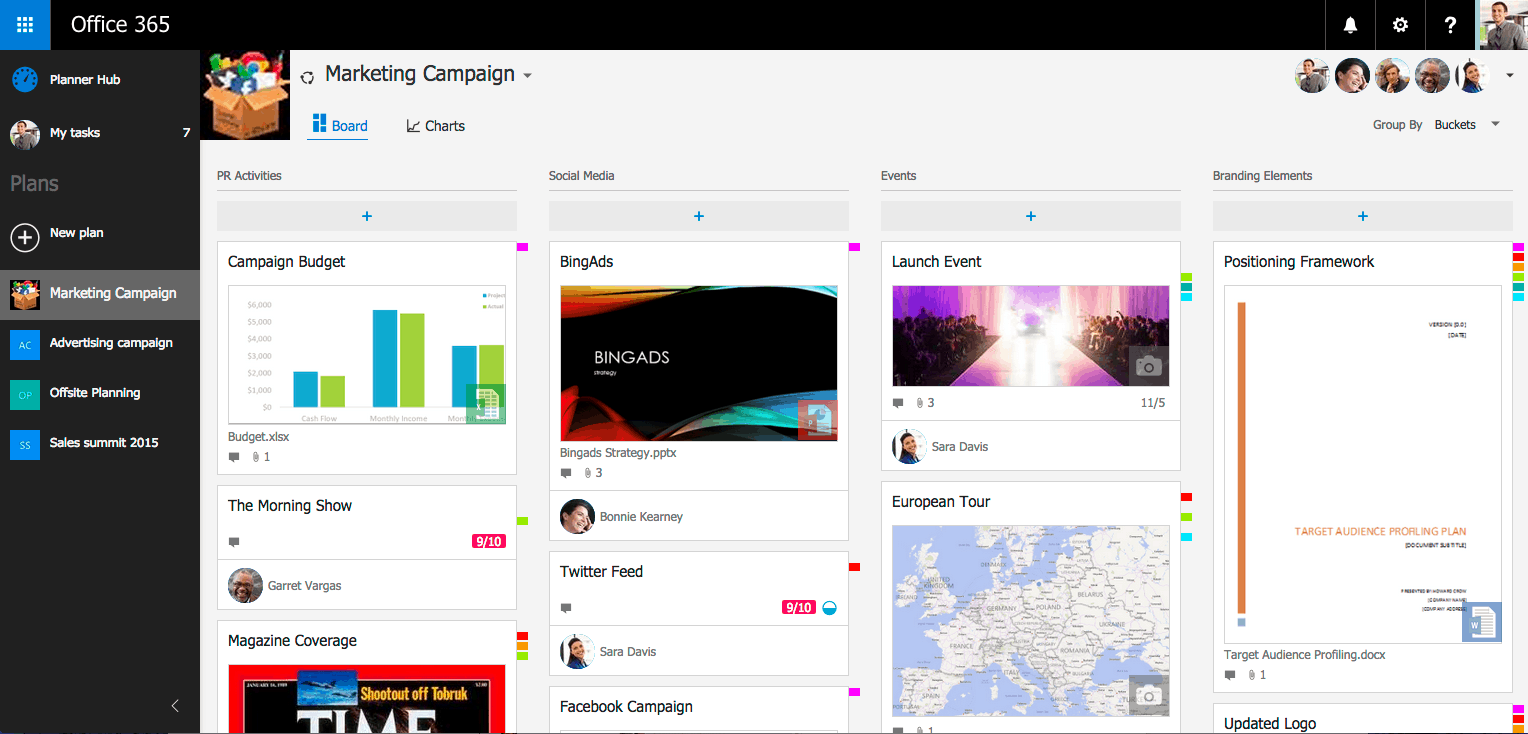
It achieves this using concepts called “Boards” and “Cards“.

\n

Each plan has its own Board, which can be metaphorically analogous to a whiteboard or corkboard that has all of the project/plan/assignment’s pertinent details attached to it. Within every board, each work item or task is delineated by a Card.

\n

Here’s where things get very interesting. A Card can hold all sorts of vital information, including due dates, attachments, categories, and even conversations. Team members can be assigned to various Cards. Once assigned, they receive updates about the changing circumstances of that card in the form of email notifications. Because Planner is already integrated into Office 365, all the infrastructure for emailing, conversation updates, and notification handling is already in place, and is done automatically by the organization’s Office 365 system.

\n

Planner also gives broader, higher level views of all the Boards through the Hub view, which automatically generates efficient and clear visuals and charts that accurately measure the progress of all the Cards in play. This makes it very quick and easy to see in one glance how progress is coming for the entire Board.

\n

Introducing Office 365 Planner 4

\n

Naturally, Planner also makes it easy on the individual as well, as alongside the Hub view Planner will show a team member all of his/her tasks related to the context of Cards he/she’s been assigned to, such as due dates, notifications, progress, and more.

\n

Planner’s Office 365 integration means that Planner conversations within Cards are available through team members’ respective Outlook 2016, Outlook on the Web, and Outlook Groups Mobile Apps.

\n

Office 365 Planner 5 border-1024x571

\n

Planner also makes file sharing and collaboration very efficient. Word, Excel, and PowerPoint documents can be attached to Cards and edited collaboratively, in tune with the theme of collaboration in Office 2016.

\n

One really cutting edge feature is OneNote integration. Every plan has a OneNote notebook attached, making it trivially easy for team members to share, record, and express ideas with each other very easily. Imagine the possibilities created by hand-drawing notes on a Surface, and having them shared instantly across the entire organization. Such would be immeasurably valuable for a product design organization, which may heavily rely on visual design drawings for effective collaboration.

\n

Finally, Microsoft is pulling all the stops to ensure Planner is the perfect fit for every enterprise organization. Planner features multiple redundant backups, virtually instantaneous recovery and HIPAA, FISMA, ISO27001, and EU Model compliance for world class data security and availability.

\n

So when will it be available?

\n

Office 365 Planner preview will be shown off first for Office 365 First Release customers starting Q4 2015. It remains to be seen when Planner will be available to all Office 365 organization customers.

\n

It should also be noted that Planner is currently planned to be available primarily for Office 365 Enterprise and Education customers. Planner may be included in other Office 365 plans, but Microsoft will reveal that information at a later date.

\n\nFurther reading: Office, Office 2016, Office 365, planner, preview

Share this article:
Tags:
Office Office 2016 Office 365 planner preview
Previous Article Microsoft adds new features to Xbox.com website Next Article Microsoft CEO Satya Nadella waxes philosophical on Office 2016 release

Related Articles

Microsoft is no longer manufacturing the Windows RT powered Surface 2

February 23, 2026

Microsoft treats Windows Phone owners with extra 20GB of free SkyDrive storage for one year

February 23, 2026

Bing now comes with Britannica Online answers within search results

February 23, 2026

Leave a Comment Cancel reply

Your email address will not be published. Required fields are marked *

Recent Posts

  • Microsoft is no longer manufacturing the Windows RT powered Surface 2
  • Microsoft treats Windows Phone owners with extra 20GB of free SkyDrive storage for one year
  • Bing now showcases professional and celebrity Klout scores during search results
  • Bing now lets you search and browse for your friends’ Facebook photos
  • Bing now lets you explore free online courses and helps you find books to read

Recent Comments

No comments to show.

Archives

  • February 2026
  • December 2022
  • November 2022
  • October 2022
  • September 2022
  • August 2022
  • July 2022
  • June 2022
  • May 2022
  • April 2022
  • March 2022
  • February 2022
  • January 2022
  • December 2021
  • November 2021
  • October 2021
  • September 2021
  • August 2021
  • July 2021
  • June 2021
  • May 2021
  • April 2021
  • March 2021
  • February 2021
  • January 2021
  • December 2020
  • November 2020
  • October 2020
  • September 2020
  • August 2020
  • July 2020
  • June 2020
  • May 2020
  • April 2020
  • March 2020
  • February 2020
  • January 2020
  • December 2019
  • November 2019
  • October 2019
  • September 2019
  • August 2019
  • July 2019
  • June 2019
  • May 2019
  • April 2019
  • March 2019
  • February 2019
  • January 2019
  • December 2018
  • November 2018
  • October 2018
  • September 2018
  • August 2018
  • July 2018
  • June 2018
  • May 2018
  • April 2018
  • March 2018
  • February 2018
  • January 2018
  • December 2017
  • November 2017
  • October 2017
  • September 2017
  • August 2017
  • July 2017
  • June 2017
  • May 2017
  • April 2017
  • March 2017
  • February 2017
  • January 2017
  • December 2016
  • November 2016
  • October 2016
  • September 2016
  • August 2016
  • July 2016
  • June 2016
  • May 2016
  • April 2016
  • March 2016
  • February 2016
  • January 2016
  • December 2015
  • November 2015
  • October 2015
  • September 2015
  • August 2015
  • July 2015
  • June 2015
  • May 2015
  • April 2015
  • March 2015
  • February 2015
  • January 2015
  • December 2014
  • November 2014
  • October 2014
  • September 2014
  • August 2014
  • July 2014
  • June 2014
  • May 2014
  • April 2014
  • March 2014
  • February 2014
  • January 2014
  • December 2013
  • November 2013
  • October 2013
  • September 2013
  • August 2013
  • July 2013
  • June 2013
  • May 2013
  • April 2013
  • March 2013
  • February 2013
  • January 2013
  • December 2012
  • November 2012
  • October 2012
  • September 2012
  • August 2012
  • July 2012
  • June 2012
  • May 2012
  • April 2012
  • March 2012
  • February 2012
  • January 2012
  • December 2011
  • November 2011
  • October 2011
  • September 2011
  • August 2011
  • July 2011
  • June 2011
  • May 2011
  • April 2011
  • March 2011
  • February 2011
  • January 2011
  • December 2010
  • November 2010
  • October 2010
  • September 2010

Categories

  • Announcements
  • Deals
  • Developer
  • Editorial
  • Feature
  • Feature stories
  • Hero-post
  • Hotdeals
  • How-to
  • Latest news
  • Microsoft / office 365
  • News
  • Office 365
  • Onpodcast
  • Opinion
  • Our featured post
  • Polls
  • Review
  • Reviews
  • Videos
OnMSFT.com

OnMSFT.com covers Microsoft news, reviews, and how-to guides. Formerly known as WinBeta, we have been your source for Microsoft news since 1998.

Categories

  • Windows
  • Surface
  • Xbox
  • How-To
  • OnPodcast
  • Gaming
  • Edge
  • Teams

Recent Posts

  • Microsoft is no longer manufacturing the Windows RT powered Surface 2
  • Microsoft treats Windows Phone owners with extra 20GB of free SkyDrive storage for one year
  • Bing now showcases professional and celebrity Klout scores during search results
  • Bing now lets you search and browse for your friends’ Facebook photos
  • Bing now lets you explore free online courses and helps you find books to read

Quick Links

  • About OnMSFT.com
  • Contact OnMSFT
  • Join Our Team
© 2010–2026 OnMSFT.com LLC. All rights reserved.
About OnMSFT.comContact OnMSFT

