
Microsoft Teams and Slack aren’t the only names when it comes to remote teleconferencing solutions. Along with many others, there’s also Zoom, which apparently experienced recent growth to 13 million monthly active users.
\n
With a recent internal video leaking online, some have gone as far as to say that Microsoft at one point felt that Zoom video conferencing was as an ‘emerging threat.” So, what does Microsoft have to be afraid of? And how does Zoom stack up against Teams? In this guide, we’ll pit the two against each other and help you see the difference.
\n
Price
\n
To begin, we’ll touch on the price. Just like Microsoft Teams, Zoom has a free plan and other paid options. However, it’s important to note that, unlike paid Teams plans with Office 365, paid Zoom plans do not come bundled with extra software. Zoom is mainly just a teleconferencing solution and not meant to be the Office 365 collaboration hub like Teams is.
\n
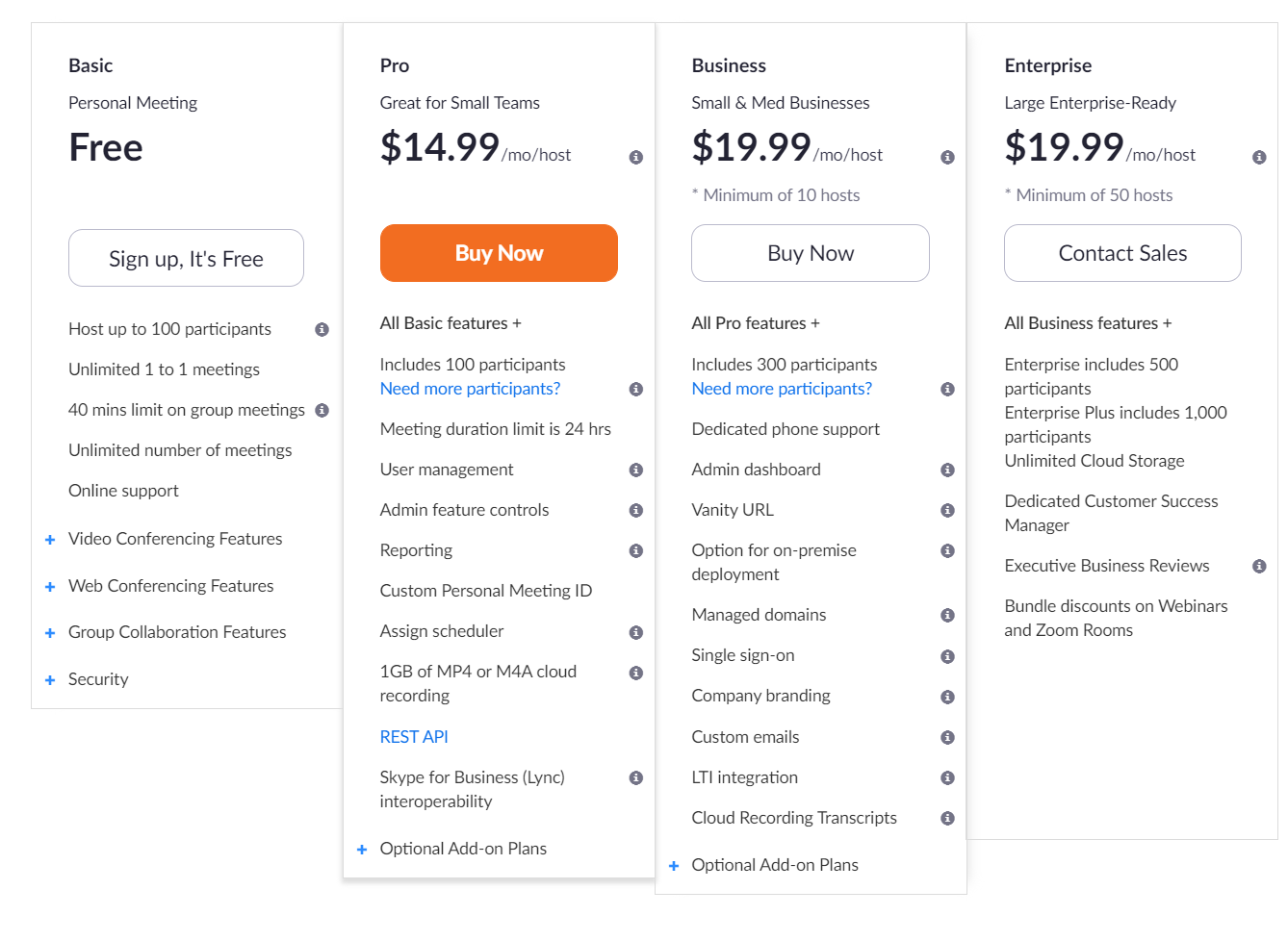
There are, however, extra features in paid Zoom plans that help enhance the experience, which we describe more in-depth in the next section. These are divided into a $14.99 “Pro” plan, a $19.99 “Business” plan with a minimum of 10 hosts, and a $19.99 “Enterprise” plan, that has a minimum of 50 hosts. you can read more about the plans here.
\n
Keep in mind that in Zoom terms, these prices are per “host.” This is someone who schedules, starts and controls the settings in a meeting. A standard Zoom free plan also allows you to invite up to 100 participants in a meeting. However, you can buy more as an add-on for $50 per month or choose a paid “Business” or “Enterprise” plan which has access to 300 or 500 participants.
\n

\n
Zoom Meetings
\n
Microsoft Teams and Slack aren’t the only names when it comes to remote teleconferencing solutions. Along with many others, there’s also Zoom, which apparently experienced recent growth to 13 million monthly active users. With a recent internal video leaking online, some have gone as far as to say t
\n
\n
On the Microsoft Teams front, you can always go with a Free plan, but there are multiple paid Office 365 plans which include Teams at no added cost, depending on the size of your company or business. These cover Office 365 Business Essentials, Office 365 Business Premium, and Office 365 Business. For larger corporations, there is also Office 365 Enterprise plans.
\n
Under Office 365 Business Essentials, Microsoft Teams will start at $5.00 per user, per month. This is best for small businesses as it has the bare essentials. Then, there’s Office 365 Business Premium, which is $12.50, per user, per month. Finally, there is Office 365 Business, which is $8.25 per user per month.
\n
For larger organizations, Microsoft takes things a bit further as it has special Office 365 Enterprise plans (with Teams included.) Office 365 E1 plans include Teams for $8.00 per user, per month. Then, Office 365 E3 plans include Teams for $20.00 per user per month. Again, the differences in these plans boil down between access to email, Office apps, and a few other things, which we’ve explained here. There’s a lot of extra value in Teams if you need it for more than just video conferencing.
\n
We’ve explained the differences in these plans in a separate post, but it boils down to access to other Microsoft services, Office apps, and the Outlook email service. Again, you might not need these features, but it’s still great to have for day-to-day operations.
\n
Base features and different plans
\n

\n
The Power of Microsoft Teams
\n
Microsoft Teams and Slack aren’t the only names when it comes to remote teleconferencing solutions. Along with many others, there’s also Zoom, which apparently experienced recent growth to 13 million monthly active users. With a recent internal video leaking online, some have gone as far as to say t
\n
\n
When it comes to features included, Zoom makes it pretty easy. The base plan of Zoom includes hosts of up to 100 participants. There’s also unlimited 1 to 1 meeting, but a 40 minute limit on group meetings. As for features of meetings, you can create an unlimited amount of meetings and even online support if things are to go wrong and you need help.
\n
All Zoom Free plans also include HD video and voice calls, active speaker view, full-screen gallery view, screen sharing, and the ability to join by phone. Other features included in Zoom’s free plans can be seen below. These all carry over into the other tiers as well. However, please be aware that under the free plan if 3 or more participants join a meeting, the meeting will time out after 40 minutes. Other features covered in all Zoom plans can be seen in the chart below.
\n
\n
As we said under the pricing section, the biggest difference paid versions of Teams is that it gets you bonus features of Office 365. However, Teams mainly shares the same features across free and paid plans. Essentially, the differences between the free and paid versions of Microsoft Teams comes down to maximum members, file storage sizes, extra features in recording meetings as well as phone calls.
\n
Free versions of Teams have a limit of up to 300 members (users) per organization. You also can enjoy up to 250 people on a meeting in Teams which is different from Zoom’s 100 person limit for the free plan.
\n
Elsewhere, Free Microsoft Teams plans limit storage to 2GB per user, with 10GB shared storage. Paid plans, meanwhile, bump the storage up to 1TB per user. Paid Teams plans can also upgrade you to more maximum members and users per organization. All of the following features are included in both Free and paid versions of Teams.
\n
\n
\n
- Guest access
\n
- 1:1 and group online audio and video calls
\n
- Channel meetings
\n
- Screen Sharing
\n
- Background and screen blur
\n
\n
\n
Just like Zoom, Paid versions of Teams offer up Admin tools for managing users and apps, usage reporting for Office 365 services, 99.9% financially-backed SLA uptime, and Configurable user settings and policies. Compared to Zoom, Teams might work better as a phone solution, though, as paid versions of the plan let you include phone calling for $12-$20 per month. Zoom is a $15 per month add on.
\n
Security and Privacy
\n

\n
Finally, you might be wondering where Teams and Zoom stands when it comes to security and privacy. Recently, a Twitter thread revealed that Zoom could be monitoring the activity on your computer. Some have also worried that it could collect data on the programs running. Prontonmail gives a good insight into all the privacy flaws of Zoom, so you give it a read.
\n
The concerns, though, are in fact true, though Zoom seemed to dismiss it in a Tweet. Zoom’s Privacy’s page notes the following: “Whether you have Zoom account or not, we may collect Personal Data from or about you when you use or otherwise interact with our Products. ” Zoom also claims that its Communications are established using 256-bit TLS encryption and all shared content can be encrypted using AES-256 encryption. Chats are also encrypted end-to-end by TLS 1.2 with the Advanced Encryption Standard (AES) 256-bit algorithm.
\n
When it comes to Microsoft Teams, the story is different. Microsoft explains that it “does not use your data for anything other than providing you with the service that you have subscribed to.” The company claims it does not scan your email, documents, or teams for advertising or for purposes that are not service-related. Microsoft also doesn’t have access to your uploaded content.
\n
As far as encryption goes in Teams, it has one disadvantage to Zoom. Microsoft is using the lesser secure type of encryption policy. According to this support page, Microsoft Teams data is encrypted in transit and at rest. Unlike with end-to-end encryption, the data is not encrypted on a sender’s system or device, and not only the recipient is able to decrypt it. Teams is also Tier D-compliant. This includes the following standards: ISO 27001, ISO 27018, SSAE16 SOC 1 and SOC 2, HIPAA. More information on that is available here.
\n
It depends on your needs
\n
In choosing either Teams or Zoom, everything comes down to your needs as a business. Zoom is a great alternative for Teams when it comes to just video conferencing. It gives you access to calling without all the extra stuff. Teams, though, again has the most value for businesses. It’s paid plans not only include audio and video calling under Teams, but you also get access to other Office 365 apps and Microsoft 365 services. This isn’t something that everyone will need, but it sure might be useful for smaller organizations.
\n
But it’s not to say that Zoom is just for small companies. Zoom is currently used by 21st Century Fox, Delta, Dropbox, Logitech, Rakuten, Salesforce, and many more. That’s just as Microsoft Teams, too, which is currently being used by BP, GE, NASCAR, Northwhell Health, Toshiba and many Fortune 500 companies, too.
\n