
With COVID-19 still spreading across the world, many schools and educational institutions have shifted to online learning. This has been a challenge, but Microsoft has been there to support the move through its Teams service. That’s why in July 2020, Microsoft announced tons of new Teams features for teachers and students to take advantage of. Here’s a quick recap.
Improving online meetings and classes
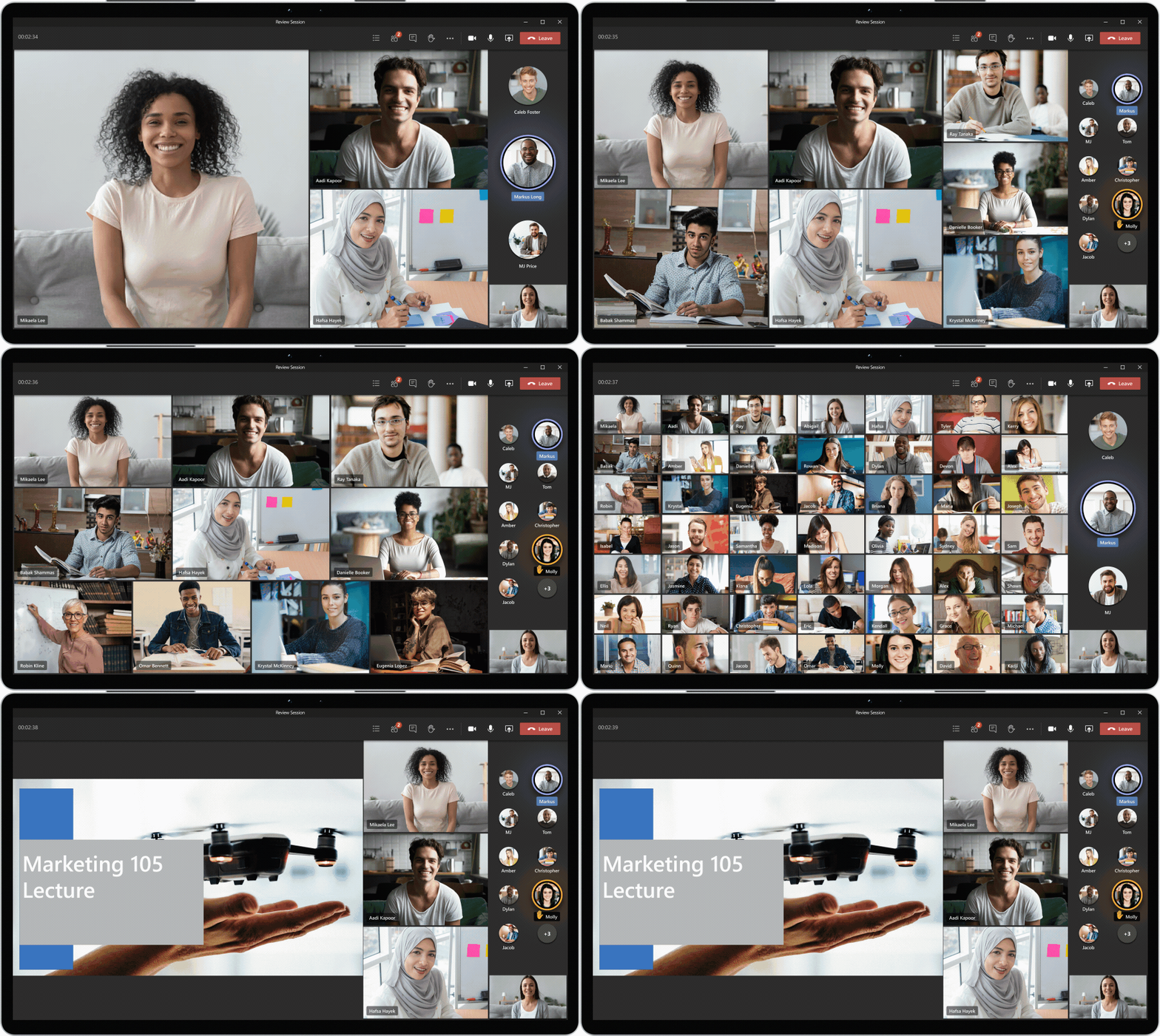
We’ll be starting first with something that everyone is familiar with by now: online meetings and classes. In this area, there were a ton of improvements. These include the addition of Large Gallery View, Together Mode, and Dynamic View. All of these features are designed to make video conferencing easier, and in some cases, less stressful. There were also some smaller features, added too, which you can see below.
- Educators will soon have the new option to download Attendance Reports after a class meeting is over in the meeting chat and channel thread (Coming in September)
- Whiteboard in Teams now has new features including faster load times, sticky notes, text, and drag-and-drop capabilities (Now Available.)
- Teams meetings are now available for up to 300 attendees (up from 250). By the close of 2020, Teams meetings will grow to support up to 1,000 students (Avaialble now and later this year.)
- Reflect messaging extension, available in early August, will give educators and staff another social and emotional connection with their students and colleagues (Coming in early August.)
Capping off the list of meetings and class features are virtual breakout rooms. This was initially announced in July, but Microsoft will only be adding it in the final quarter of 2020. With the feature, educators will be able to pick the number of breakout rooms they’d like, either randomly or manually assign students, move students from one room to the other.
More controls for student safety
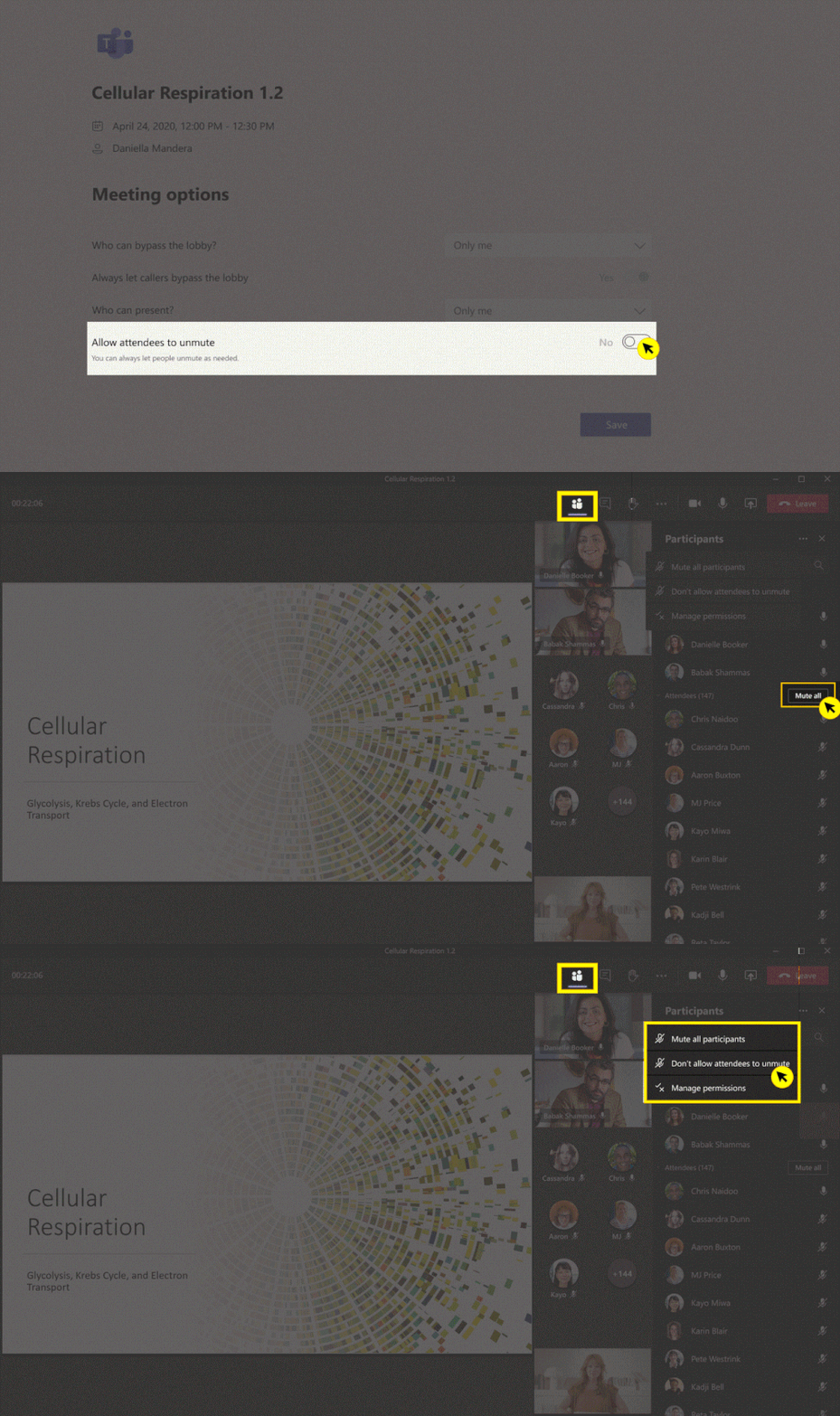
Next on the list of added features are some more controls for student safety, and plugging the holes in Teams that some students might be taking advantage of. On this front, Microsoft announced the addition of Hard Audio Mute. Coming in September, teachers will be able to mute students when it’s time to focus by making it impossible for them to unmute themselves. You can see below for some of the other added features.
- A team owner can now delete cross-post, if the post is inappropriate (Now Available)
- IT Admins will soon have the option to control when students can join meetings by policy. This helps keep classrooms and student-to-student interaction secure (Now Avaialble)
- To help educators have time to prepare their virtual classroom and prevent students from joining without permission, Student Lobby gives educators control over when students are admitted to a scheduled meeting. (Coming in August.)
- Using Group policy assignment, IT Admins can save time and reduce the complexity of managing groups of students or faculty.
- School Data Sync (SDS) is adding back automatic class team creation! Admins can once again automatically bulk-create both M365 Groups and class teams for their educators (Coming in August.)
Wrapping up the list of features is the ability for IT Admins to create a custom background policy. There are also other IT admin, features, too, which you can learn about by checking this link here.
Improvements for Teams assignments

Moving down the list brings us to improvements for Teams assignments. Here, there are six core features. Most of these will be coming in August. They cover viewing assignments across all classes, quickly previewing a linked resource, improvements to grading, and more. See below for a quick summary.
- Educators and students will once again be able to view upcoming and turned in assignments by class or view them across all classes (Coming in August.)
- When an educator adds a link as an assignment resource, students will be able to see a thumbnail preview before clicking to the site or resource (Coming in August)
- Tackle unconscious bias and even the playing field in class with Anonymous Grading. (Coming in August)
- Instead of setting things up on an assignment-by-by-assignment basis, educators can now manage a set of Assignments settings in the Assignments tab (Coming in August.)
- Assignments is growing even more globally inclusive with additional languages (Now Avaialble.)
- o make learning more equitable, the Class Materials folder is now available on Android. (Now Avaialble)
- New celebration animations when turning in assignments (coming in August.)
Capping off this area are some wider improvements to make Assignments in Teams better. This includes an icon refresh to improve readability and functional association foe educators. Also included is support for larger assignments files, attaching more than 10 files at a time, and Large Class UI improvements to speed up viewing and creating assignments for classes larger than 200 students. Large class UI improvements are available now and the others will be coming in August.
More ways to deploy and manage Teams

We’ll be ending with some more things for IT admins or those interested in or already switching to Teams. Coming in early August, Microsoft has simplified grading with SDS and OneRoster compliant SIS. Thanks to this, Teams automatically sends grades entered by educators in Assignments to their OneRoster compliant SIS. You can have a look below for other improvements.
- Using Group policy assignment, IT Admins can save time and reduce the complexity of managing groups of students or faculty (Coming in Early August)
- School Data Sync (SDS) is adding back automatic class team creation! Admins can once again automatically bulk-create both M365 Groups and class teams (Coming in August.)
- Educator-led team creation is another great deployment option that alleviates work for educators while still granting them control over which classes they want to create and use (Coming in August.)
- Early Class Access API gives additional control to IT Admins to support and create teams with educators (Coming in August)
You can learn more about these features, and more by checking this Microsoft Link here.
As you can tell, there are a lot of new features for Teams in Education. We invite you to check out Microsoft’s blog post for some more in-depth details. We also remind you to keep it tuned to our Teams news hub, for all your Microsoft Teams news and information.