Skip to content
OnMSFT.com
  • Home
  • About
  • Contact
  • Windows
  • Surface
  • Xbox
  • How-To
  • OnPodcast
  • Edge
  • Teams
  • Gaming
Menu
  • Home
  • About
  • Contact
  • Windows
  • Surface
  • Xbox
  • How-To
  • OnPodcast
  • Edge
  • Teams
  • Gaming
  1. Home
  2. How-to
  3. How to enable dark theme now in Microsoft Edge Insider builds

How to enable dark theme now in Microsoft Edge Insider builds

James Walker James Walker
April 11, 2019
2 min read

Edge Insider dark theme\n

\n

How to enable dark theme in Microsoft Edge Insider

\n

To enable dark theme in Microsoft Edge Insider (Dev and Canary) builds:

\n

    \n

  1. Launch Edge Insider and navigate to “edge://flags” in the address bar.
  2. \n

  3. Search for the “edge-follow-os-theme” flag.
  4. \n

  5. Change the flag’s value to “Enabled” and follow the prompt to restart Edge.
  6. \n

\n

\n

Applies to All Windows 10 Versions

\n

\n

Microsoft has only just launched the first Insider builds of its upcoming Chromium-powered Edge browser. Many features are currently missing or unfinished, with dark theme support being one of them. If you’re keen to use dark theme straightaway, there is a method to force it to enable by diving under the hood.

\n

First up, open the Edge Insider build you’re using (either Dev or Canary). Next, navigate to “edge://flags” in the address bar. This screen lets you tweak scores of internal Edge and Chromium settings; unless you know what an option does, it’s advisable you refrain from changing it.

\n

Enabling dark theme in Edge Insider

\n

In the search bar at the top of the screen, type “edge-follow-os-theme.” You should see a single result, labelled “Microsoft Edge theme.” Use the dropdown menu to change its value to “Enabled.”

\n

A bar will appear at the bottom of the screen, prompting you to restart Edge to apply the changes. When the app reopens, you should now find Edge’s window is clothed in a neat dark theme.

\n

Enabling dark theme in Edge Insider

\n

You will need to have Windows set to use dark app colours first, using Personalization > Colours in the Settings app. Unfortunately, there’s currently no way to set Edge’s theme independently of the system colour scheme, so you can’t use Edge in dark mode with Windows’ default light theme.

\n
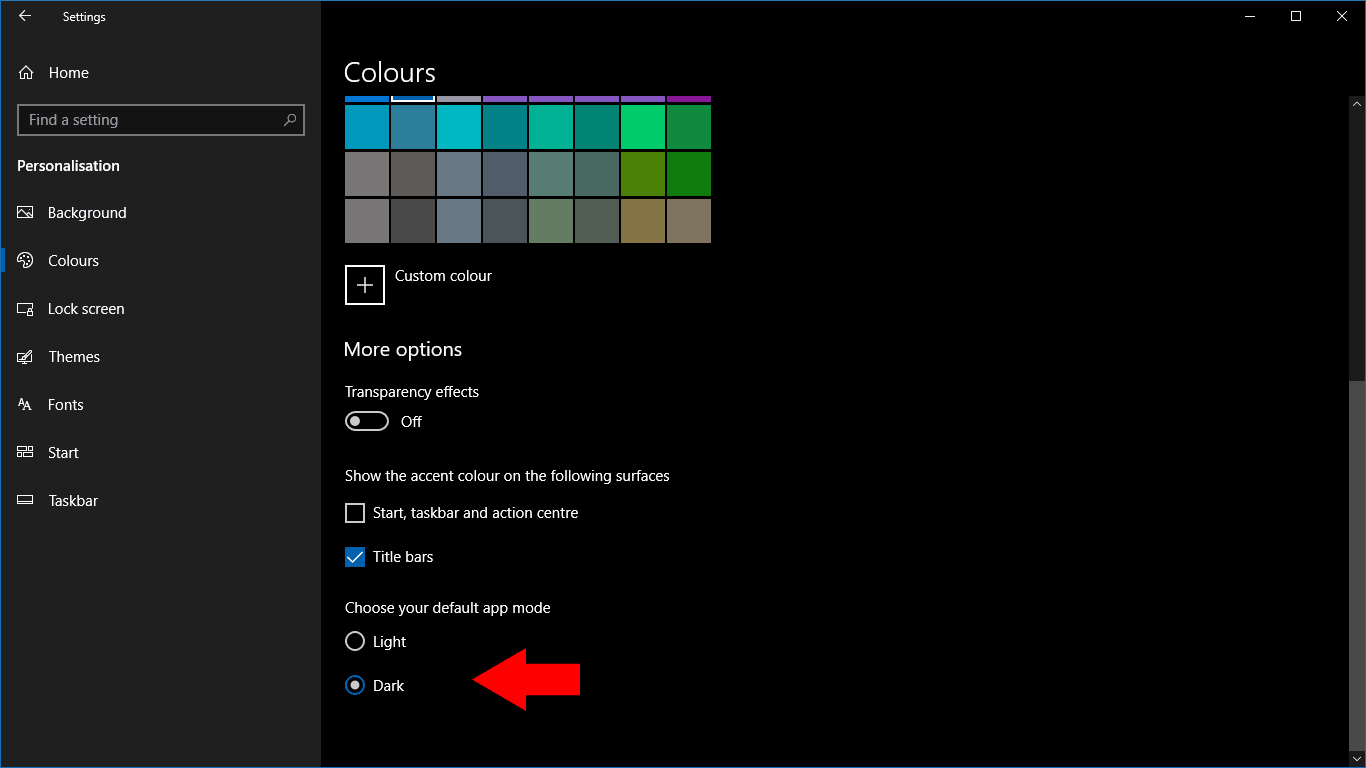
Setting Windows 10 colour scheme

\n

At the time of writing, dark theme only changes the browser chrome. It doesn’t have any impact on Edge’s built-in webpages, such as the Start page or Settings pages. Microsoft might choose to extend its coverage in the future – since it’s currently disabled in the Insider builds, it can be assumed this feature is still undergoing active development.

\n\nFurther reading: Edge Insider, Microsoft Edge, Windows 10

Share this article:
Tags:
Edge Insider Microsoft Edge Windows 10
Previous Article [Updated] Xbox One to get another system update in May Next Article Microsoft to host two free Summer Camps to teach kids video game development and other technical skills

Related Articles

How to Fix the Phone Link App Not Working on Windows 11 – OnMSFT.com

December 29, 2022

5 easy ways to make desktop shortcuts on Windows 11 – OnMSFT.com

December 29, 2022

How to customize precision touchpads on Windows – OnMSFT.com

December 22, 2022

Leave a Comment Cancel reply

Your email address will not be published. Required fields are marked *

Recent Posts

  • Microsoft is no longer manufacturing the Windows RT powered Surface 2
  • Microsoft treats Windows Phone owners with extra 20GB of free SkyDrive storage for one year
  • Bing now showcases professional and celebrity Klout scores during search results
  • Bing now lets you search and browse for your friends’ Facebook photos
  • Bing now lets you explore free online courses and helps you find books to read

Recent Comments

No comments to show.

Archives

  • February 2026
  • December 2022
  • November 2022
  • October 2022
  • September 2022
  • August 2022
  • July 2022
  • June 2022
  • May 2022
  • April 2022
  • March 2022
  • February 2022
  • January 2022
  • December 2021
  • November 2021
  • October 2021
  • September 2021
  • August 2021
  • July 2021
  • June 2021
  • May 2021
  • April 2021
  • March 2021
  • February 2021
  • January 2021
  • December 2020
  • November 2020
  • October 2020
  • September 2020
  • August 2020
  • July 2020
  • June 2020
  • May 2020
  • April 2020
  • March 2020
  • February 2020
  • January 2020
  • December 2019
  • November 2019
  • October 2019
  • September 2019
  • August 2019
  • July 2019
  • June 2019
  • May 2019
  • April 2019
  • March 2019
  • February 2019
  • January 2019
  • December 2018
  • November 2018
  • October 2018
  • September 2018
  • August 2018
  • July 2018
  • June 2018
  • May 2018
  • April 2018
  • March 2018
  • February 2018
  • January 2018
  • December 2017
  • November 2017
  • October 2017
  • September 2017
  • August 2017
  • July 2017
  • June 2017
  • May 2017
  • April 2017
  • March 2017
  • February 2017
  • January 2017
  • December 2016
  • November 2016
  • October 2016
  • September 2016
  • August 2016
  • July 2016
  • June 2016
  • May 2016
  • April 2016
  • March 2016
  • February 2016
  • January 2016
  • December 2015
  • November 2015
  • October 2015
  • September 2015
  • August 2015
  • July 2015
  • June 2015
  • May 2015
  • April 2015
  • March 2015
  • February 2015
  • January 2015
  • December 2014
  • November 2014
  • October 2014
  • September 2014
  • August 2014
  • July 2014
  • June 2014
  • May 2014
  • April 2014
  • March 2014
  • February 2014
  • January 2014
  • December 2013
  • November 2013
  • October 2013
  • September 2013
  • August 2013
  • July 2013
  • June 2013
  • May 2013
  • April 2013
  • March 2013
  • February 2013
  • January 2013
  • December 2012
  • November 2012
  • October 2012
  • September 2012
  • August 2012
  • July 2012
  • June 2012
  • May 2012
  • April 2012
  • March 2012
  • February 2012
  • January 2012
  • December 2011
  • November 2011
  • October 2011
  • September 2011
  • August 2011
  • July 2011
  • June 2011
  • May 2011
  • April 2011
  • March 2011
  • February 2011
  • January 2011
  • December 2010
  • November 2010
  • October 2010
  • September 2010

Categories

  • Announcements
  • Deals
  • Developer
  • Editorial
  • Feature
  • Feature stories
  • Hero-post
  • Hotdeals
  • How-to
  • Latest news
  • Microsoft / office 365
  • News
  • Office 365
  • Onpodcast
  • Opinion
  • Our featured post
  • Polls
  • Review
  • Reviews
  • Videos
OnMSFT.com

OnMSFT.com covers Microsoft news, reviews, and how-to guides. Formerly known as WinBeta, we have been your source for Microsoft news since 1998.

Categories

  • Windows
  • Surface
  • Xbox
  • How-To
  • OnPodcast
  • Gaming
  • Edge
  • Teams

Recent Posts

  • Microsoft is no longer manufacturing the Windows RT powered Surface 2
  • Microsoft treats Windows Phone owners with extra 20GB of free SkyDrive storage for one year
  • Bing now showcases professional and celebrity Klout scores during search results
  • Bing now lets you search and browse for your friends’ Facebook photos
  • Bing now lets you explore free online courses and helps you find books to read

Quick Links

  • About OnMSFT.com
  • Contact OnMSFT
  • Join Our Team
© 2010–2026 OnMSFT.com LLC. All rights reserved.
About OnMSFT.comContact OnMSFT

