Skip to content
OnMSFT.com
  • Home
  • About
  • Contact
  • Windows
  • Surface
  • Xbox
  • How-To
  • OnPodcast
  • Edge
  • Teams
  • Gaming
Menu
  • Home
  • About
  • Contact
  • Windows
  • Surface
  • Xbox
  • How-To
  • OnPodcast
  • Edge
  • Teams
  • Gaming
  1. Home
  2. Feature
  3. Microsoft Edge started 2020 with its first stable release, here’s what’s new since then

Microsoft Edge started 2020 with its first stable release, here’s what’s new since then

Rabia Noureen Rabia Noureen
December 31, 2020
5 min read

Microsoft released the first stable version of the new Microsoft Edge browser back in January 2020. Unlike the previous version, the new Microsoft Edge is based on the Chromium open-source project. Over the past few months, the company has already made many improvements to its functionality, and the team is still working to introduce brand new features.

As 2020 draws to a close, we have taken some time to evaluate the most noteworthy features added to the browser, along with some highly anticipated upcoming changes. In our recap, we will touch on the high points, with an emphasis on end-user features. Here’s what you need to know.

What’s New in Microsoft Edge

Sidebar Search

Edge Sidebar Search

The first is a new sidebar search option that allows users to search the web without leaving the current tab. This means that users can now highlight a phrase on a page, right-click on it, and select the “Search in Sidebar for” option from the context menu to use this feature. The browser performs the search with Bing to display search results. The new search experience is a great productivity tool that eliminates the need to switch to a different tab to quickly search for something.

Vertical Tabs

Animated GIF of vertical tabs user interface

The 3rd feature on our list is the new Vertical tabs experience that is coming soon to Edge. Thanks to vertical tabs, users will be able to align their tabs on the left-hand side of the browser and manage large numbers of tabs simultaneously. The handy feature has been designed for users who like to open dozens of tabs at any given time. The vertical alignment of open tabs can help to improve productivity by making it easier to identify tabs at a glance.

As of now, Microsoft is currently testing this feature, and it’s not available in the Stable version of the browser. To try it out, you need to download the Canary or Dev version of Microsoft Edge.

Collections

Animation showing Collections exporting to Onenote

The Collections feature allows users to group web pages, images, and text snippets for their convenience. Collections can be helpful in different scenarios: First of all, users can compare product information before making a purchase decision. The feature also comes in handy for creating lesson plans, brainstorming ideas, organizing information, and conducting research.

Collections have seen some performance improvements during the past couple of months. The tool received a new Pinterest integration, the ability to pin notes right to a web page, change the background color of these notes, and more. These updates are available for all users in the Stable builds of Microsoft Edge.

Profiles

Microsoft Edge Open Links In Work Profile

The new Microsoft Edge browser picked up support for multiple profiles earlier this year. The new Profiles feature allows users to create multiple user profiles to keep work or personal content separate such as passwords, favorites, history, extensions, addresses, and other settings. It is important to note that Edge supports two types of profiles. Users can either create a cloud profile or a local profile. We invite you to check out our detailed review to learn more about multiple profiles.

Smart Copy

Animated GIF of Smart Copy user interface

Have you ever tried to copy blocks of text from a web page and paste them into Excel or other applications. If so, you probably know that it could be tricky sometimes to copy tabular data and maintain the source site’s formatting. To address this issue, Microsoft Edge is now testing a Smart Copy experience that preserves the original formatting of the text if the user is copying it from a table. The headings, paragraphs, and tables are pasted correctly into an email or document. However, to use Smart Copy, you need to be running the Canary build of Microsoft Edge.

Web Capture tool

thumbnail image 2 of blog post titled Introducing web capture for Microsoft Edge Re: Introducing web capture for Microsoft Edge Re: Introducing web capture for Microsoft Edge Re: Introducing web capture for Microsoft Edge Re: Introducing web capture for Microsoft Edge Re: Introducing web capture for Microsoft Edge Re: Introducing web capture for Microsoft Edge Re: Introducing web capture for Microsoft Edge Re: Introducing web capture for Microsoft Edge Re: Introducing web capture for Microsoft Edge Re: Introducing web capture for Microsoft Edge Re: Introducing web capture for Microsoft Edge Re: Introducing web capture for Microsoft Edge Re: Introducing web capture for Microsoft Edge Re: Introducing web capture for Microsoft Edge Re: Introducing web capture for Microsoft Edge Re: Introducing web capture for Microsoft Edge Re: Introducing web capture for Microsoft Edge Re: Introducing web capture for Microsoft Edge Re: Introducing web capture for Microsoft Edge

The company has recently added a new tool called “Web Capture” in the Microsoft Edge preview builds. It brings the ability for users to capture screenshots of the webpages and share them with their colleagues. With the Web Capture feature, users will be able to scroll while marking webpages, add highlights, and ink on the captures. There’s also the ability to click full-page screenshots of web pages. You can read our separate post to learn more about using this tool.

QR code generator

Microsoft Edge QR code generator

The QR code generator is another new feature that will soon make it’s way to the new Chromium Edge browser. The feature will let users share websites between PCs and mobile devices by scanning a QR code. The QR code generator is currently hidden behind an experimental flag and will probably receive changes in terms of functionality over time.

Shopping Features

TBD

In version 87, Microsoft Edge has added a bunch of new shopping features for this holiday season. These new capabilities can help users save money on products bought online when they visit online shops in Edge. The list includes Coupons, an improved price comparison tool, New Tab page enhancements, Microsoft Bing’s Deals Hub, and more. However, the deal-finding experience currently supports select popular online stores, and there’s no word on if the company plans to extend it to more sites. You can read more about these shopping features here.

Syncing
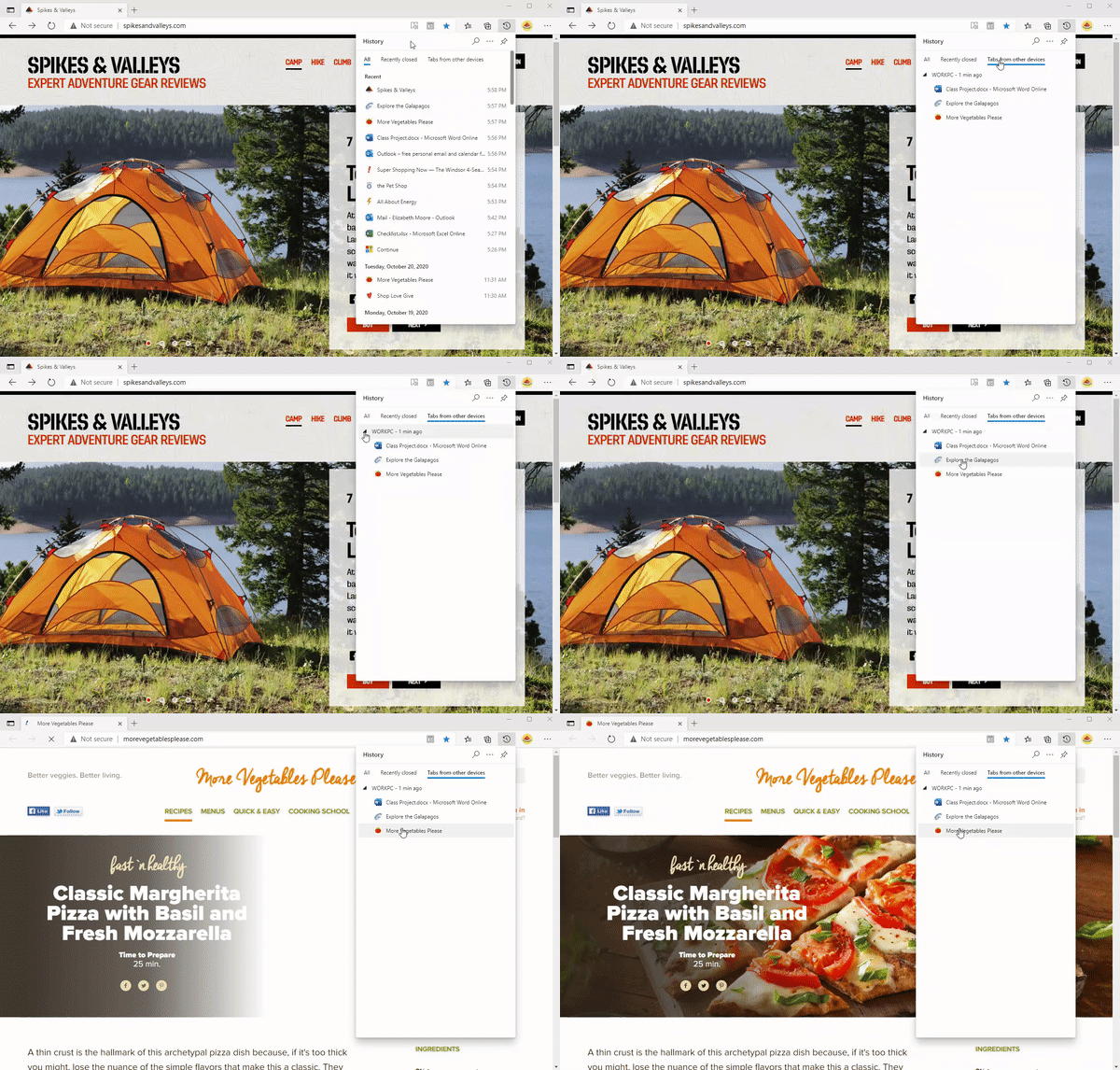
thumbnail image 3 of blog post titled Improvements to history in Microsoft Edge Re: Improvements to history in Microsoft Edge Re: Improvements to history in Microsoft Edge Re: Improvements to history in Microsoft Edge Re: Improvements to history in Microsoft Edge Re: Improvements to history in Microsoft Edge Re: Improvements to history in Microsoft Edge Re: Improvements to history in Microsoft Edge Re: Improvements to history in Microsoft Edge Re: Improvements to history in Microsoft Edge Re: Improvements to history in Microsoft Edge Re: Improvements to history in Microsoft Edge Re: Improvements to history in Microsoft Edge Re: Improvements to history in Microsoft Edge Re: Improvements to history in Microsoft Edge Re: Improvements to history in Microsoft Edge Re: Improvements to history in Microsoft Edge Re: Improvements to history in Microsoft Edge Re: Improvements to history in Microsoft Edge Re: Improvements to history in Microsoft Edge

The syncing capabilities of Edge have been a point of criticism since its launch, and it’s probably one of the reasons that could be keeping users from switching to their browser. Microsoft Edge currently supports favorite and password syncing, but users will soon be able to sync browsing history and open tabs across devices. These capabilities are now available in the Canary and Dev channels of the Edge Insider program, and you can find more details in our separate post.

Tracking Prevention

Next up is security and privacy. On this front, Microsoft Edge offers more privacy options than many other popular browsers. The new tracking prevention functionality in Microsoft Edge is turned on by default and it helps to improve the online privacy of users. Users can choose from the following three tracking prevention levels to block trackers from sites they visit: Basic, Balanced, and Strict. The browser also protects users against malicious downloads and websites with the help of Microsoft Defender Smartscreen.

Other features and changes

To end the recap, we’ll look at some important announcements for Microsoft Edge in 2020. Interestingly, Microsoft Edge picked support for Surface Pro X, and it’s now natively available on Apple M1 devices.

In addition, Microsoft is also busy adding more features to the browser like Sleeping tabs. There are a bunch of enhancements coming to the Stable channel in early 2021, including Tab previews, dictionary in PDF, Vertical tabs, and more. As always, stay tuned to OnMSFT.com for all the latest Microsoft news and information.


Share This Post:

Tags: Canary Channel | Dev Channel | Microsoft | Microsoft Edge | Web browser | Windows 10
Share this article:
Tags:
Canary Channel Dev Channel Microsoft Microsoft Edge Web browser Windows 10
Previous Article New features for OneDrive, Teams and more, here’s everything added to Microsoft 365 in 2020 Next Article You can now get the Microsoft Surface Duo at the lowest price ever, just $740 at CDW

Related Articles

Here is our Xbox 2022 wrap up – OnMSFT.com

December 27, 2022

Xbox classics revisited vol.8: classic racing games – OnMSFT.com

December 20, 2022

Here are some Xbox Christmas gifts for that gamer on your list – OnMSFT.com

December 20, 2022

Leave a Comment Cancel reply

Your email address will not be published. Required fields are marked *

Recent Posts

  • Microsoft is no longer manufacturing the Windows RT powered Surface 2
  • Microsoft treats Windows Phone owners with extra 20GB of free SkyDrive storage for one year
  • Bing now showcases professional and celebrity Klout scores during search results
  • Bing now lets you search and browse for your friends’ Facebook photos
  • Bing now lets you explore free online courses and helps you find books to read

Recent Comments

No comments to show.

Archives

  • February 2026
  • December 2022
  • November 2022
  • October 2022
  • September 2022
  • August 2022
  • July 2022
  • June 2022
  • May 2022
  • April 2022
  • March 2022
  • February 2022
  • January 2022
  • December 2021
  • November 2021
  • October 2021
  • September 2021
  • August 2021
  • July 2021
  • June 2021
  • May 2021
  • April 2021
  • March 2021
  • February 2021
  • January 2021
  • December 2020
  • November 2020
  • October 2020
  • September 2020
  • August 2020
  • July 2020
  • June 2020
  • May 2020
  • April 2020
  • March 2020
  • February 2020
  • January 2020
  • December 2019
  • November 2019
  • October 2019
  • September 2019
  • August 2019
  • July 2019
  • June 2019
  • May 2019
  • April 2019
  • March 2019
  • February 2019
  • January 2019
  • December 2018
  • November 2018
  • October 2018
  • September 2018
  • August 2018
  • July 2018
  • June 2018
  • May 2018
  • April 2018
  • March 2018
  • February 2018
  • January 2018
  • December 2017
  • November 2017
  • October 2017
  • September 2017
  • August 2017
  • July 2017
  • June 2017
  • May 2017
  • April 2017
  • March 2017
  • February 2017
  • January 2017
  • December 2016
  • November 2016
  • October 2016
  • September 2016
  • August 2016
  • July 2016
  • June 2016
  • May 2016
  • April 2016
  • March 2016
  • February 2016
  • January 2016
  • December 2015
  • November 2015
  • October 2015
  • September 2015
  • August 2015
  • July 2015
  • June 2015
  • May 2015
  • April 2015
  • March 2015
  • February 2015
  • January 2015
  • December 2014
  • November 2014
  • October 2014
  • September 2014
  • August 2014
  • July 2014
  • June 2014
  • May 2014
  • April 2014
  • March 2014
  • February 2014
  • January 2014
  • December 2013
  • November 2013
  • October 2013
  • September 2013
  • August 2013
  • July 2013
  • June 2013
  • May 2013
  • April 2013
  • March 2013
  • February 2013
  • January 2013
  • December 2012
  • November 2012
  • October 2012
  • September 2012
  • August 2012
  • July 2012
  • June 2012
  • May 2012
  • April 2012
  • March 2012
  • February 2012
  • January 2012
  • December 2011
  • November 2011
  • October 2011
  • September 2011
  • August 2011
  • July 2011
  • June 2011
  • May 2011
  • April 2011
  • March 2011
  • February 2011
  • January 2011
  • December 2010
  • November 2010
  • October 2010
  • September 2010

Categories

  • Announcements
  • Deals
  • Developer
  • Editorial
  • Feature
  • Feature stories
  • Hero-post
  • Hotdeals
  • How-to
  • Latest news
  • Microsoft / office 365
  • News
  • Office 365
  • Onpodcast
  • Opinion
  • Our featured post
  • Polls
  • Review
  • Reviews
  • Videos
OnMSFT.com

OnMSFT.com covers Microsoft news, reviews, and how-to guides. Formerly known as WinBeta, we have been your source for Microsoft news since 1998.

Categories

  • Windows
  • Surface
  • Xbox
  • How-To
  • OnPodcast
  • Gaming
  • Edge
  • Teams

Recent Posts

  • Microsoft is no longer manufacturing the Windows RT powered Surface 2
  • Microsoft treats Windows Phone owners with extra 20GB of free SkyDrive storage for one year
  • Bing now showcases professional and celebrity Klout scores during search results
  • Bing now lets you search and browse for your friends’ Facebook photos
  • Bing now lets you explore free online courses and helps you find books to read

Quick Links

  • About OnMSFT.com
  • Contact OnMSFT
  • Join Our Team
© 2010–2026 OnMSFT.com LLC. All rights reserved.
About OnMSFT.comContact OnMSFT

