Skip to content
OnMSFT.com
  • Home
  • About
  • Contact
  • Windows
  • Surface
  • Xbox
  • How-To
  • OnPodcast
  • Edge
  • Teams
  • Gaming
Menu
  • Home
  • About
  • Contact
  • Windows
  • Surface
  • Xbox
  • How-To
  • OnPodcast
  • Edge
  • Teams
  • Gaming
  1. Home
  2. Feature
  3. Start11 Hands-on Review: Letting you Customize Windows 11

Start11 Hands-on Review: Letting you Customize Windows 11

Arif Bacchus Arif Bacchus
August 23, 2021
3 min read

Windows 11 brings many big changes and one of those involves the Start Menu. Now in the center of the screen and with static icons instead of Live Tiles, a lot of people aren’t too keen on the big redesign. If you’re one of those people and prefer to tweak Windows 11 beyond what Microsoft currently allows you to do, then you might want to check out Stardock’s latest product, Start11.

We were provided a review code by Stardock and have been playing around with the beta experience over the past few days. Start11 promises to help you restore the Classic Start Menu so that Windows looks and feels more like the way you want. But does it live up to the hype?

Start Menu

Start11 beta hands-on review: i wish microsoft let me customize the windows 11 start menu like this - onmsft. Com - august 23, 2021

The core experience of Start11 revolves around customizing the Start Menu. In my hands-on time, this ended up being my favorite part of the app experience. There are many levels of controls here, from bringing back the Windows 7 style menu, to a more modern style many that blends Windows 7 elements with Windows 10 elements.

You even can hide your profile icon, and change visual settings like the color, font, and icon sizes. Of course, there is the option to move the Taskbar to the left, too (though Windows settings let you do this, too). I swapped my settings around to make the icons a bit bigger, and show the icons as a grid rather than a list.

The best part of it all? You can adjust the menu transparency a bit and take Microsoft’s Fluent Design to new levels and get a true glass-like feel. You even can use a custom texture if you want.

Point is, all these controls go beyond what you’ll find in the Windows 11 settings menu. There you only can swap backgrounds, accent colors, and windows titles, and border colors. Start11 puts you in full control of how you want your Windows to look.

Taskbar
Start11 beta hands-on review: i wish microsoft let me customize the windows 11 start menu like this - onmsft. Com - august 23, 2021

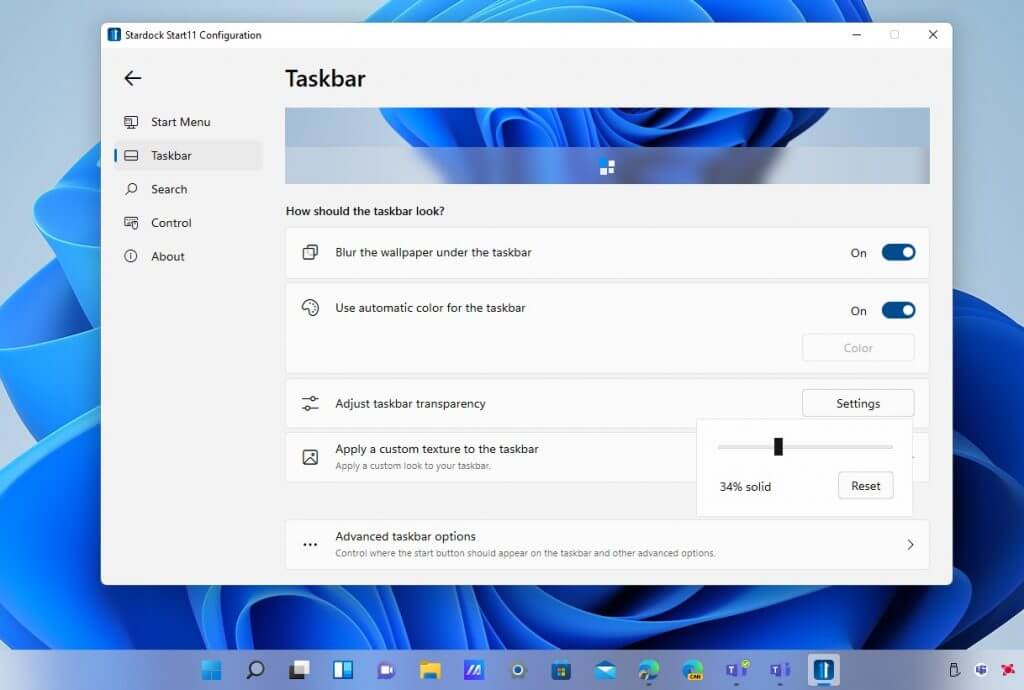
Swapping out the Windows 11 Start Menu for Start11’s take is a completely optional thing. If you like the way it looks, you can keep your current Start Menu by choosing “Use the Start11 Start Menu” to off in the settings menu. During one point of my tests, this is what I ended up doing. I wanted to change the Taskbar instead of the Start Menu.

In changing the Taskbar, there’s a couple of cool controls. You could blur the wallpaper under the background, choose your own custom color for the Taskbar, and even adjust its transparency. Seeing the Windows 11 Taskbar 100% transparent is quite interesting as it makes it feel like old-school MacOS. You even can set custom background textures, too.

Search

Start11 beta hands-on review: i wish microsoft let me customize the windows 11 start menu like this - onmsft. Com - august 23, 2021

Search is one of the central experiences of Windows 11, as Microsoft brought a new search icon. Start11, though, brings back the traditional search menu you might be familiar with from Windows 7. The universal search lets you find desktop applications and other quick settings. You also can show search result filtering icons, search file contents and names, search the internet. Overall, it’s quite speedy and works just as fast as the native Windows 11 search feature.

Controls

Start11 beta hands-on review: i wish microsoft let me customize the windows 11 start menu like this - onmsft. Com - august 23, 2021

The final core area of Start11 has to do with the ability to control the settings. You can configure the Start button or Windows Key to open up only the Windows 11 Start Menu, or the Start11 menu itself. There are also tons of other settings scattered throughout the app which can help you make Windows your own. It’s really appreciated, as the controls can go very in-depth when you need them.

More on the way soon

Start11 is currently in beta, so there’s still a lot of other features to come at a later point. You can buy the app today for $5, or try it out for free for 30 days. Stardock tells me that some of the other planned features include faster search with more detailed search results, the ability to perform math problems in the search box, more styling options, and productivity features. We also reached out to Stardock for a more in-depth interview to hear more about the engineering behind Start11. So be sure to keep it locked to OnMSFT for more heading into the future.


Share This Post:

Share this article:
Tags:
Microsoft Start Menu Start11 Windows 11
Previous Article Microsoft Whiteboard is getting new collaboration features on Windows 10, Surface Hub and iOS – OnMSFT.com Next Article Fixed Microsoft PowerApps flaw left 38 million records exposed – OnMSFT.com

Related Articles

Here is our Xbox 2022 wrap up – OnMSFT.com

December 27, 2022

Xbox classics revisited vol.8: classic racing games – OnMSFT.com

December 20, 2022

Here are some Xbox Christmas gifts for that gamer on your list – OnMSFT.com

December 20, 2022

Leave a Comment Cancel reply

Your email address will not be published. Required fields are marked *

Recent Posts

  • Microsoft is no longer manufacturing the Windows RT powered Surface 2
  • Microsoft treats Windows Phone owners with extra 20GB of free SkyDrive storage for one year
  • Bing now showcases professional and celebrity Klout scores during search results
  • Bing now lets you search and browse for your friends’ Facebook photos
  • Bing now lets you explore free online courses and helps you find books to read

Recent Comments

No comments to show.

Archives

  • February 2026
  • December 2022
  • November 2022
  • October 2022
  • September 2022
  • August 2022
  • July 2022
  • June 2022
  • May 2022
  • April 2022
  • March 2022
  • February 2022
  • January 2022
  • December 2021
  • November 2021
  • October 2021
  • September 2021
  • August 2021
  • July 2021
  • June 2021
  • May 2021
  • April 2021
  • March 2021
  • February 2021
  • January 2021
  • December 2020
  • November 2020
  • October 2020
  • September 2020
  • August 2020
  • July 2020
  • June 2020
  • May 2020
  • April 2020
  • March 2020
  • February 2020
  • January 2020
  • December 2019
  • November 2019
  • October 2019
  • September 2019
  • August 2019
  • July 2019
  • June 2019
  • May 2019
  • April 2019
  • March 2019
  • February 2019
  • January 2019
  • December 2018
  • November 2018
  • October 2018
  • September 2018
  • August 2018
  • July 2018
  • June 2018
  • May 2018
  • April 2018
  • March 2018
  • February 2018
  • January 2018
  • December 2017
  • November 2017
  • October 2017
  • September 2017
  • August 2017
  • July 2017
  • June 2017
  • May 2017
  • April 2017
  • March 2017
  • February 2017
  • January 2017
  • December 2016
  • November 2016
  • October 2016
  • September 2016
  • August 2016
  • July 2016
  • June 2016
  • May 2016
  • April 2016
  • March 2016
  • February 2016
  • January 2016
  • December 2015
  • November 2015
  • October 2015
  • September 2015
  • August 2015
  • July 2015
  • June 2015
  • May 2015
  • April 2015
  • March 2015
  • February 2015
  • January 2015
  • December 2014
  • November 2014
  • October 2014
  • September 2014
  • August 2014
  • July 2014
  • June 2014
  • May 2014
  • April 2014
  • March 2014
  • February 2014
  • January 2014
  • December 2013
  • November 2013
  • October 2013
  • September 2013
  • August 2013
  • July 2013
  • June 2013
  • May 2013
  • April 2013
  • March 2013
  • February 2013
  • January 2013
  • December 2012
  • November 2012
  • October 2012
  • September 2012
  • August 2012
  • July 2012
  • June 2012
  • May 2012
  • April 2012
  • March 2012
  • February 2012
  • January 2012
  • December 2011
  • November 2011
  • October 2011
  • September 2011
  • August 2011
  • July 2011
  • June 2011
  • May 2011
  • April 2011
  • March 2011
  • February 2011
  • January 2011
  • December 2010
  • November 2010
  • October 2010
  • September 2010

Categories

  • Announcements
  • Deals
  • Developer
  • Editorial
  • Feature
  • Feature stories
  • Hero-post
  • Hotdeals
  • How-to
  • Latest news
  • Microsoft / office 365
  • News
  • Office 365
  • Onpodcast
  • Opinion
  • Our featured post
  • Polls
  • Review
  • Reviews
  • Videos
OnMSFT.com

OnMSFT.com covers Microsoft news, reviews, and how-to guides. Formerly known as WinBeta, we have been your source for Microsoft news since 1998.

Categories

  • Windows
  • Surface
  • Xbox
  • How-To
  • OnPodcast
  • Gaming
  • Edge
  • Teams

Recent Posts

  • Microsoft is no longer manufacturing the Windows RT powered Surface 2
  • Microsoft treats Windows Phone owners with extra 20GB of free SkyDrive storage for one year
  • Bing now showcases professional and celebrity Klout scores during search results
  • Bing now lets you search and browse for your friends’ Facebook photos
  • Bing now lets you explore free online courses and helps you find books to read

Quick Links

  • About OnMSFT.com
  • Contact OnMSFT
  • Join Our Team
© 2010–2026 OnMSFT.com LLC. All rights reserved.
About OnMSFT.comContact OnMSFT
