
 \n
\n
On October 2, 2018, the Windows 10 October 2018 Update was released when Microsoft announced the new Surface Pro 6 and Surface Laptop 2 at their New York event. However, after a number of people reported issues, including issues with issues with extracting ZIP files and data loss after updating. Microsoft decided to pull the update and work on the existing bugs before re-releasing it. Now that it’s finally been re-released, here’s what you can expect from the long awaited new update to Windows 10.
\n
The Windows 10 October 2018 Update brings 157 new emojis, smart keyboards, cloud-powered clipboards, a different sniping experience, and faster and more comprehensive updates for users. Since Microsoft began the new rollout yesterday, here are what you can expect to see on your Windows 10 PC.
\n
Your Android or iPhone on your PC
\n

\n
Since the death of Windows 10 Mobile, Microsoft has pivoted to offering Android and iPhone users a more robust experience. Now, Android users will be able to see their text messages and photos from their phones on their Windows 10 PC. The Your Phone app allows you to view, send, and receive SMS text messages from your Android, on your Windows 10 PC.
\n
At the moment, iPhone users can browse the web on their phone, and pick up where you left off on your Windows 10 PC. Android phone users will likely get more use out of the Your Phone app on Windows 10, but Microsoft promises to add more of these features for iPhone users too (if Apple allows it). Here’s a look at what you can do with the Your Phone app on Windows 10.
\n
\n
Microsoft’s Timeline on phone
\n
\n
Using Microsoft Launcher on Android allows you to see the websites you visited, pick up where you left off in Microsoft Edge, Word, Excel, PowerPoint, and other Microsoft apps on Android. Timeline makes it easier for you to find all your content on any device, including Android and iOS.
\n
Timeline is another way to pick up where you left off on a bigger screen, using your Windows 10 PC. Want to see the website you were using on your Android phone on your Windows 10 PC? Timeline makes it easy for you to see what you were doing in Microsoft Edge or Office and finish whatever you were doing. You can change your Timeline settings in Windows 10 to extend the time that Timeline sees on your devices.
\n
Switching back and forth in time is as easy as scrolling back to find things you were working on earlier today or earlier in the week. You can pick and choose what activities you want to share or remove from a specific day or hour. At the moment, Timeline is available in preview on Android phone via Microsoft Launcher and will be coming soon to preview on iPhone. Here’s a video of how Microsoft Timeline will work with your Android or iPhone.
\n
\n
SwiftKey powering Windows 10 virtual keyboard
\n

\n
SwiftKey gives you more accurate text and autocorrect predictions by learning how and what you type. SwiftKey suggests emojiis that you use most and it is already available as a keyboard option on Android and iOS, so it only makes sense that it is available on WIndows 10 too. With SwiftKey on WIndows 10, typing will be even easier when you use the touch keyboard to write in the following languages: English (United States), English (United Kingdom), French (France), German (Germany), Italian (Italy), Spanish (Spain), Portuguese (Brazil), and Russian. More languages will make their way SwiftKey on Windows 10 soon.
\n

\n
Additionally, you can go to Settings > Devices > Typing and select “View Typing Insights” to see how AI helps you type on your Windows 10 PC. Please note that these insights are only available if you are using the on-screen keyboard for autocorrecting your spelling errors, word predictions, and word suggestions. There are no insights available for ussing the physical keyboard on your PC (yet).
\n
Cloud-powered clipboard
\n
\n
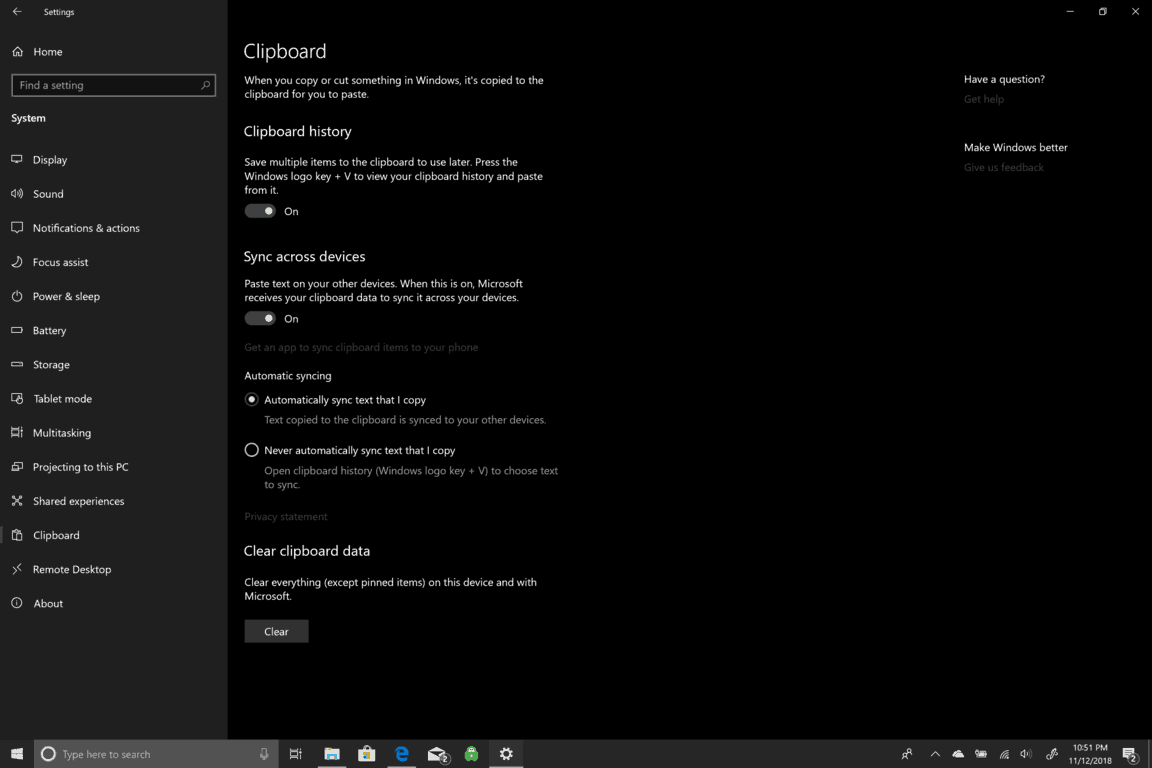
Next, is the cloud-powered clipboard. Now you can copy annd paste content across devices. If you want to enable the cloud-powered clipboard, go to Settings > System > Clipboard. From there, you can enable clipboard history and save multiple items to your clipboard to share across your devices.
\n

\n
Your cloud-powered clipboard history operates in the same way that Microsoft Timeline does and you can access your clipboard across any Windows 10 PC. Currently, clipboard history supports plain text, HTML and image sizes less than 1MB.
\n
157 new emoji
\n
\n
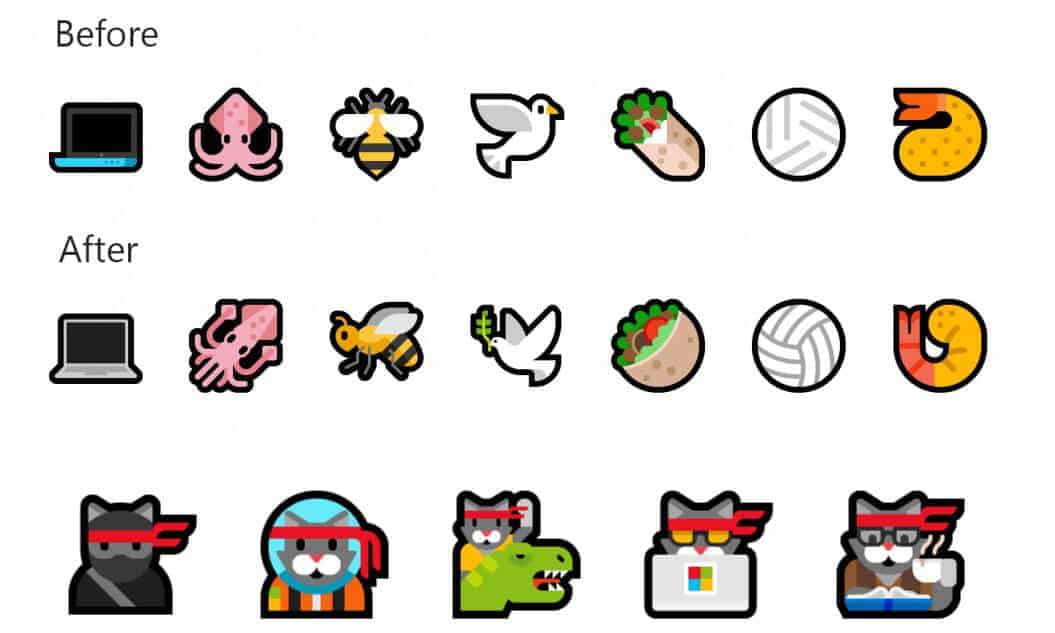
There are 157 new emoji available in the October 2018 Update. There are some new emojis and some old ones, but as you can see, the change is noticeable. You can bring up the new emojis by using on-screen keyboard or by pressing the “Windows Key + .” You can use the new emojis in the Your Phone app on your Windows 10 PC too.
\n
3D models and Inking in Microsoft Word and PowerPoint
\n
In Windows 10, Microsoft Word and PowerPoint has been used to tell and illustrate stories and presentations. The new update brings new AI-powered inking features and 3D updates that help you find even more creative ways to design and create great content. In PowerPoint, you can sketch out your ideas and AI tools will take your scribbled thoughts and format your scribbles into slides. If you are using your Surface Pro 6, you can use your Surface Pen to create graphs or draw shapes, and PowerPoint will convert them into text and shapes for you to edit later. Here’s a look at the new updates to Word and PowerPoint in action.
\n
\n
Microsoft’s AI-powered design engine, PowerPoint Designer, is able to figure out what story you are trying to convey. PowerPoint Designer recommends slide designs based on what you inked on your screen. If you prefer to type, PowerPoint Designer can analyze a block of text and suggest design ideas using icons and Smart Art. In addition, Microsoft is adding built-in animations to 3D models in PowerPoint and Word. These new animations will make it easier for anyone to add movement and animation to slides you are using for work, school, or just for fun.
\n
Learning Tools on Microsoft Edge
\nThere are a number of Learning Tools available in Microsoft Edge. Learning Tools in Edge can improve how you read a book or browse the web. There are Grammar tools as well as ways to improve your reading experience by changing text sizes and colors to make reading your favorite book or article in Edge easier on your eyes. There’s also Line focus in reading preferences which highlights specific lines within the text so you can read one, two, or three lines of text at once while dimming the rest of the text. Here’s a quick look at how Learning Tools in Edge can help you.
\n
\n
Screen Sniping in Windows 10
\n
The screen snipping tool is now a dedicated app in Windows 10 called Snip & Sketch. If you are looking for an easy way to take screenshots in Windows 10, this is it. Microsoft did not get rid of the Sniping Tool entirely; it is still there. Instead, Microsoft reworked how you take a screenshot. Now, you can find Snip & Sketch among your other Windows 10 apps or pull it up using its keyboard shortcut; Windows Key + Shift + S. Using the keyboard shortcut brings up three ways of taking screenshots; rectangular, freeform, or a full-screen screenshot.
\n

\n
After you take your screenshot, Windows will give you a notification that the screenshot was added to your clipboard. If you click the notification, you will be taken directly into the Snip & Sketch app to further edit your screenshot with inking, cropping, and share your screenshot. You can still take a screenshot the old way; Windows Key + PrtScn that takes a full screenshot and saves the file in the Screenshots subfolder in your Picture folder.
\n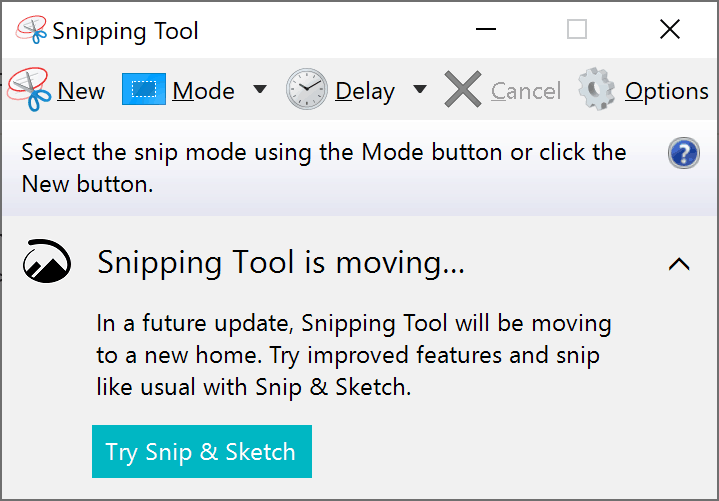
\n
However, the Windows Key + Shift + S combination does replace the same keyboard shortcut combination that was used in the old Windows 10 snipping tool. From here on, taking and editing screenshots should be a much easier experience in Windows 10.
\n
Other small Windows 10 features
\n

\n
- \n
- Game bar: new look, new audio controls, and Game bar is now an dedicated Windows 10 app. Game bar can allow you to stream directly to Mixer. Microsoft also added Game Mode improvements allowing for fewer interruptions. Microsoft took feedback directly from gamers on how Game Mode works. Game Mode is now auto-enabled for all games. Game Mode pauses Windows Update installs, including restart notifications while you’re playing a game. A future update will add improved game performance with less FPS drops, depending on the game and Windows PC you are using. You can enable/disable Game Mode in Windows Settings.

\n
\n
\n
- \n
- \n
- \n
- Skype: The new Skype for Windows 10 update brings all the latest Skype capabilities to Windows 10 users. Skype customers across iOS, Android, Mac and Windows 10 will enjoy the same consistent experience. One feature exclusive to Windows 10 users is the Share Charm. With the Share Charm, Windows 10 won’t have to even launch Skype to share content with their Skype contacts. Just click or touch the Share Charm to share content from Microsoft Edge or another Windows 10 app, select a Skype contact to share with, and you’re done. No need to even launch Skype.
\n
\n
\n
\n
Faster, better, and more comprehensive updates
\nSince the re-release of the Windows 10 October 2018 Update rollout yesterday, many people are eagerly waiting to get their hands on this “big” Windows 10 update. For me, this update has caused nothing but problems. One that I have personally experienced is my license of Windows 10 is not being activated on my Surface Pro 5 and Surface Book 2. Thankfully, the Windows 10 license activation issue was quickly resolved, but the first rollout of the Windows 10 October 2018 Update was a disaster for Microsoft and many Windows 10 users. Besides my most recent issue, I find it hard for Microsoft to be able to consistently deliver future updates without any issues.
\n
Back at the beginning of October, when this update was supposed to be released, we gave our hands-on video review of the Windows 10 October 2018 Update. Since that time,Microsoft have dealt with a number of issues with the update rollout process. Many of you are eagerly waiting to get your Windows 10 PC updated immediately, but it is a better idea to err on the side of caution. Microsoft is doing a slower rollout this time around to “more carefully study device health data.” Due to the amount of issues that the first rollout caused, it is better to wait until Microsoft pushes the update to your Windows 10 PC automatically. However, if you can’t wait, you can update right now at your own risk.
\n\nFurther reading: Microsoft, Microsoft Edge, Windows 10, Xbox



