
If you didn’t know it already, Microsoft held an online press-only event today, centered around productivity, and including a number of significant new announcements. The roughly 30-minute long event touched a lot of bases across Microsoft’s productivity suite, ranging from Teams, Office, Outlook, and more. It’s a lot to digest, but we’ve got your back with a recap. Here’s everything you need to know.
\n
Microsoft launches Microsoft 365 Personal and Family
\n

\n
The biggest news from the Microsoft event was the launch of Microsoft 365 Personal and Family. This subscription essentially replaces Office 365 for consumers, and comes with some other benefits and added extras which we describe next. If you’re an individual, you can buy into Microsoft 365 Personal for $6.99 a month. Families, meanwhile, can buy into Microsoft 365 Family for $9.99 a month per user, for up to six users. Plans will be available for purchase starting April 21.
\n
Microsoft Editor in Word, PowerPoint Designer, Presenter Coach, Money in Excel
\n
\n
Along with the announcement of Microsoft 365 Personal and Family, Microsoft also announced some new features for its core Office 365 apps. A lot of these features are designed for those who are subscribing to Microsoft 365, but they will be available for non-subscribers too, with limitations.
\n
Starting first with Microsoft Editor, this feature will be coming to Microsoft Word, as well as a browser extension on Chrome and Edge, and experience on Outlook. The editor feature essentially can help you become a better writer. It will suggest grammar, spelling, punctuation, and other sentence structure changes. It’s powered by A.I. and will be available in 20 languages. Subscribers to Microsoft 365 will have access to advanced grammar and style parts of the Editor. Non-subscribers can still use it but just to correct spelling and grammar.
\n
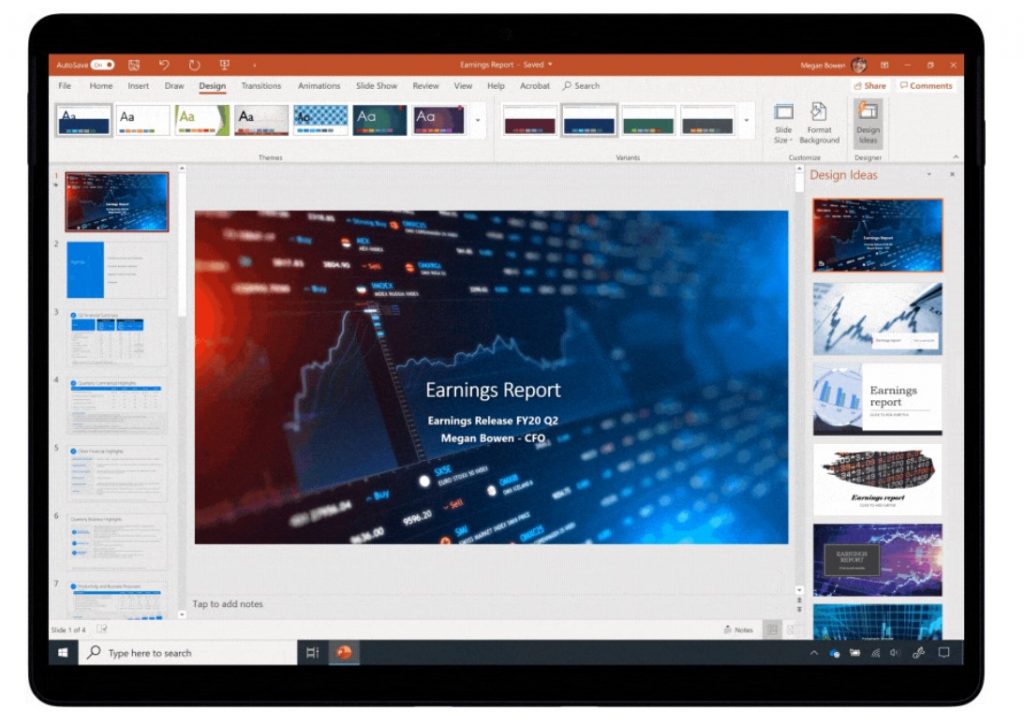
Next, there’s PowerPoint Presenter and Designer. The Presenter Feature is designed to help you improve your presentation skills and uses A.I. to detect if you’re talking too fast, saying “umm” too much, or just reading the text from your slides. The Designer feature, meanwhile, allows you to add images and special videos to your presentations. Subscribers to Microsoft 365 will have access to advanced layouts and templates in PowerPoint designer, and pitch, originality and speech refinement tools of Presenter Coach. Non-subcribers can enjoy layout recommendations, and the ability to filter words and pacing.
\n
When it comes to the creativity side of PowerPoint, subscribers to Microsoft 365 will have access to an additional 300 templates, 8,000 images, 175 looping videos, 300 fonts, and 2,800 icons. Non-subscribers only have access to 2,000 templates, 750 images, 25 looping videos, 82 fonts, and 320 icons.
\n
Finally, there’s Money in Excel. On this front, Microsoft is making it manage, track, and analyze your money and spending. Thanks to a partnership with Plaid, you’ll be able to connect your bank and credit card accounts to Money in Excel, so you can import transactions and account balances automatically. You also can use the feature to use different Excel data types to help you better import and expand your spreadsheets. These include food, movies, places, and more. Money in Excel is a feature exclusive to Microsoft 365 Personal and Family.
\n
Microsoft teases Teams for Consumer
\n
\n
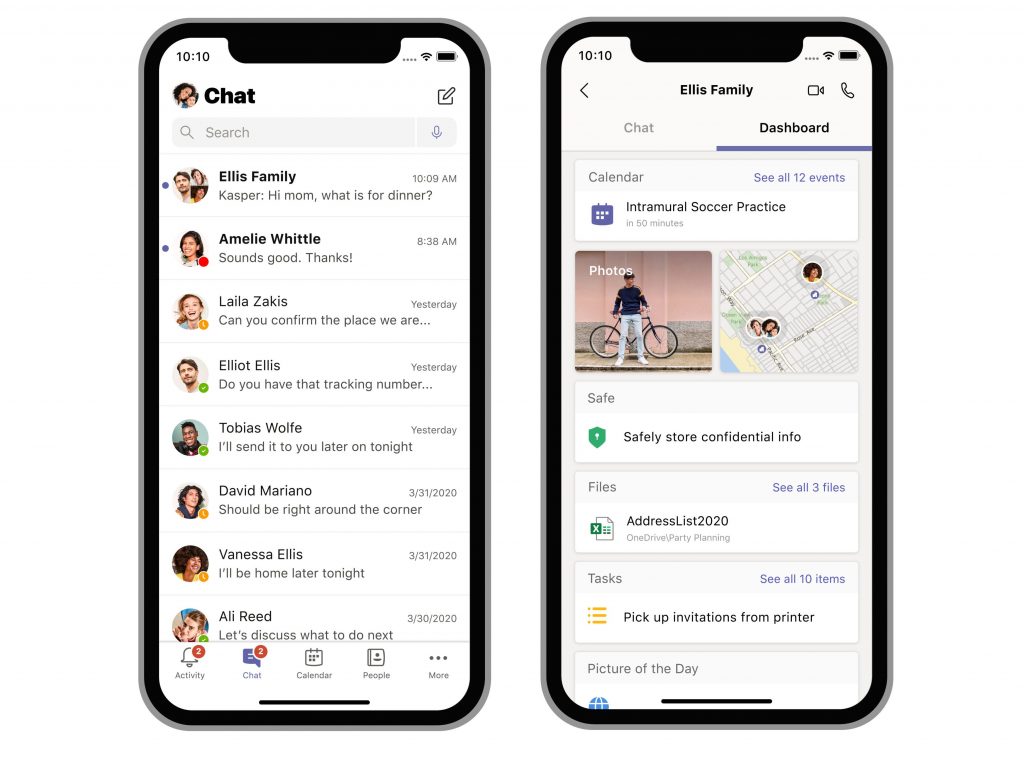
The other big news from Microsoft’s event is Teams for Consumer. This isn’t a new version of Teams, but it rather adds new consumer-facing features to Teams. The features are mobile-only to start and are designed to help you manage your work and personal life together under Microsoft Teams. Features include a “dashboard” where you can see all your shared pictures, keep your important passwords, account information and rewards numbers. Teams for Consumer will launch in the Fall and a preview will come later this summer. You’ll be able to switch between work and personal accounts from the Teams app.
\n
A new Family Safety App
\n

\n
To tie in with Microsoft 365 Personal and Family, Microsoft also launched a new Family Safety app for iOS and Android. This app is coming later in the year and will help parents manage their family’s digital lives. It has controls to help manage screentime across Windows, Android, and Xbox. It also has location sharing capabilities, too. A preview will be coming soon.
\n
New features for Edge, Outlook
\n

\n
Of course, Microsoft’s other products were touched on during this event too. Microsoft announced some new features for Outlook, which can help you better manage work and personal life. You’ll be able to link your personal calendar from other accounts like Gmail your work calendar, and with a toggle switch, show your real availability in your work account.
\n
Microsoft also announced some features for Edge, too. These include Vertical Tabs, Smart Copy With vertical Tab, you’ll be able to see your tabs in your vertical format, on the left side of the browser instead of along the top. Meanwhile, with Smart Copy, you’ll be able to make sure that pasted text keeps its original formatting when inserted into its destination. Other Edge news includes collections heading to the iOS and Android versions of Edge, and a new Password Monitor which can help you see if your password is stored on the dark web.
\n
Office 365 business plans are being renamed to Microsoft 365
\n

\n
Finally, Microsoft is also announcing that all small and medium business plans will begin using Microsoft’s new Microsoft 365 brand. Come April 21, there will be a few name changes.
\n
Of note is the following: Office 365 Business Essentials will become Microsoft 365 Business Basic. Office 365 Business Premium will become Microsoft 365 Business Standard. Microsoft 365 Business will become Microsoft 365 Business Premium. Office 365 Business and Office 365 ProPlus will both become Microsoft 365 Apps.
\n
Select Office 365 for Enterprise plans will not be impacted by the change. You can see these here at Microsoft.
\n