
 \n
\n
The newest Windows 10 update, is the November Update, also known as Windows 10 19H2. As we’ve already learned, the Windows 10 November Update will be ready on November 12, 2019. Of course, with every Windows 10 update, in addition to new features, there will be plenty of bug fixes and performance improvements that will come too.
\n
The Windows 10 November Update, Windows 10 19H2, will be known as version 1909 moving forward. Here’s a look at the most important features in the Windows 10 version 1909 update. Microsoft is making pre-release Windows 10 feature updates available using Windows Server Update Service (WSUS). Microsoft sees offering IT administrators access to new Windows 10 feature updates through WSUS as an easier way to evaluate updates before they are generally available. More information on Windows 10 feature updates and WSUS is available here.
\n
Furthermore, Microsoft Support will be available for enterprise customers using Windows Insider Preview builds moving forward, provided they request the service through this online request form. Other important updates include the ability to create calendar events without directly opening the Calendar app in Windows 10. You can create events and appointments directly from the taskbar, as seen below.
\n

\n
Another new feature includes the ability to change how you handle notifications. Microsoft indicates the difference between “banner” and “Action Center” using images now to make the experience more user-friendly. As you can see in the image below, now you easily identify and choose how you receive notifications on your banner and Action Center.
\n
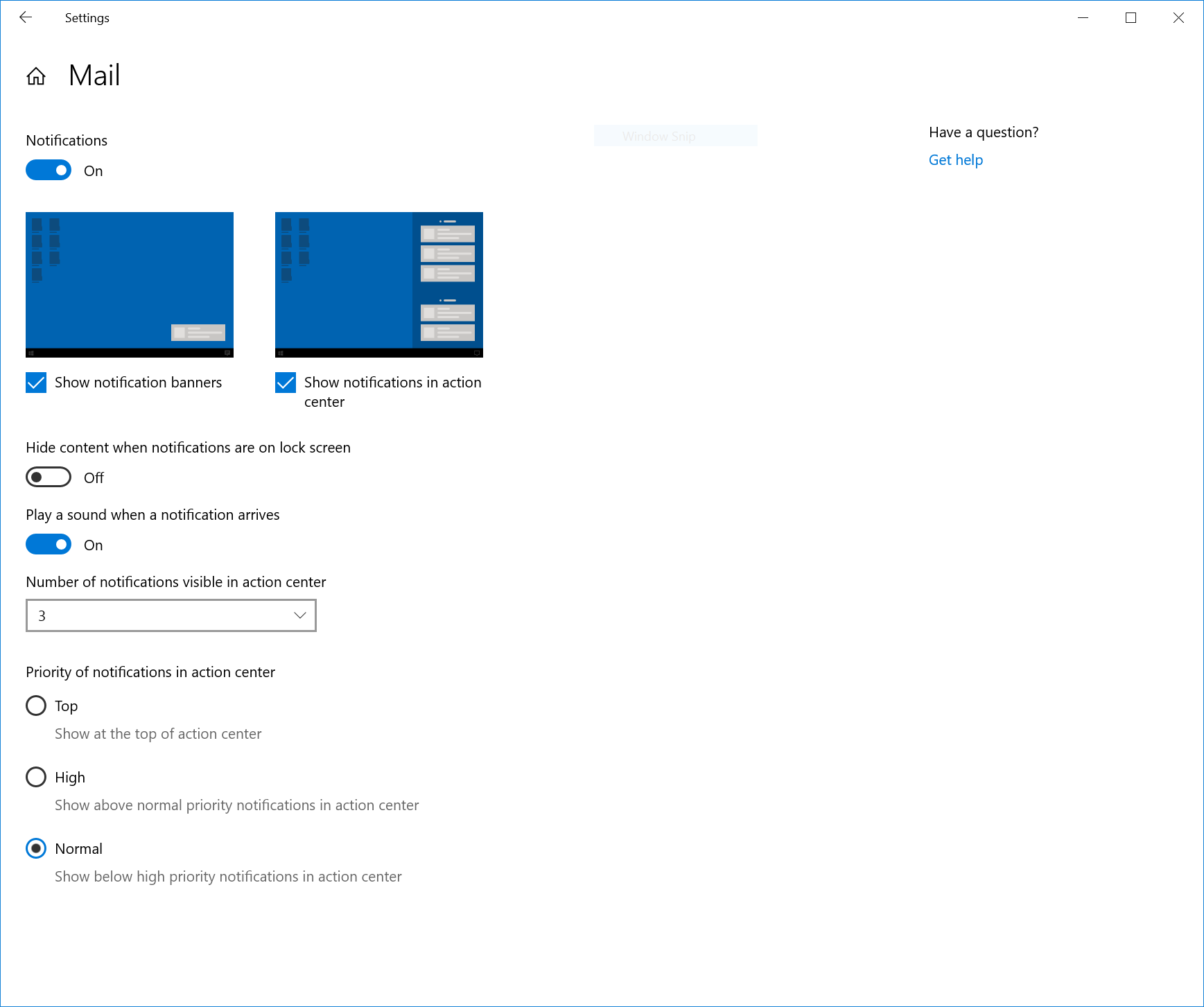
\nOther updates for notifications include the ability to shut off the sound that plays for new notifications, the ability to access notifications settings from the Action Center, and new notification sorting options. Here’s a look at the rest of what’s coming in the Windows 10 version 1909 update:
\n
\n
\n
- Windows containers require a matched host and container version. This restricts customers and limits Windows containers from supporting mixed-version container pod scenarios This update includes 5 fixes to address this and allow the host to run down-level containers on up-level for process (Argon) isolation.
\n
- A fix to allow OEMs to reduce the inking latency based on the hardware capabilities of their devices rather than being stuck with latency selected on typical hardware configuration by the OS.
\n
- Key-rolling or Key-rotation feature enables secure rolling of Recovery passwords on MDM managed AAD devices upon on-demand request from Microsoft Intune/MDM tools or upon every time recovery password is used to unlock the BitLocker-protected drive. This feature will help prevent accidental recovery password disclosure as part of manual BitLocker drive unlock by users.
\n
- A change to enable third-party digital assistants to voice activate above the Lock screen.
\n
- The navigation pane on the Start menu now expands when you hover over it with your mouse to better inform where clicking goes.
\n
- We now show the options to configure and turn off notifications from an app/website right on the notification, both as a banner and in Action Center.
\n
- We have added additional debugging capabilities for newer Intel processors. This is only relevant for hardware manufacturers.
\n
- We have made general battery life and power efficiency improvements for PCs with certain processors.
\n
- A CPU may have multiple “favored” cores (logical processors of the highest available scheduling class). To provide better performance and reliability, we have implemented a rotation policy that distributes work more fairly among these favored cores.
\n
- We have enabled Windows Defender Credential Guard for ARM64 devices for additional protection against credential theft for enterprises deploying ARM64 devices in their organizations.
\n
- We have enabled the ability for enterprises to supplement the Windows 10 in S Mode policy to allow traditional Win32 (desktop) apps from Microsoft Intune.
\n
- We’re updating the search box in File Explorer to now be powered by Windows Search. This change will help integrate your OneDrive content online with the traditional indexed results. More details here.
\n
- We have added the ability for Narrator and other assistive technologies to read and learn where the FN key is located on keyboards and what state it is in (locked versus unlocked).
\n
\n
\n
Although the update will not change anything significant on the developers’ end, it’s still important for developers to see what is coming next. A new Windows 10 SDK is not necessary for this update, as no new APIs are available. The best way for developers to update their systems is to download and install Visual Studio 2019.
\n

\n
If you would like to update your system to Windows 10 version 1909, you can download it via your VSS subscription, or by using the WIP (Windows Insider Program) Release Preview Ring. From there, run Visual Studio 2019 to install the latest SDK. The latest Windows 10 SDK will be selected by default. Here are the quick steps developers need to follow to update their systems.
\n
- \n
- Run the Visual Studio installer by going to https://www.visualstudio.com/downloads/
- Under Workloads, choose “Universal Windows Platform development”
- Click “Install”
\n
\n
\n
\n
That’s it. Are you excited about the Windows 10 version 1909? Let us know your thoughts in the comments.
\n\nFurther reading: 19H2, Microsoft, version 1909, Windows 10, Windows 10 November 2019 Update


