Skip to content
OnMSFT.com
  • Home
  • About
  • Contact
  • Windows
  • Surface
  • Xbox
  • How-To
  • OnPodcast
  • Edge
  • Teams
  • Gaming
Menu
  • Home
  • About
  • Contact
  • Windows
  • Surface
  • Xbox
  • How-To
  • OnPodcast
  • Edge
  • Teams
  • Gaming
  1. Home
  2. Feature
  3. Hands-on with the Microsoft Outlook app for Samsung Galaxy Watch

Hands-on with the Microsoft Outlook app for Samsung Galaxy Watch

Arif Bacchus Arif Bacchus
October 24, 2019
3 min read

\n

In the modern world, you always need to be in touch with your colleagues and friends. For work, that typically means checking your email. But what will happen if you’re in the middle of a meeting and can’t pull out your phone from your pocket to check that important message? Or, what if you don’t want to touch your phone to check emails?

\n

Well, if you own a Samsung Android Phone and a Samsung Smartwatch, then Microsoft is here to help. The company recently released a new Outlook app for Samsung Galaxy wearables, and we downloaded it to try it out. While it’s not as feature-complete as the stand-alone app on Android, it does get some common emailing tasks done right. Here’s more on the experience.

\n

Downloading the app

\n

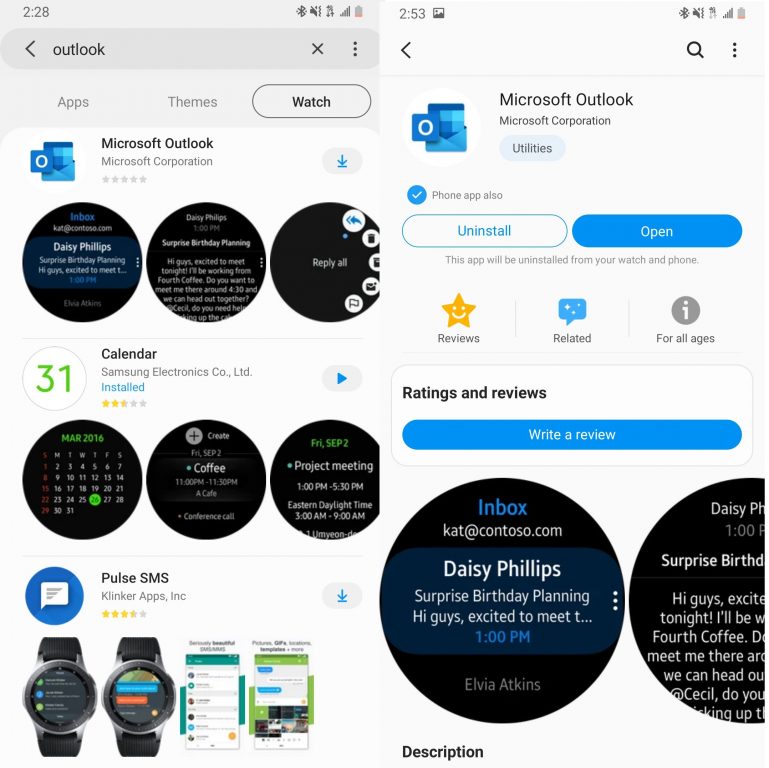
Unlike with the Apple watch, if you already have the Outlook app installed on your Samsung Phone, you’ll still need to manually download the companion app to your Galaxy Smart Watch. You can do so by clicking here and visiting the Galaxy Store. Once you’ve clicked the download button, make sure that your phone is paired to your watch, and the app should automatically install. Depending on your model of watch, you can then access the app by swiping to your list of apps and finding Microsoft Outlook.

\n
\n

Notifications, and using the app to read emails

\n

Once the Outlook app is installed on your Samsung Galaxy wearable, you’ll first notice that it will take you to your list of emails by default. You can scroll up and down to see a preview of your messages. Typically, you’ll see the subject line of the email on top, followed by a quick preview of the content of the emails, with the time you received it on the bottom. Tapping on any message will open it and you can scroll up and down to read its content in full. You’ll also get notified about emails and upcoming events in your Outlook calendar. These appear as a simple pop-up message on the watch.

\n

\n

\n

\n

\n

\n

\n

\n\n

Additional controls for filtering emails

\n

In addition to what we mentioned above, there are some additional options available. By pressing the … button on the side of the app, you can view emails by account, filter by unread, view your flagged emails, or view all emails. Overall, it’s nice to have these controls, as it lets you see all the messages you need, without having to touch your phone. It’s also great to see the emails show up as white text on a black background, making the messages easy to read at a glance.

\n

\n

\n

\n

\n

\n

\n

\n

\n\n

Replying to emails

\n

Of course, you also can reply to emails, but that is where this app falls a bit short. Instead of allowing you to use a keyboard, the Outlook app only gives you options to reply with quick replies. There’s also no option to use voice to reply. Nonetheless, some quick replies include “What?” “Great!,” “I agree,” Nice,” “Talk to you later,” “What’s up,” “On my way,” “Thank you,” Thanks,” “Nope,” and more.

\n

There are also additional controls for replying to all in the message, as well as deleting the message, archiving it, leaving it as unread, or flagging it. Again, this isn’t as feature-complete as the Android app, and I can see this as a last resort to replying to messages when doing something like running, or cooking, where your phone isn’t always available.

\n

\n

\n

\n

\n

\n

\n

\n

\n

\n

\n\n

A nifty little app

\n

At the end of the day, the new Outlook app for Samsung Galaxy wearables is quite cool. While it is a bit short on features, and you can’t reply to messages using your voice or a keyboard, it’s great to see it in the Galaxy Store. The app gives you a quick glance at all your emails and definitely will help you save time during a busy day.

\n\nFurther reading: Android, Galaxy, Galaxy Watch, Office 365, Outlook, Samsung

Share this article:
Tags:
Android Galaxy Galaxy Watch Outlook Samsung
Previous Article Xbox One owners can now play the Battlefield V video game for free in a new trial version Next Article Windows Terminal Preview 1910 brings better tabs UI and Dynamic Profiles

Related Articles

Here is our Xbox 2022 wrap up – OnMSFT.com

December 27, 2022

Xbox classics revisited vol.8: classic racing games – OnMSFT.com

December 20, 2022

Here are some Xbox Christmas gifts for that gamer on your list – OnMSFT.com

December 20, 2022

Leave a Comment Cancel reply

Your email address will not be published. Required fields are marked *

Recent Posts

  • Microsoft is no longer manufacturing the Windows RT powered Surface 2
  • Microsoft treats Windows Phone owners with extra 20GB of free SkyDrive storage for one year
  • Bing now showcases professional and celebrity Klout scores during search results
  • Bing now lets you search and browse for your friends’ Facebook photos
  • Bing now lets you explore free online courses and helps you find books to read

Recent Comments

No comments to show.

Archives

  • February 2026
  • December 2022
  • November 2022
  • October 2022
  • September 2022
  • August 2022
  • July 2022
  • June 2022
  • May 2022
  • April 2022
  • March 2022
  • February 2022
  • January 2022
  • December 2021
  • November 2021
  • October 2021
  • September 2021
  • August 2021
  • July 2021
  • June 2021
  • May 2021
  • April 2021
  • March 2021
  • February 2021
  • January 2021
  • December 2020
  • November 2020
  • October 2020
  • September 2020
  • August 2020
  • July 2020
  • June 2020
  • May 2020
  • April 2020
  • March 2020
  • February 2020
  • January 2020
  • December 2019
  • November 2019
  • October 2019
  • September 2019
  • August 2019
  • July 2019
  • June 2019
  • May 2019
  • April 2019
  • March 2019
  • February 2019
  • January 2019
  • December 2018
  • November 2018
  • October 2018
  • September 2018
  • August 2018
  • July 2018
  • June 2018
  • May 2018
  • April 2018
  • March 2018
  • February 2018
  • January 2018
  • December 2017
  • November 2017
  • October 2017
  • September 2017
  • August 2017
  • July 2017
  • June 2017
  • May 2017
  • April 2017
  • March 2017
  • February 2017
  • January 2017
  • December 2016
  • November 2016
  • October 2016
  • September 2016
  • August 2016
  • July 2016
  • June 2016
  • May 2016
  • April 2016
  • March 2016
  • February 2016
  • January 2016
  • December 2015
  • November 2015
  • October 2015
  • September 2015
  • August 2015
  • July 2015
  • June 2015
  • May 2015
  • April 2015
  • March 2015
  • February 2015
  • January 2015
  • December 2014
  • November 2014
  • October 2014
  • September 2014
  • August 2014
  • July 2014
  • June 2014
  • May 2014
  • April 2014
  • March 2014
  • February 2014
  • January 2014
  • December 2013
  • November 2013
  • October 2013
  • September 2013
  • August 2013
  • July 2013
  • June 2013
  • May 2013
  • April 2013
  • March 2013
  • February 2013
  • January 2013
  • December 2012
  • November 2012
  • October 2012
  • September 2012
  • August 2012
  • July 2012
  • June 2012
  • May 2012
  • April 2012
  • March 2012
  • February 2012
  • January 2012
  • December 2011
  • November 2011
  • October 2011
  • September 2011
  • August 2011
  • July 2011
  • June 2011
  • May 2011
  • April 2011
  • March 2011
  • February 2011
  • January 2011
  • December 2010
  • November 2010
  • October 2010
  • September 2010

Categories

  • Announcements
  • Deals
  • Developer
  • Editorial
  • Feature
  • Feature stories
  • Hero-post
  • Hotdeals
  • How-to
  • Latest news
  • Microsoft / office 365
  • News
  • Office 365
  • Onpodcast
  • Opinion
  • Our featured post
  • Polls
  • Review
  • Reviews
  • Videos
OnMSFT.com

OnMSFT.com covers Microsoft news, reviews, and how-to guides. Formerly known as WinBeta, we have been your source for Microsoft news since 1998.

Categories

  • Windows
  • Surface
  • Xbox
  • How-To
  • OnPodcast
  • Gaming
  • Edge
  • Teams

Recent Posts

  • Microsoft is no longer manufacturing the Windows RT powered Surface 2
  • Microsoft treats Windows Phone owners with extra 20GB of free SkyDrive storage for one year
  • Bing now showcases professional and celebrity Klout scores during search results
  • Bing now lets you search and browse for your friends’ Facebook photos
  • Bing now lets you explore free online courses and helps you find books to read

Quick Links

  • About OnMSFT.com
  • Contact OnMSFT
  • Join Our Team
© 2010–2026 OnMSFT.com LLC. All rights reserved.
About OnMSFT.comContact OnMSFT

