Skip to content
OnMSFT.com
  • Home
  • About
  • Contact
  • Windows
  • Surface
  • Xbox
  • How-To
  • OnPodcast
  • Edge
  • Teams
  • Gaming
Menu
  • Home
  • About
  • Contact
  • Windows
  • Surface
  • Xbox
  • How-To
  • OnPodcast
  • Edge
  • Teams
  • Gaming
  1. Home
  2. Feature
  3. Android Apps on Windows 10? Hands on with Phone Screen in the Your Phone app

Android Apps on Windows 10? Hands on with Phone Screen in the Your Phone app

Arif Bacchus Arif Bacchus
July 15, 2019
4 min read

\n

Microsoft’s Your Phone app on Windows 10 is truly great if you’re an Android user. Similar to the synergies with iOS and macOS, you can get your text messages, notifications, and recent photos right on your PC without even touching your phone. But, if you’re a Windows Insider, the Your Phone app can go a bit beyond that.

\n

The reason why? You can mirror and control or type on your Android Phone and Android Apps from your PC while it is still in your pocket. The experience is known as “Phone Screen” and is still a work in progress, but we recently spent some time playing around with it. Here’s more on what we think.

\n

Set up is easy as 1,2,3 — but only works with WiFi.

\n

Granted that you’ve already installed Your Phone app on your Android device, you can get started with Phone Screen by pairing your Android phone with your PC via Bluetooth. You can do so by clicking the Phone Screen section of Your Phone. For the first time, the app will assist in the process and will give you prompts on how to pair, but you can also manually pair by going to the Windows 10 settings.

\n

Once paired, you need to keep Bluetooth on and your phone and PC connected to the same network and router, be it wired, or wirelessly. You also need to grant some permissions and agree and press “Start Now” on the prompt that appears on your Android Phone. This security feature just alerts you that Your Phone companion will capture everything that is displayed on your screen. You can stop this from appearing by clicking “Do not show again.”

\n

Keep in mind, Phone Screen will only work if your PC and Android Phone are on the same network, and with Bluetooth on.  However, given that the Your Phone App can already sync messages and photos through WiFi, we’re a bit curious as to if Microsoft could get Phone Screen working with just an LTE connection.

\n
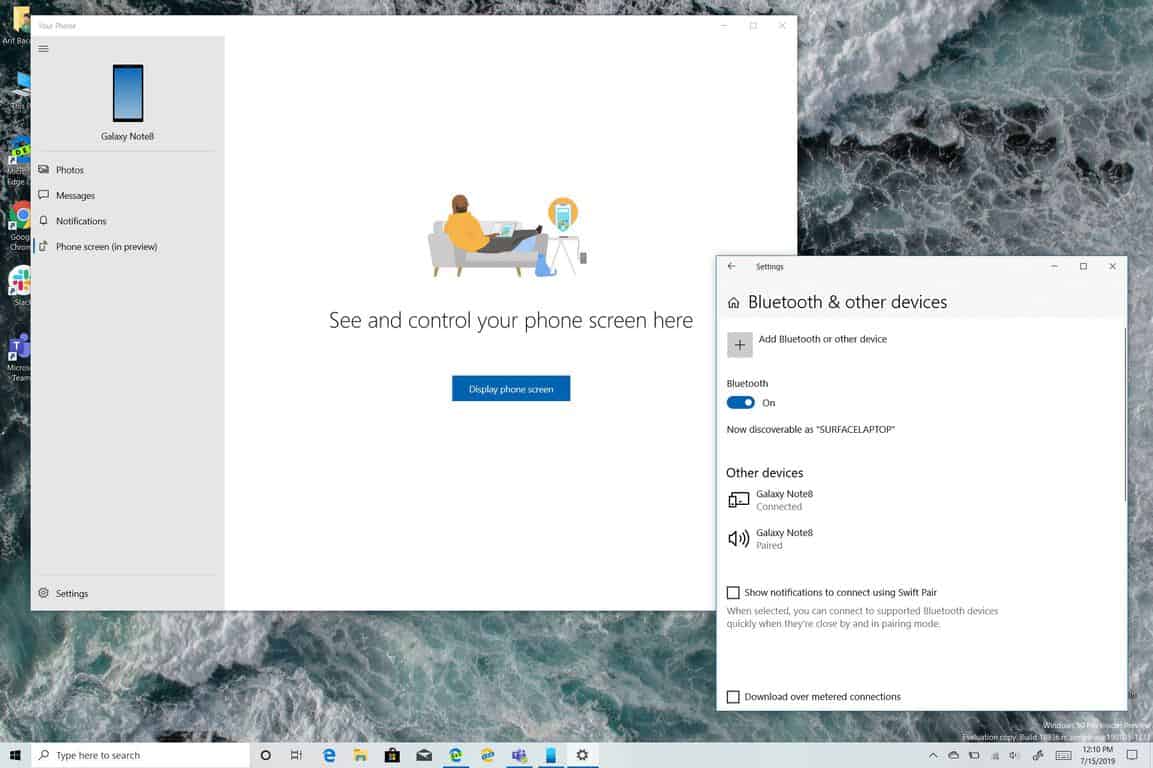
Bluetooth settings on Windows 10

\n

Get and control your Android Apps on Windows 10 with some latency

\n

In our setup at our home office, we have a very fast fiber optic connection, but we still experienced just a slight bit of latency when playing around with Phone Screen on Windows 10. For our initial tests, we kept the phone and the Surface laptop as close as possible to our router.

\n

When opening up and interacting with Snapchat, WhatsApp, and playing Dr. Mario World, there was just a slight delay between what actually appeared on the phone’s screen and what appeared on our Windows 10 PC. It’s barely noticeable, and it still felt as if we were holding the Android phone in our hand, rather than looking at a stream on our PC.

\n

The experience is especially cool because Snapchat and many other Android apps are not available on Windows 10. Despite that, there were just a few issues with the touch controls on our Surface with Phone Screen. For instance, it wouldn’t always recognize our touch inputs when sliding to dismiss notifications on the Android drop-down menu, forcing to use the mouse to control our phone instead. Responding to messages using the keyboard on our Surface Laptop also worked well, and there was no delay when typing.

\n

See a demo of Phone Screen yourself in the video below. Audio is not available in this clip, as the audio from our Android phone is not streamed to the PC, but rather to the phone itself.

\n

\n

Phone Screen is still in beta, at least for now

\n

Cool as it is, Phone Screen is only compatible with a few phones and PCs. Microsoft has a list right here, but the majority of supported Android phones range from the Samsung Galaxy S8 to the OnePlus 6T. Supported PCs include the Surface Go, Surface Laptop, Surface Laptop 2, Surface Pro 4, Surface Pro 5, Surface Pro 6, Surface Book, and Surface Book 2. These Surface devices, though, must be running the latest Bluetooth driver updates (Marvell 15.68.17013.110.) Phone Screen might work on other PCs, as long as it supports Bluetooth Low Energy Peripheral Role, but that’s not guaranteed.

\n

Many might argue that it’s not “fair” that Phone Screen is not supported on all Windows 10 devices, but this only ensures maximum compatibility and the best possible experience. Microsoft promises it will add more PCs and Phones to the supported devices list over time.

\n

Phone Screen on Windows 10

\n

Phone Screen is the start of something great, but there are still some missing features…

\n

Microsoft is still working on the Phone Screen experience, and there are a few things that could be added. As most mobile phones are often used for calls, a feature that allows users to place calls using Phone Screen (and stream the audio to the PC instead of the phone) would be very appreciated. Similar to Dell Mobile connect, a feature for using your PC as a Bluetooth speaker could also increase the potential usage cases of Phone Screen. With the feedback from Windows Insiders, though, Microsoft will likely add more features as time goes on, so this is definitely the start of something great for Windows 10.

\n\nFurther reading: Microsoft, Phone Screen, Windows 10, Windows Insider, Your Phone

Share this article:
Tags:
Microsoft Phone Screen Windows 10 Windows Insider Your Phone
Previous Article Windows 10 19H2 build 18362.10005 is now available for Slow Ring Insiders Next Article Pre-release Windows 10 drivers now available for Surface 3 via Windows Update

Related Articles

Here is our Xbox 2022 wrap up – OnMSFT.com

December 27, 2022

Xbox classics revisited vol.8: classic racing games – OnMSFT.com

December 20, 2022

Here are some Xbox Christmas gifts for that gamer on your list – OnMSFT.com

December 20, 2022

Leave a Comment Cancel reply

Your email address will not be published. Required fields are marked *

Recent Posts

  • Microsoft is no longer manufacturing the Windows RT powered Surface 2
  • Microsoft treats Windows Phone owners with extra 20GB of free SkyDrive storage for one year
  • Bing now showcases professional and celebrity Klout scores during search results
  • Bing now lets you search and browse for your friends’ Facebook photos
  • Bing now lets you explore free online courses and helps you find books to read

Recent Comments

No comments to show.

Archives

  • February 2026
  • December 2022
  • November 2022
  • October 2022
  • September 2022
  • August 2022
  • July 2022
  • June 2022
  • May 2022
  • April 2022
  • March 2022
  • February 2022
  • January 2022
  • December 2021
  • November 2021
  • October 2021
  • September 2021
  • August 2021
  • July 2021
  • June 2021
  • May 2021
  • April 2021
  • March 2021
  • February 2021
  • January 2021
  • December 2020
  • November 2020
  • October 2020
  • September 2020
  • August 2020
  • July 2020
  • June 2020
  • May 2020
  • April 2020
  • March 2020
  • February 2020
  • January 2020
  • December 2019
  • November 2019
  • October 2019
  • September 2019
  • August 2019
  • July 2019
  • June 2019
  • May 2019
  • April 2019
  • March 2019
  • February 2019
  • January 2019
  • December 2018
  • November 2018
  • October 2018
  • September 2018
  • August 2018
  • July 2018
  • June 2018
  • May 2018
  • April 2018
  • March 2018
  • February 2018
  • January 2018
  • December 2017
  • November 2017
  • October 2017
  • September 2017
  • August 2017
  • July 2017
  • June 2017
  • May 2017
  • April 2017
  • March 2017
  • February 2017
  • January 2017
  • December 2016
  • November 2016
  • October 2016
  • September 2016
  • August 2016
  • July 2016
  • June 2016
  • May 2016
  • April 2016
  • March 2016
  • February 2016
  • January 2016
  • December 2015
  • November 2015
  • October 2015
  • September 2015
  • August 2015
  • July 2015
  • June 2015
  • May 2015
  • April 2015
  • March 2015
  • February 2015
  • January 2015
  • December 2014
  • November 2014
  • October 2014
  • September 2014
  • August 2014
  • July 2014
  • June 2014
  • May 2014
  • April 2014
  • March 2014
  • February 2014
  • January 2014
  • December 2013
  • November 2013
  • October 2013
  • September 2013
  • August 2013
  • July 2013
  • June 2013
  • May 2013
  • April 2013
  • March 2013
  • February 2013
  • January 2013
  • December 2012
  • November 2012
  • October 2012
  • September 2012
  • August 2012
  • July 2012
  • June 2012
  • May 2012
  • April 2012
  • March 2012
  • February 2012
  • January 2012
  • December 2011
  • November 2011
  • October 2011
  • September 2011
  • August 2011
  • July 2011
  • June 2011
  • May 2011
  • April 2011
  • March 2011
  • February 2011
  • January 2011
  • December 2010
  • November 2010
  • October 2010
  • September 2010

Categories

  • Announcements
  • Deals
  • Developer
  • Editorial
  • Feature
  • Feature stories
  • Hero-post
  • Hotdeals
  • How-to
  • Latest news
  • Microsoft / office 365
  • News
  • Office 365
  • Onpodcast
  • Opinion
  • Our featured post
  • Polls
  • Review
  • Reviews
  • Videos
OnMSFT.com

OnMSFT.com covers Microsoft news, reviews, and how-to guides. Formerly known as WinBeta, we have been your source for Microsoft news since 1998.

Categories

  • Windows
  • Surface
  • Xbox
  • How-To
  • OnPodcast
  • Gaming
  • Edge
  • Teams

Recent Posts

  • Microsoft is no longer manufacturing the Windows RT powered Surface 2
  • Microsoft treats Windows Phone owners with extra 20GB of free SkyDrive storage for one year
  • Bing now showcases professional and celebrity Klout scores during search results
  • Bing now lets you search and browse for your friends’ Facebook photos
  • Bing now lets you explore free online courses and helps you find books to read

Quick Links

  • About OnMSFT.com
  • Contact OnMSFT
  • Join Our Team
© 2010–2026 OnMSFT.com LLC. All rights reserved.
About OnMSFT.comContact OnMSFT

