Skip to content
OnMSFT.com
  • Home
  • About
  • Contact
  • Windows
  • Surface
  • Xbox
  • How-To
  • OnPodcast
  • Edge
  • Teams
  • Gaming
Menu
  • Home
  • About
  • Contact
  • Windows
  • Surface
  • Xbox
  • How-To
  • OnPodcast
  • Edge
  • Teams
  • Gaming
  1. Home
  2. Editorial
  3. Top three reasons I have not updated my Surface 3 to Windows 10

Top three reasons I have not updated my Surface 3 to Windows 10

Arif Bacchus Arif Bacchus
February 2, 2016
4 min read

\n

Back in 2015 I was very excited to get my Surface 3. Aside from wonderful design, the 2 GB of RAM, 64 GB of space, and free Office 365 subscription were all very appealing for the price point.

\n

Ultimately though the key decision point for me in this purchase was the fact that Surface 3 runs Windows 8.1.

\n

At the time of my purchase I was a student, and I was not looking for yet another mobile device like an iPad.  I wanted something that would run in a mobile and touch friendly form, but act like a desktop computer.

\n

Long story short, we have now entered the Windows 10 era of Microsoft with the company now making it a required update, and here are my top three current reasons as to why I refuse to update my Surface 3 to Windows 10 for as long as I can.

\n

1) Windows 10 bugs

\n

It appears that many new Surface devices running Windows 10 have had several issues. The issues range from faulty screens, poor software, and black screens after sleep. Microsoft has even attempted to address these issues with a recent firmware update, but they have not really worked. To me, this shows that Microsoft is essentially coming off as clueless when it comes to getting Windows 10 to run perfectly on Surface devices.

\n

Meanwhile, with Windows 8.1 on my Surface, I continue to have no such issues. Everything continues to runs just as the day I purchased my device. I find it better to stick with an operating system that has been with the Surface lineup since it was first announced, rather than jump on board a new experience and face issues such as those mentioned above.

\n

2) Elimination of Metro Start Screen & Charms Bar

\n

Screenshot (57)

The all important metro start screen

\n

Win10

The disappearing desktop on the Windows 10 Start Screen

\n

While Windows 10 does feature Continuum to help touch screen devices switch between tablet and desktop mode, it does not feature a full Metro start screen. Windows 8.1 is more heavily aimed towards touch devices such as Surface 3, and getting to apps while sitting in desktop mode was very easy. I simply could tap the Start button while on my desktop to go back to the Metro screen with favorite apps. In Windows 10, however, a tap of the start button in tablet mode overtakes the entire desktop to show me my apps, and I lose sight of my folders underneath. This is a massive loss of productivity and kills the desktop-like experience of a Surface device.

\n

My other favorite feature of Windows 8.1 is the Charms bar. So, the lack of a Charms bar in Windows 10 is another reason why I refuse to update. In Windows 10, to search, I need to move my fingers to the bottom of the screen in order to tap on a very tiny search button. The charms bar in Windows 8.1, however, gives me faster access to search, brightness, and other settings. With the Charms bar, I am able to drag my Surface 3 screen brightness level custom levels using a slider. In Windows 10, however, the slider is replaced by a brightness button, again eliminating control of a desktop like experience.

\n

3) OneDrive Placeholders

\n
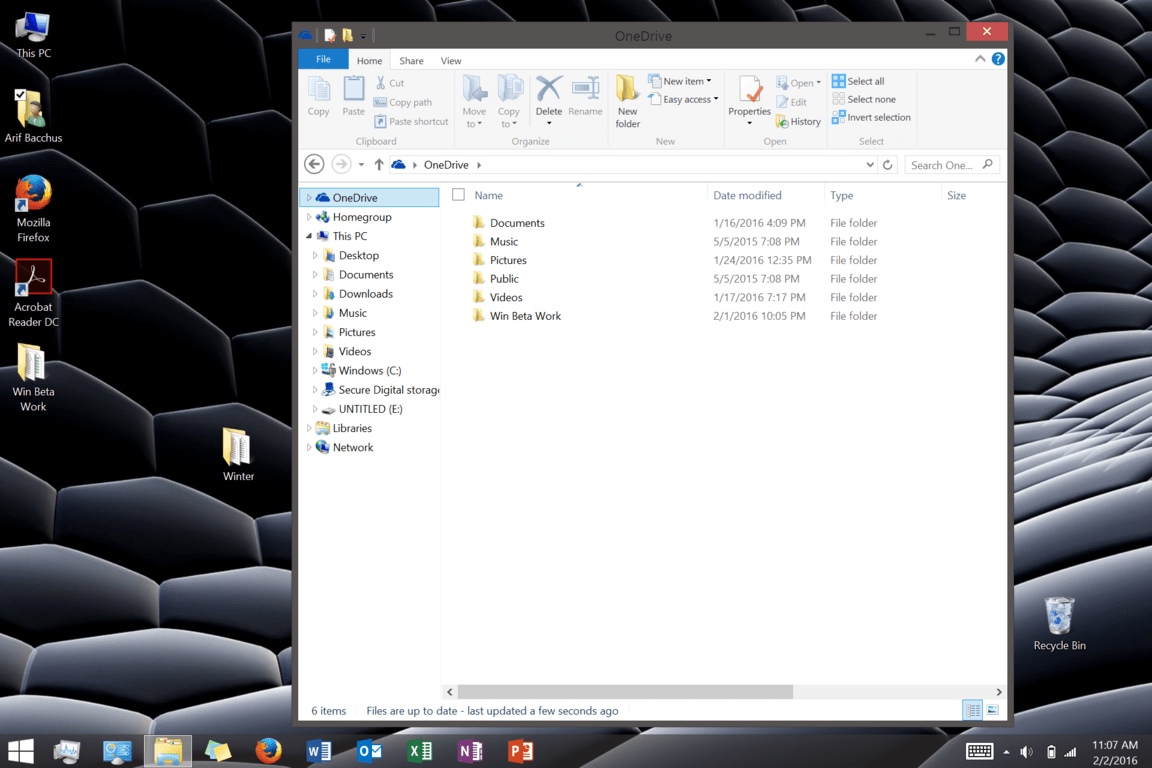
One Drive Holder

\n

A lot of my work is done between devices, and I depend on OneDrive to move files from one device to another. Windows 8.1 offers OneDrive placeholders, which let me see my one drive files, even if they are located in the cloud and not on my Surface. Thanks to this feature in Windows 8.1, my files are available, but not taking up space on the limited space on my Surface hard drive.

\n

With Windows 10, however, OneDrive place holders do not work. This is yet another reason why I refuse to update.   The lack of a placeholder means I need to go to two places, both my OneDrive folder and the web OneDrive to see my files online files that are being uploaded or downloaded from my Surface 3. Again, this kills the experience of the Surface 3, as I am forced to do two things to retrieve and upload files.

\n

At the end of the day there is no denying that Windows 10 is beautiful. I run it on my Desktop and I absolutely love it, but the same can not be said for Surface devices. The killing of the charms bar, and the amount of bugs ruin the Surface 3 touch screen experience. Windows 10 is great for desktops and non touch devices, but not built with Surface devices in mind.

\n\nFurther reading: Surface, Surface 3, Windows 10, Windows update

Share this article:
Tags:
Surface Surface 3 Windows 10 Windows update
Previous Article Far Cry Primal available for pre-order, to be released February 23rd Next Article VAIO Z flip, the first laptop with Skylake 28W CPUs, is here

Related Articles

Microsoft and the metaverse – missed opportunity or the next big thing? – OnMSFT.com

February 4, 2022

Ignite 2021: Teams for Consumer Just Became Important

November 2, 2021

OnMSFT Roundtable: Our thoughts on Windows 11 (they’re not all good) – OnMSFT.com

October 8, 2021

Leave a Comment Cancel reply

Your email address will not be published. Required fields are marked *

Recent Posts

  • Microsoft is no longer manufacturing the Windows RT powered Surface 2
  • Microsoft treats Windows Phone owners with extra 20GB of free SkyDrive storage for one year
  • Bing now showcases professional and celebrity Klout scores during search results
  • Bing now lets you search and browse for your friends’ Facebook photos
  • Bing now lets you explore free online courses and helps you find books to read

Recent Comments

No comments to show.

Archives

  • February 2026
  • December 2022
  • November 2022
  • October 2022
  • September 2022
  • August 2022
  • July 2022
  • June 2022
  • May 2022
  • April 2022
  • March 2022
  • February 2022
  • January 2022
  • December 2021
  • November 2021
  • October 2021
  • September 2021
  • August 2021
  • July 2021
  • June 2021
  • May 2021
  • April 2021
  • March 2021
  • February 2021
  • January 2021
  • December 2020
  • November 2020
  • October 2020
  • September 2020
  • August 2020
  • July 2020
  • June 2020
  • May 2020
  • April 2020
  • March 2020
  • February 2020
  • January 2020
  • December 2019
  • November 2019
  • October 2019
  • September 2019
  • August 2019
  • July 2019
  • June 2019
  • May 2019
  • April 2019
  • March 2019
  • February 2019
  • January 2019
  • December 2018
  • November 2018
  • October 2018
  • September 2018
  • August 2018
  • July 2018
  • June 2018
  • May 2018
  • April 2018
  • March 2018
  • February 2018
  • January 2018
  • December 2017
  • November 2017
  • October 2017
  • September 2017
  • August 2017
  • July 2017
  • June 2017
  • May 2017
  • April 2017
  • March 2017
  • February 2017
  • January 2017
  • December 2016
  • November 2016
  • October 2016
  • September 2016
  • August 2016
  • July 2016
  • June 2016
  • May 2016
  • April 2016
  • March 2016
  • February 2016
  • January 2016
  • December 2015
  • November 2015
  • October 2015
  • September 2015
  • August 2015
  • July 2015
  • June 2015
  • May 2015
  • April 2015
  • March 2015
  • February 2015
  • January 2015
  • December 2014
  • November 2014
  • October 2014
  • September 2014
  • August 2014
  • July 2014
  • June 2014
  • May 2014
  • April 2014
  • March 2014
  • February 2014
  • January 2014
  • December 2013
  • November 2013
  • October 2013
  • September 2013
  • August 2013
  • July 2013
  • June 2013
  • May 2013
  • April 2013
  • March 2013
  • February 2013
  • January 2013
  • December 2012
  • November 2012
  • October 2012
  • September 2012
  • August 2012
  • July 2012
  • June 2012
  • May 2012
  • April 2012
  • March 2012
  • February 2012
  • January 2012
  • December 2011
  • November 2011
  • October 2011
  • September 2011
  • August 2011
  • July 2011
  • June 2011
  • May 2011
  • April 2011
  • March 2011
  • February 2011
  • January 2011
  • December 2010
  • November 2010
  • October 2010
  • September 2010

Categories

  • Announcements
  • Deals
  • Developer
  • Editorial
  • Feature
  • Feature stories
  • Hero-post
  • Hotdeals
  • How-to
  • Latest news
  • Microsoft / office 365
  • News
  • Office 365
  • Onpodcast
  • Opinion
  • Our featured post
  • Polls
  • Review
  • Reviews
  • Videos
OnMSFT.com

OnMSFT.com covers Microsoft news, reviews, and how-to guides. Formerly known as WinBeta, we have been your source for Microsoft news since 1998.

Categories

  • Windows
  • Surface
  • Xbox
  • How-To
  • OnPodcast
  • Gaming
  • Edge
  • Teams

Recent Posts

  • Microsoft is no longer manufacturing the Windows RT powered Surface 2
  • Microsoft treats Windows Phone owners with extra 20GB of free SkyDrive storage for one year
  • Bing now showcases professional and celebrity Klout scores during search results
  • Bing now lets you search and browse for your friends’ Facebook photos
  • Bing now lets you explore free online courses and helps you find books to read

Quick Links

  • About OnMSFT.com
  • Contact OnMSFT
  • Join Our Team
© 2010–2026 OnMSFT.com LLC. All rights reserved.
About OnMSFT.comContact OnMSFT