\n
\n
As you may know, Microsoft is expected to release the Windows 10 Anniversary Update on August 2, and Windows 10 users should be looking forward to enjoy many new handy features such as an improved Cortana, a better Microsoft Edge with support for extensions, new accessibility features and more. The Anniversary Update will actually be the first wave of “Redstone” updates, with a second wave expected to be released on Windows 10 devices in Spring 2017.
\n
While it’s great to see Microsoft iterating relatively quickly on Windows 10 while also being open with its development process with the Windows Insider program, I think that the company has still some work to do on its own native apps to make Windows 10 an OS that is really enjoyable to use. As of now, some of Microsoft apps are currently better on Windows 10 devices than on iOS and Android (the Groove music app and the Xbox app come to mind), but other parts of the OS still feel like Redmond hasn’t truly nailed the basics yet. This is even more important as I’m talking about native apps that ship with the OS, and Microsoft can’t really afford to provide a sub-par Windows 10 experience out of the box when both iOS and Android had years to achieve an undeniable state of polish.
\n
And so, I took a look at five Windows 10 native apps that I think could be improved to provide a better experience to Windows 10 users. If you’re familiar with the Android and/or iOS versions, then you may better understand some of our remarks below.
\n
Number 1: The Office Mobile apps can only open one document at a time
\n
If Office is recognized today as the gold standard for productivity on the desktop, I can’t really say the same about the Office Mobile apps. Right now, the three Office Mobile apps (Word, Excel and PowerPoint) ship on all Lumia devices and are free to use for all of their functionality, but users on Windows 10 devices with screens bigger than 10 inches must have an Office 365 subscription to use them for anything other than viewing documents.
\n
On Windows 10, the Office Mobile apps are a currently an interesting solution for those of you who prefer to use lightweight apps over the more full-featured Win32 alternatives. However, using these apps on a Windows 10 PC can feel quite frustrating as these apps are not able to open multiple documents in separate windows as you can do with the Win32 apps (or third-party alternatives like Libre Office).
\n
To be clear, if you set up Office Mobile apps as the default apps to open Office documents on your PC, then opening new Office documents will make your previously open document disappear as the newly opened file replaces it immediately (your previous document will be saved, however). This functionality may be a technical limitation of Windows 10 UWP apps, though Microsoft could use an easy workaround to give users more flexibility.
\n

Word Mobile on Windows 10.
\n
Indeed, if you tried to use the Windows 10 Maps recently, you may have spotted that the app has been updated with a handy tab feature that allows users to perform different searches simultaneously. This is currently the only Windows 10 app to allow this and we think it’s an obvious feature to add to the Office Mobile apps to make them more usable in a productivity setting. Indeed, the Office Mobile apps should just work like a web browser: open a new document, find it in a new tab while your previous documents are accessible in background tabs. Wouldn’t that be handy?
\n

Tabs in the Windows 10 Maps app.
\n
Number 2: The OneNote app isn’t a Notepad replacement yet
\n
As a member of the Office family of productivity apps, OneNote is a free note taking app that currently ships on all Windows 10 devices. It’s also ubiquitous, as the app is also available on iOS, Android, and Macs.
\n
While the app currently packs solid features for those of you who need a versatile note taking app in their everyday life, one of the app’s biggest limitations is that it can’t be used without being logged in with a Microsoft account. In other words, it’s not possible to use it with a local account that would store notes locally and not on Microsoft’s cloud. This limitation is pretty strange as the other Office Mobile apps don’t require you to log in to use them.
\n

You can’t use OneNote without being signed in.
\n
This seems more problematic on Windows 10 Mobile: in case you would rather not log in with a Microsoft account on a Windows 10 Mobile phone, not being able to use OneNote means that you would have no easy way to write notes on your phone (it’s not possible to download a third-party Notes app from the Windows Store either).
\n
Number 3: Outlook calendar can’t sync all your past appointments
\n
Outlook Mobile on Windows 10, which is actually a combination of the Outlook Mail and Calendar apps, is a massive improvement over the Windows 8/Windows Phone 8 built-in apps. As the Outlook apps have been decoupled from the OS to become standard Windows Store apps, Microsoft has also been able to update them more frequently than before. However, Outlook Mobile on iOS and Android (a rebranding of third-party apps from Acompli that Microsoft bought in 2014) can still claim some exclusive features such as the integration with third-party apps and services into your Outlook calendar.
\n
As of now, the Outlook Mobile apps on Windows 10 lack consistency: while the Outlook Mail app allow users to change their mailbox sync settings, the Outlook calendar is currently not as configurable. Whether you’re using an Outlook.com account or a Google account, the Outlook calendar app can’t sync with calendar appointments that are more than 3 months old. There is no setting to change how you synchronize your past calendar entries, and this limitation seems really unfortunate for an app that sports the well-known Outlook brand.
\n

You can’t sync all your past calendar appointments with Outlook Mobile.
\n
Number 4: Microsoft should streamline how to set reminders
\n
Microsoft currently has multiple tools to set reminders. On Windows 10, Cortana may be the easiest way to set reminders, but many of you probably use Outlook tasks or Microsoft’s Wunderlist app to manage your to-dos. But among these three solutions, Cortana reminders are the only tool to be natively integrated into Windows 10.
\n
However, those of you familiar with Windows Phone 8.1 may recall that Cortana reminders used to coexist with Outlook tasks from the native calendar app back in the day. Outlook tasks had their advantages as if you were using an Exchange account or an Outlook.com account on your Windows Phone, you could sync your Outlook tasks with both the Outlook desktop app and the Outlook web apps.
\n

Outlook tasks on Windows Phone 8.1.
\n
On Windows Phone 8.1, Cortana reminders were better than Outlook tasks in certain ways as they were featured directly in the calendar app, and it was also possible to pin a Cortana reminders tile to your home screen. However, Cortana reminders lived on your Windows Phone and you could not sync them the desktop Outlook app or Outlook.com.
\n
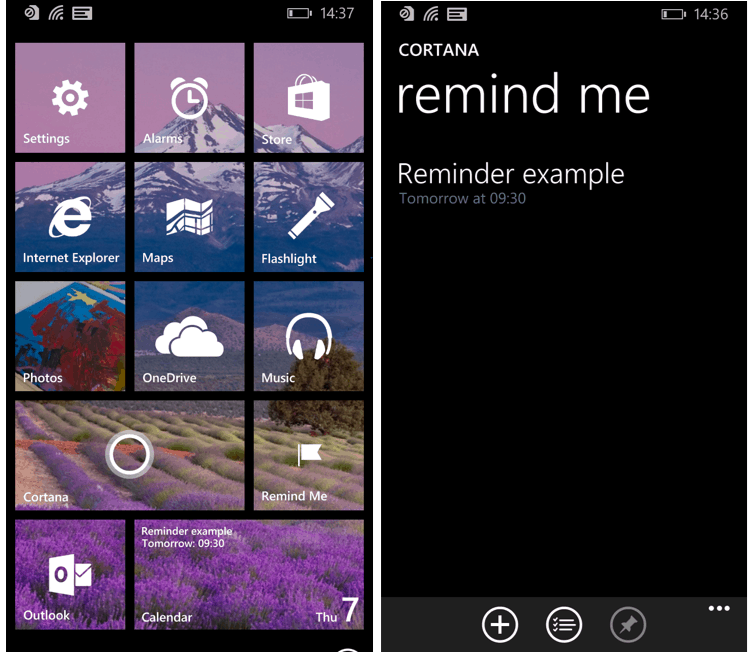
You could pin Cortana reminders on Windows Phone 8.1.
\n
Windows 10 changed a lot of things: Outlook tasks are no longer supported in the Outlook calendar app, so Cortana is now the only “native” way to set reminders on Windows 10 devices. However, Cortana reminders are no longer pinnable to your start screen, which makes them a little harder to use. As of now, it takes too many steps to access them from the Cortana app (they’re in the hamburger menu).
\n
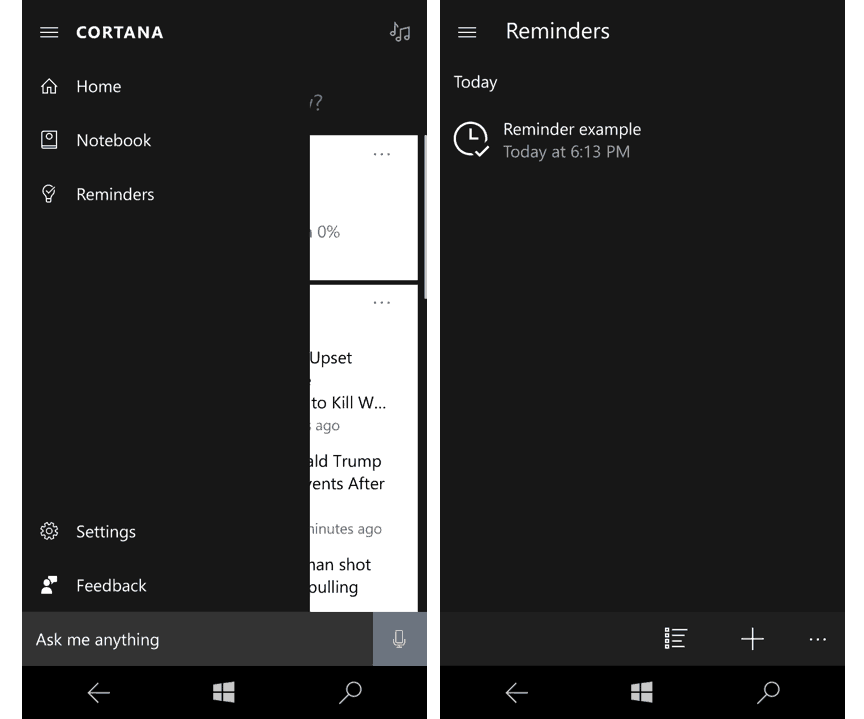
On Windows 10, Cortana reminders are hidden in the hamburger menu.
\n
Worse, Cortana is still not available in several markets, which means that all Windows 10 users who don’t have access to Cortana can’t set reminders with an integrated solution on their Windows 10 device. It’s not clear how MS could solve this. At least, the company should bring back support for Outlook tasks in the Outlook calendar app to enable a basic reminder functionality on all markets.
\n
But maybe Windows 10 needs a dedicated reminder app which would give users more flexibility. Do you really need the cloud to set reminders on your device?
\n
Number 5: The Movies & TV app needs to be integrated with OneDrive
\n
Do you remember the Xbox Music app on Windows 8.1/Windows Phone 8.1? It was far from great, but one of its best features was that Microsoft made it a cloud music locker. You could just put all your music in OneDrive and your content would magically appear in the Xbox Music app. Of course, the Groove Music app on Windows 10 still does this, and the app has also been recently updated with the addition of curated playlists based on your own music.
\n

The Groove Music app can play your tracks from OneDrive and even create curated playlists from them.
\n
Compared to the Groove Music app, the Movies & TV app seems pretty useless as of now. As a basic media player, it’s probably not as good as VLC or other third-party apps, so unless you’re buying a lot of content on the Windows Store you’re probably not using it very much. However, integrating this app with your OneDrive content would make it much more useful: it would be a straightforward way to stream your own videos stored on OneDrive without wasting precious storage space on your devices.
\n

Microsoft, please integrate your Movies & TV app with OneDrive.
\n
Microsoft must do better with its Windows 10 apps
\n
I can’t deny it, Windows 10 is a massive improvement over its predecessor, and the fact that already 350 million people are actively using it after nearly a year in the market is definitely impressive. However, the new operating system is still very young and the upcoming Anniversary Update may not pack enough new features to make Windows 10 truly enjoyable. Moreover, Microsoft has yet to prove that Universal Windows 10 apps could ultimately replace legacy Win32 apps, as Microsoft’s own UWP apps often pale against their legacy counterparts.
\n
If Microsoft wants users to love Windows 10, then the company has to make sure that its core native apps built on the UWP framework are versatile and easy to use. Microsoft’s own apps should always be best on Windows 10 devices, which should also prove third-party developers that the Universal Windows Platform is a valuable addition to a market where Apple and Google are too often controlling the narrative.
\n
\n\nFurther reading: Apps, Cortana, Microsoft, Movies & TV, Office, Office Mobile, OneNote, Outlook, Windows 10