Skip to content
OnMSFT.com
  • Home
  • About
  • Contact
  • Windows
  • Surface
  • Xbox
  • How-To
  • OnPodcast
  • Edge
  • Teams
  • Gaming
Menu
  • Home
  • About
  • Contact
  • Windows
  • Surface
  • Xbox
  • How-To
  • OnPodcast
  • Edge
  • Teams
  • Gaming
  1. Home
  2. Feature
  3. Windows 10 Anniversary Update: What’s new with pen and touch

Windows 10 Anniversary Update: What’s new with pen and touch

Dave W. Shanahan Dave W. Shanahan
July 25, 2016
4 min read

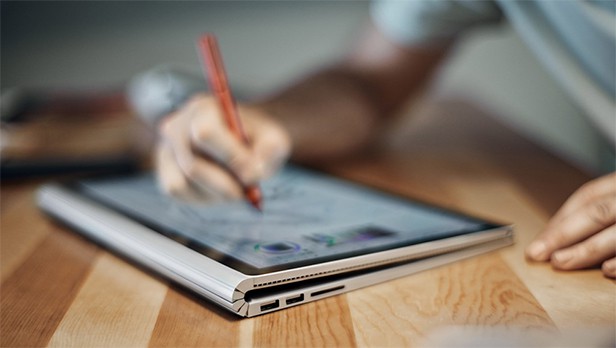
Surface Book with Pen\n

The Windows 10 Anniversary Update brings a number of new improvements and features to pen and touch. “Windows Ink Workspace,” otherwise known as Windows Ink, provides map and photo enhancements, along with other new capabilities using the Surface Pen in the Anniversary Update.

\n

Windows Ink Workspace

Windows Ink Workspace (Windows Ink)

\n

Windows Ink allows Surface Pen users to draw or annotate on top of any Windows 10 app.

\n

The Anniversary Update allows Surface Pen users have a new sidebar accessible on the taskbar (or by clicking the Surface Pen) giving access to Sketchpad, Screen sketch, or Sticky Notes. Ink Workspace provides users with a virtual ruler too, making it easy to draw straight lines when needed. Sticky Notes quickly integrate with Cortana, and Cortana sets reminders for you based on your sticky note content. There is also a new map and photo inking feature available in the Windows 10 Anniversary Update.

\n

Windows Ink, Map Inking

Maps inking

\n

At Build 2016, Microsoft showcases the capability where the user can draw directly on photos in the Windows 10 Photos app, or draw on a route in the Maps app. When inking on a map, the ink can calculate distances when drawing routes in the Maps app and even re-position itself when drawing in 3D mode. For example, if you are using the Maps app to calculate heights if you were planning a hike. Many might enjoy the map inking integration after going on a hike using the Explore Tile on the Microsoft Band.

\n

For Office 365 users, Ink Workspace figures out if you want to delete an entire paragraph of text just by scribbling the paragraph out. When highlighting notes or text, the highlight function will automatically snap to sentences to keep you from highlighting text unintentionally. The highlight function works best for teachers when grading student papers or other documents in OneNote.

\n

Microsoft is trying to make the Surface Pen a more useful than just an accessory. Sketchpad, Screen sketch, and Sticky Notes all provide a renewed focus on the “power of the pen.”

\n

Sketchpad

\n

Windows Ink Workspace, microsoft

Sketchpad

\n

Sometimes jotting things down on a blank piece of paper can lead to ideas you never thought possible. Sketchpad offers that experience while focusing on how people use analog pens today. Sketchpad allows Windows 10 users to start with a blank slate to use the Surface Pen or just your fingers to doodle, create, or brainstorm. You can simultaneous use the digital ruler with one hand while you wield your finger or Surface Pen in the other. Once, you’re done, you can easily save and share doodles and ideas from any email or messaging app to get your ideas in motion.

\n

Screen sketch

\n

Windows Ink Workspace, Screen sketch, gif

Screen sketch

\n

Screen sketch takes a screenshot of your entire desktop and allows you to draw on top of the screenshot in any way you choose. Screen sketch allows you to draw, write on, and crop the entire image. Screen sketch is similar to Sketchpad and offers ample opportunities to share your created content.

\n

Sticky Notes

\n

Windows ink Workspace, gif, Sticky notes

Sticky Notes

\n

Sticky Notes allows you to create and save notes to your Windows 10 device experience. Not only can you customize the colors on your sticky notes, but you also have the ability to integrate with Cortana to set reminders. With Sticky Notes and Cortana, you can see your notes and reminders across all of your Windows 10 devices. Smart entity extraction is also available with Bing. For example, you will be able to write a phone number in Sticky Notes and Bing will ready the number to be called or write down a flight number and Bing will bring you latest flight status update. Sticky Notes will help Windows 10 users realize what they were missing with Windows Ink.

\n

Windows Ink Workspace

Windows Ink Workspace pen settings

\n

Finally, there are always ways of customizing your Surface Pen settings for Windows Ink Workspace. You can change the buttons of the pen to correspond with your own personal preferences. Click the pen once to go to the Windows Ink Workspace Home, click twice to be taken to the Sketchpad, hold down the button to open Cortana. You choose what each pen click represents. You can also use pen clicks to open Windows 10 apps, or change other pen settings, like turn pen cursor on or off, or ignore touch when using your pen.

\n

The Windows 10 Anniversary Update makes using the pen easier, improves touch, and provides a better overall pen and touch experience on Windows 10 than ever before.

\n

Editor’s note: This is the second post in a series that will go over the new features of the Windows 10 Anniversary Update. This post is ideal for new users who are experiencing the update for the very first time. For those who have been a part of the Insider program, share your thoughts on the Anniversary Update in the comment section below.

\n\nFurther reading: AU Feature Series, Cortana, Microsoft, Surface Pen, Windows 10, Windows 10 Anniversary Update


Share this article:
Tags:
AU Feature Series Cortana Microsoft Surface Pen Windows 10 Windows 10 Anniversary Update
Previous Article Cortana for iOS updated with support for photo reminders Next Article SharePoint rolls out Lists, and integration with PowerApps and Flow

Related Articles

Here is our Xbox 2022 wrap up – OnMSFT.com

December 27, 2022

Xbox classics revisited vol.8: classic racing games – OnMSFT.com

December 20, 2022

Here are some Xbox Christmas gifts for that gamer on your list – OnMSFT.com

December 20, 2022

Leave a Comment Cancel reply

Your email address will not be published. Required fields are marked *

Recent Posts

  • Microsoft is no longer manufacturing the Windows RT powered Surface 2
  • Microsoft treats Windows Phone owners with extra 20GB of free SkyDrive storage for one year
  • Bing now showcases professional and celebrity Klout scores during search results
  • Bing now lets you search and browse for your friends’ Facebook photos
  • Bing now lets you explore free online courses and helps you find books to read

Recent Comments

No comments to show.

Archives

  • February 2026
  • December 2022
  • November 2022
  • October 2022
  • September 2022
  • August 2022
  • July 2022
  • June 2022
  • May 2022
  • April 2022
  • March 2022
  • February 2022
  • January 2022
  • December 2021
  • November 2021
  • October 2021
  • September 2021
  • August 2021
  • July 2021
  • June 2021
  • May 2021
  • April 2021
  • March 2021
  • February 2021
  • January 2021
  • December 2020
  • November 2020
  • October 2020
  • September 2020
  • August 2020
  • July 2020
  • June 2020
  • May 2020
  • April 2020
  • March 2020
  • February 2020
  • January 2020
  • December 2019
  • November 2019
  • October 2019
  • September 2019
  • August 2019
  • July 2019
  • June 2019
  • May 2019
  • April 2019
  • March 2019
  • February 2019
  • January 2019
  • December 2018
  • November 2018
  • October 2018
  • September 2018
  • August 2018
  • July 2018
  • June 2018
  • May 2018
  • April 2018
  • March 2018
  • February 2018
  • January 2018
  • December 2017
  • November 2017
  • October 2017
  • September 2017
  • August 2017
  • July 2017
  • June 2017
  • May 2017
  • April 2017
  • March 2017
  • February 2017
  • January 2017
  • December 2016
  • November 2016
  • October 2016
  • September 2016
  • August 2016
  • July 2016
  • June 2016
  • May 2016
  • April 2016
  • March 2016
  • February 2016
  • January 2016
  • December 2015
  • November 2015
  • October 2015
  • September 2015
  • August 2015
  • July 2015
  • June 2015
  • May 2015
  • April 2015
  • March 2015
  • February 2015
  • January 2015
  • December 2014
  • November 2014
  • October 2014
  • September 2014
  • August 2014
  • July 2014
  • June 2014
  • May 2014
  • April 2014
  • March 2014
  • February 2014
  • January 2014
  • December 2013
  • November 2013
  • October 2013
  • September 2013
  • August 2013
  • July 2013
  • June 2013
  • May 2013
  • April 2013
  • March 2013
  • February 2013
  • January 2013
  • December 2012
  • November 2012
  • October 2012
  • September 2012
  • August 2012
  • July 2012
  • June 2012
  • May 2012
  • April 2012
  • March 2012
  • February 2012
  • January 2012
  • December 2011
  • November 2011
  • October 2011
  • September 2011
  • August 2011
  • July 2011
  • June 2011
  • May 2011
  • April 2011
  • March 2011
  • February 2011
  • January 2011
  • December 2010
  • November 2010
  • October 2010
  • September 2010

Categories

  • Announcements
  • Deals
  • Developer
  • Editorial
  • Feature
  • Feature stories
  • Hero-post
  • Hotdeals
  • How-to
  • Latest news
  • Microsoft / office 365
  • News
  • Office 365
  • Onpodcast
  • Opinion
  • Our featured post
  • Polls
  • Review
  • Reviews
  • Videos
OnMSFT.com

OnMSFT.com covers Microsoft news, reviews, and how-to guides. Formerly known as WinBeta, we have been your source for Microsoft news since 1998.

Categories

  • Windows
  • Surface
  • Xbox
  • How-To
  • OnPodcast
  • Gaming
  • Edge
  • Teams

Recent Posts

  • Microsoft is no longer manufacturing the Windows RT powered Surface 2
  • Microsoft treats Windows Phone owners with extra 20GB of free SkyDrive storage for one year
  • Bing now showcases professional and celebrity Klout scores during search results
  • Bing now lets you search and browse for your friends’ Facebook photos
  • Bing now lets you explore free online courses and helps you find books to read

Quick Links

  • About OnMSFT.com
  • Contact OnMSFT
  • Join Our Team
© 2010–2026 OnMSFT.com LLC. All rights reserved.
About OnMSFT.comContact OnMSFT
