Skip to content
OnMSFT.com
  • Home
  • About
  • Contact
  • Windows
  • Surface
  • Xbox
  • How-To
  • OnPodcast
  • Edge
  • Teams
  • Gaming
Menu
  • Home
  • About
  • Contact
  • Windows
  • Surface
  • Xbox
  • How-To
  • OnPodcast
  • Edge
  • Teams
  • Gaming
  1. Home
  2. Feature
  3. Move over Cortana: Hands-on with Alexa on Windows 10 PC

Move over Cortana: Hands-on with Alexa on Windows 10 PC

Arif Bacchus Arif Bacchus
June 19, 2018
3 min read

\n

Cortana has long been the only digital assistant available on Windows 10, but some of this year’s PCs from Lenovo, Acer, and HP also now come with Amazon Alexa installed on board. Yesterday, our colleagues over at Windows Central published a download link for the Alexa app on Windows, so after trying it today here’s a hands-on look at the experience.

\n

Installing

\n

Alexa is officially only supported on the previously mentioned PCs, but it can still run on any Windows 10 PC with the right .exe install files. Indeed, after clicking and running the .exe file, the Alexa setup will install Microsoft Visual C++ 2015 as part of the prerequisites. It will then install the Amazon Alexa App itself, and let you know when it is finished. Once done you can open the Alexa app from the start menu and sign in with your Amazon Password. You can also tweak the settings on this first boot and enable Alexa to launch when you boot up your computer.

\n

\n

Functions

\n

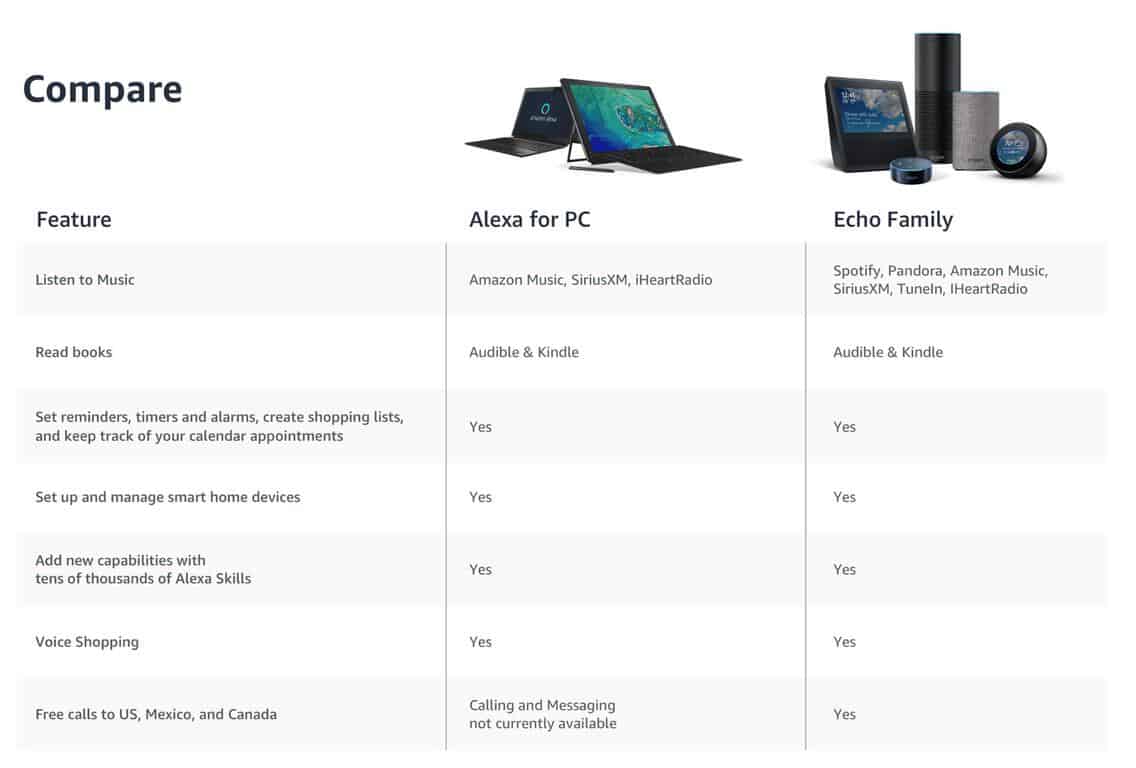
Even though Alexa’s wake word doesn’t work on my PC, the Alexa app on Windows 10 functions just as it would on an Echo device. Once pinned to the taskbar, you can manually summon Alexa and easily ask the assistant all kinds of general trivia or questions about weather, reminders, jokes, and the news. Of course, Cortana already can do most this stuff, but Alexa does have some extra third-party skills and knowledge which Cortana currently lacks. Please be aware, though, that Alexa on PC can’t make phone calls or send messages, as this is an exclusive feature for Echo devices.

\n
\n

Alexa also integrates nicely with Amazon’s own services, including Amazon Music. Amazon shopping is included too, and you can ask Alexa to add certain items to your shopping cart. Answers will be provided in a card-style interface, similar to the Android version of the app. You can see all this in the video below, where I asked Alexa about NASCAR, have it play Jeopardy with me, and asked it to play me a song. It’s nice to have this stuff available from another service, even though Cortana already does most of it.

\n

\n

Keeping Alexa on the taskbar

\n

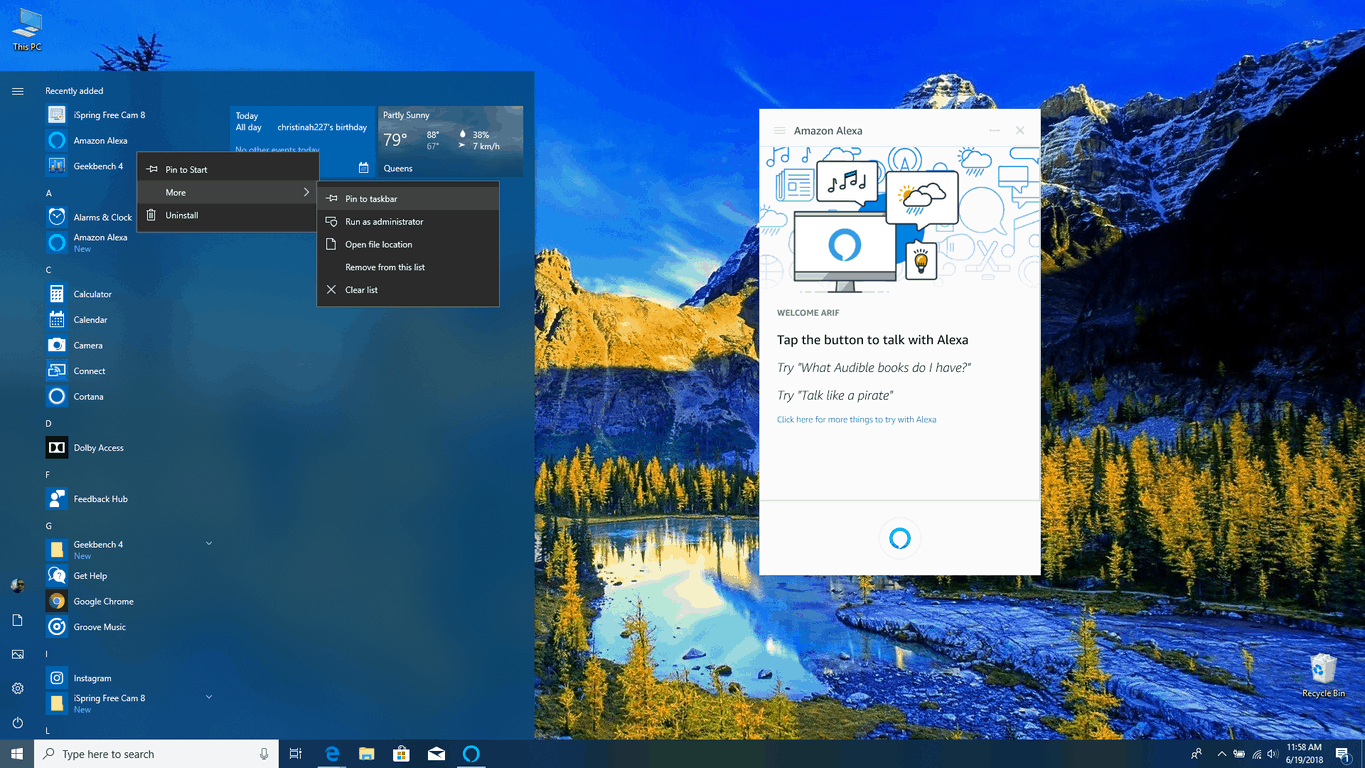
Cortana has a dedicated area on the taskbar in Windows 10, and you can do something similar for Alexa if you feel the need. To do this, you can head to the start menu and find Amazon Alexa in the list. After that, you can right-click on it, select “more.” and then click on “Pin to Taskbar.” This will eliminate the need to constantly open the Start Menu and click on the app to interact with Cortana.

\n
\n

What’s broken and doesn’t work

\n

Alexa on Windows 10 can connect with your Microsoft Account so the assistant can read your Outlook calendar or make appointments, but that’s just about all the Microsoft data you’ll get from it. There is no support for voice volume controls with Alexa on Windows 10, and the assistant can’t send emails on Windows or read your contacts.

\n

\n

It’s likely a limit set by Microsoft, but with Alexa and Cortana partnership still on the way, more might be heading to the dedicated Windows 10 app soon. This also could be why the Alexa wake word also won’t work on certain PCs, as I described above.

\n

Final thoughts

\n

At the end of the day, Alexa on Windows 10 doesn’t really live up to the hype that I thought it would. The app does some extra things and has more third-party connections, but it’s not really as productive and integrated with Windows as Cortana is. As a Windows user, I feel as though Alexa is not nicely designed and clean, and just a wrap of an Android application. There’s more time on the road ahead for this Amazon Alexa app to evolve, and I’ll be sticking to Cortana for now.

\n\nFurther reading: Alexa, Amazon, Cortana, Microsoft, Windows 10

Share this article:
Tags:
Alexa Amazon Cortana Microsoft Windows 10
Previous Article [Updated] Latest Microsoft Edge beta on Android and iOS introduces new ad blocking feature | On MSFT Next Article Windows Server 2019 Insider build 17692 is out with first preview of Hyper-V 2019

Related Articles

Here is our Xbox 2022 wrap up – OnMSFT.com

December 27, 2022

Xbox classics revisited vol.8: classic racing games – OnMSFT.com

December 20, 2022

Here are some Xbox Christmas gifts for that gamer on your list – OnMSFT.com

December 20, 2022

Leave a Comment Cancel reply

Your email address will not be published. Required fields are marked *

Recent Posts

  • Bethesda’s Redfall may get pushed back to a May 2023 release – OnMSFT.com
  • Activision Blizzard deal approved in Chile, Japan may be next in line – OnMSFT.com
  • Xbox Games with Gold January 2023 lineup announced – OnMSFT.com
  • Activision Blizzard studio Proletariat becomes the latest game developer to unionize – OnMSFT.com
  • How to Fix the Phone Link App Not Working on Windows 11 – OnMSFT.com

Recent Comments

No comments to show.

Archives

  • December 2022
  • November 2022
  • October 2022
  • September 2022
  • August 2022
  • July 2022
  • June 2022
  • May 2022
  • April 2022
  • March 2022
  • February 2022
  • January 2022
  • December 2021
  • November 2021
  • October 2021
  • September 2021
  • August 2021
  • July 2021
  • June 2021
  • May 2021
  • April 2021
  • March 2021
  • February 2021
  • January 2021
  • December 2020
  • November 2020
  • October 2020
  • September 2020
  • August 2020
  • July 2020
  • June 2020
  • May 2020
  • April 2020
  • March 2020
  • February 2020
  • January 2020
  • December 2019
  • November 2019
  • October 2019
  • September 2019
  • August 2019
  • July 2019
  • June 2019
  • May 2019
  • April 2019
  • March 2019
  • February 2019
  • January 2019
  • December 2018
  • November 2018
  • October 2018
  • September 2018
  • August 2018
  • July 2018
  • June 2018
  • May 2018
  • April 2018
  • March 2018
  • February 2018
  • January 2018
  • December 2017
  • November 2017
  • October 2017
  • September 2017
  • August 2017
  • July 2017
  • June 2017
  • May 2017
  • April 2017
  • March 2017
  • February 2017
  • January 2017
  • December 2016
  • November 2016
  • October 2016
  • September 2016
  • August 2016
  • July 2016
  • June 2016
  • May 2016
  • April 2016
  • March 2016
  • February 2016
  • January 2016
  • December 2015
  • November 2015
  • October 2015
  • September 2015
  • August 2015
  • July 2015
  • June 2015
  • May 2015
  • April 2015
  • March 2015
  • February 2015
  • January 2015
  • December 2014
  • November 2014
  • October 2014
  • September 2014
  • August 2014
  • July 2014
  • June 2014
  • May 2014
  • April 2014
  • March 2014
  • February 2014
  • January 2014
  • December 2013
  • November 2013
  • October 2013
  • September 2013
  • August 2013
  • July 2013
  • June 2013
  • May 2013
  • April 2013
  • March 2013
  • February 2013
  • January 2013
  • December 2012
  • November 2012
  • October 2012
  • September 2012
  • August 2012
  • July 2012
  • June 2012
  • May 2012
  • April 2012
  • March 2012
  • February 2012
  • January 2012
  • December 2011
  • November 2011
  • October 2011
  • September 2011
  • August 2011
  • July 2011
  • June 2011
  • May 2011
  • April 2011
  • March 2011
  • February 2011
  • January 2011
  • December 2010
  • November 2010
  • October 2010
  • September 2010

Categories

  • Announcements
  • Deals
  • Developer
  • Editorial
  • Feature
  • Feature stories
  • Hero-post
  • Hotdeals
  • How-to
  • Latest news
  • Microsoft / office 365
  • News
  • Office 365
  • Onpodcast
  • Opinion
  • Our featured post
  • Polls
  • Review
  • Reviews
  • Videos
OnMSFT.com

OnMSFT.com covers Microsoft news, reviews, and how-to guides. Formerly known as WinBeta, we have been your source for Microsoft news since 1998.

Categories

  • Windows
  • Surface
  • Xbox
  • How-To
  • OnPodcast
  • Gaming
  • Edge
  • Teams

Recent Posts

  • Bethesda's Redfall may get pushed back to a May 2023 release - OnMSFT.com
  • Activision Blizzard deal approved in Chile, Japan may be next in line - OnMSFT.com
  • Xbox Games with Gold January 2023 lineup announced - OnMSFT.com
  • Activision Blizzard studio Proletariat becomes the latest game developer to unionize - OnMSFT.com
  • How to Fix the Phone Link App Not Working on Windows 11 - OnMSFT.com

Quick Links

  • About OnMSFT.com
  • Contact OnMSFT
  • Join Our Team
© 2010–2026 OnMSFT.com LLC. All rights reserved.
About OnMSFT.comContact OnMSFT

