
 \n
\n
Ever since Microsoft discontinued its efforts on its Windows 10 Mobile platform, many former users have moved to other platforms, namely iPhone and Android. Because of this, Microsoft has refocused its efforts to these systems, building new apps to bring their ecosystem to those platforms.
\n
Over time, Microsoft pushed out what used to be Windows 10 Mobile exclusives, including Edge and Cortana, over to the iOS and Android platforms. While the company isn’t leaving the many proud iPhone users out of the equation given its releases of Edge and Cortana for that platform, it’s clear Android users will be able to make themselves feel even more at home to Microsoft’s services. This is because the company can virtually bake its services into those phones by installing a simple app: Microsoft Launcher.
\n
Originally known as Arrow Launcher, the home screen app started as a Microsoft Garage project and has since been rebranded to become the central hub for users to use Bing, Cortana, and Microsoft News. Microsoft has taken features in Windows 10, such as Cortana, Timeline, more recently Sticky Notes, and brought them to Android thanks to this one app. Below are some of likely the most useful features you get with Microsoft Launcher over the stock version that likely comes with your phone.
\n
Timeline—syncing activities between devices
\n
Timeline first came to Windows 10 in the April 2018 Update as a way for users to easily jump from one PC to the next by syncing recently viewed activities. These include webpages in Edge as well as documents in Word, PowerPoint, and Excel, which are synced between devices in a single view. However, the feature became available to those on Android devices thanks to Microsoft Launcher’s 5.0 update, giving users a chronological list of activities browsed on Edge for Android as well as Office documents.
\n
In Microsoft Launcher, activities are listed in a chronological list order, with the most recent being on top. Assuming your privacy settings allow this, the activities include Edge history from both your phone as well as what where you’ve been to on your PC.
\n
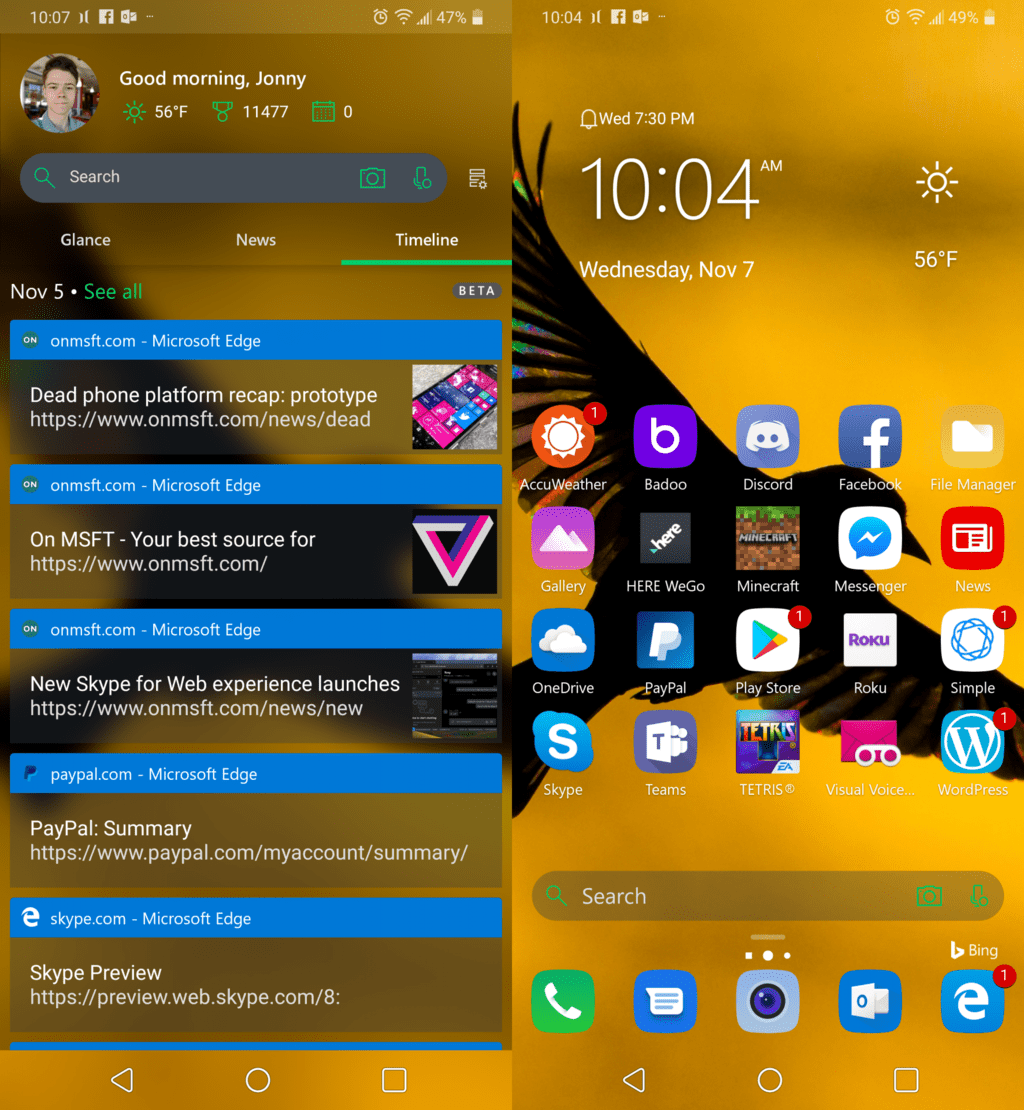
Timeline can be accessed by swiping to the right in Microsoft Launcher.
\n
I find this to be very useful, because often, I close tabs unintentionally, and Timeline is a very easy way to re-access the webpages I was on before. As a writer, I also find it handy that I can access a source article on my phone as well, and then quickly access the same link on my PC when I begin writing.
\n
While certainly an interesting feature, many users are likely skeptical about it given its nature on user privacy. For this to work, Microsoft must sync all of the user’s activity of those supported apps and store them in the cloud, then redistribute the data onto other devices. It’s not a big issue for me as I am not big on privacy myself, but I can understand where the concerned people come from.
\n
Cortana—your virtual assistant from Microsoft
\n
Cortana is the assistant that comes on Windows 10 PCs and Xbox One consoles, although it was first released for the Windows Phone 8.1 platform to compete with the likes of Siri on iPhones. Microsoft Launcher includes integration with that same assistant, which can be accessed from the microphone icon either on the search bar or the Cortana card.
\n
The Cortana card can display quick info, which she gathers from the system, including unread text messages, upcoming reminders, tracking info. She is especially useful because of her integration with Microsoft’s services, including Outlook, To-Dos, Bing, and Translator. She’s very basic if you use her though the Microsoft Launcher, however there is a dedicated app on the Google Play Store, which can additionally play music, and manage devices such as the Xbox or the Surface Headphones we recently reviewed.
\n

Adding a reminder from Cortana also adds it to the Tasks list in Microsoft Launcher.
\n
While I don’t use Cortana very often, I do find it to be useful when I ask her to add an entry to my to-do list, so that I can access the list later from the Tasks card. And speaking of cards…
\n
Glance screen—a customizable list of pinned cards and widgets
\n
Most Android phones come with a left home screen with Google search and news. Apple devices show a customizable list of widgets, and even the OnePlus 6T lets you choose between a Google Search screen or a widgets list. Microsoft takes all this a step further by putting it all on a single glance screen, complete with info cards, widgets, news, and the Timeline history.
\n
Cards are Launcher’s built-in information widgets, useful for displaying many different things, such as sticky notes, recent messages and emails, calendar, tasks, screen time, contacts, and recently opened documents and apps, just to name a few. And of course, if the cards aren’t enough, you can also add any Android widget to the list, which are fully customizable in height to suit the user’s preference.
\n

Glance Screen as seen on the left, which is fully customizable as seen on the right.
\n
I am a big fan of the vertical list of widgets. It’s how information should be sorted. Windows Phone and iOS got this right, with both platforms sorting tiles and widgets (respectively) in this order. On an Android phone, someone with a lot of widgets would have to use multiple home pages to sort all of this info, and resorting can also take extra time. Putting all of it in a vertical list makes it easier to access the info on one scrollable screen and saves me a lot of time rearranging the widgets if I want to remove one or add another.
\n
Microsoft Launcher still has its fair share of issues
\n
I really do enjoy using Microsoft Launcher. But there are a few issues that cause me to scratch the back of my head. For one, the expandable dock at the bottom is buggy. Rearranging icons can cause icons to mistakenly duplicate and track over each other, adding to frustration when the intention is to swap one app for another.
\n
I would also like to see Microsoft expand the gesture settings a little bit. Right now, I’m using my phone’s home button to access the app drawer, reserving the upwards swipe for accessing the expanded dock. But I think it might be slightly more intuitive if I could set a slight swipe up to expand the dock, with a longer swipe opening the app drawer. Something similar is already incorporated into the Google Pixel’s new navigation introduced in Android Pie, where a slight swipe up brings up the recent apps and the dock, while moving the finger all the way up opens the app drawer.
\n
Other than that, Microsoft has done an excellent job at bringing its ecosystem to Android devices, giving users quick access to Cortana and the company’s other services with just the one app. Adding the additional apps like the Edge browser, Outlook, OneNote, To-Do and the countless others makes for a terrific Windows Phone alternative. Why not try it for yourself?
\n\n
\n
 \n
\n\n
\n
\n
\n
\n\nFurther reading: Android, Microsoft Launcher


