
If you’ve been following the Microsoft news carefully, you might have heard of the company’s newly renamed consumer subscription services. What was once known as Office 365 Home and Personal are now known as Microsoft 365 Personal and Family.
\n
That said, there are still some differences to know about these two plans especially when it comes to how they stand out from a free Microsoft Account. In this guide, we’ll take at that and help you choose the one that’s right for your personal use or family.
\n
Free Microsoft Account
\n

\n
What is a Microsoft account? | Microsoft
\n
If you’ve been following the Microsoft news carefully, you might have heard of the company’s newly renamed consumer subscription services. What was once known as Office 365 Home and Personal are now known as Microsoft 365 Personal and Family. That said, there are still some differences to know about
\n
\n
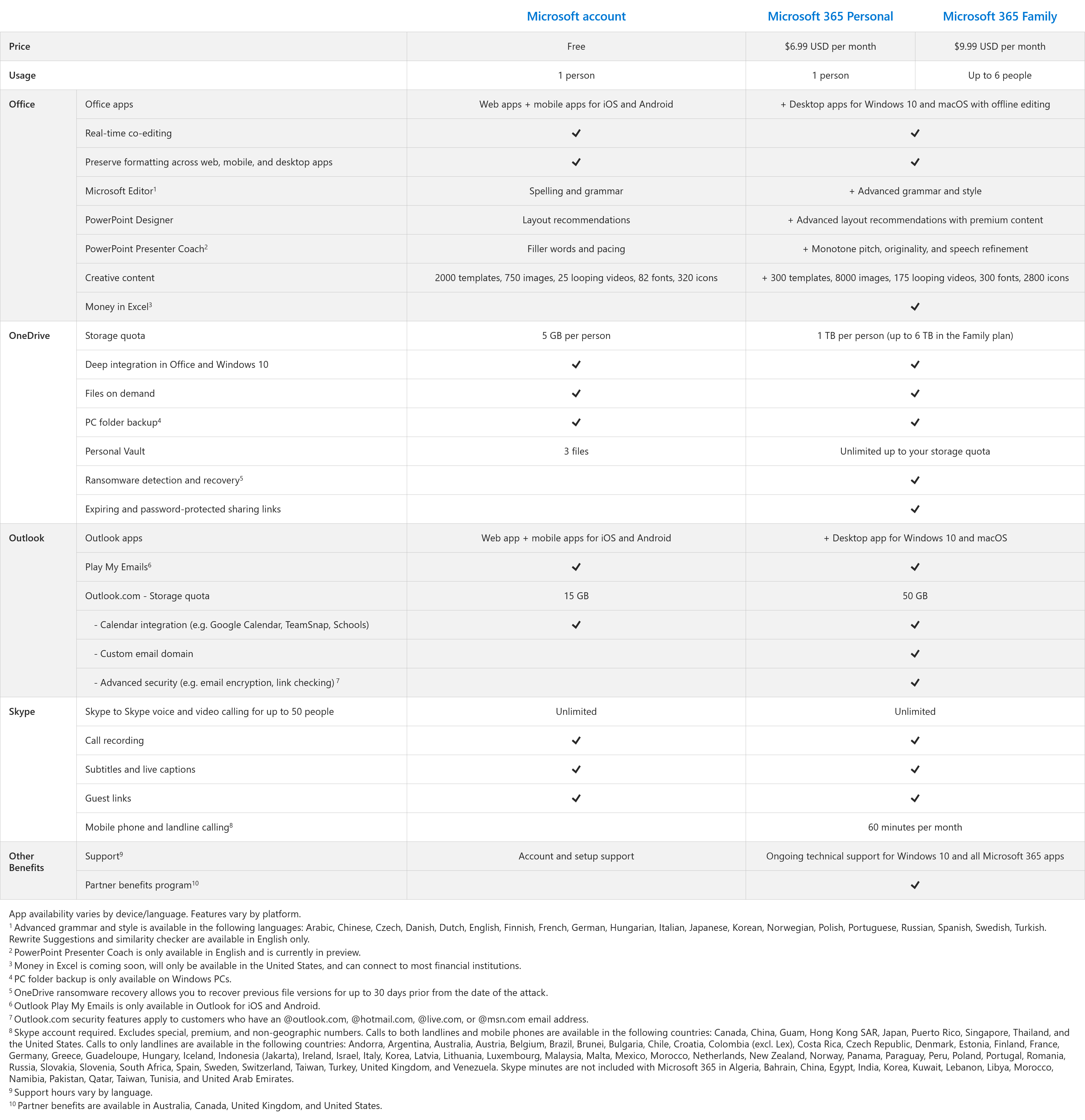
We’ll get started by mentioning a Microsoft Account. Anyone can create a Microsoft Account, free of charge, and add credit or debit card details later to enjoy Microsoft’s paid subscription services. A free account gives you access to some of the same things that you’ll get with a Microsoft 365 Personal or Family account, including Office, OneDrive, Outlook, Skype. You’ll also get an Outlook.com email address, too, as well as the ability to create an Xbox Live profile, and enjoy Microsoft’s other services. However, there are some very important limits with free Microsoft Account. We’ll be taking a look at those now.
\n
When it comes to Office, a free Microsoft Account only comes with access to web apps, and the free mobile apps on iOS and Android. This will give you basic editing functionalities, but some more sophisticated features like the drawing and mailings elements of Word will not available. You’ll still have access to co-editing and the same ability to preserve formatting across the web, mobile, and desktop apps, however.
\n
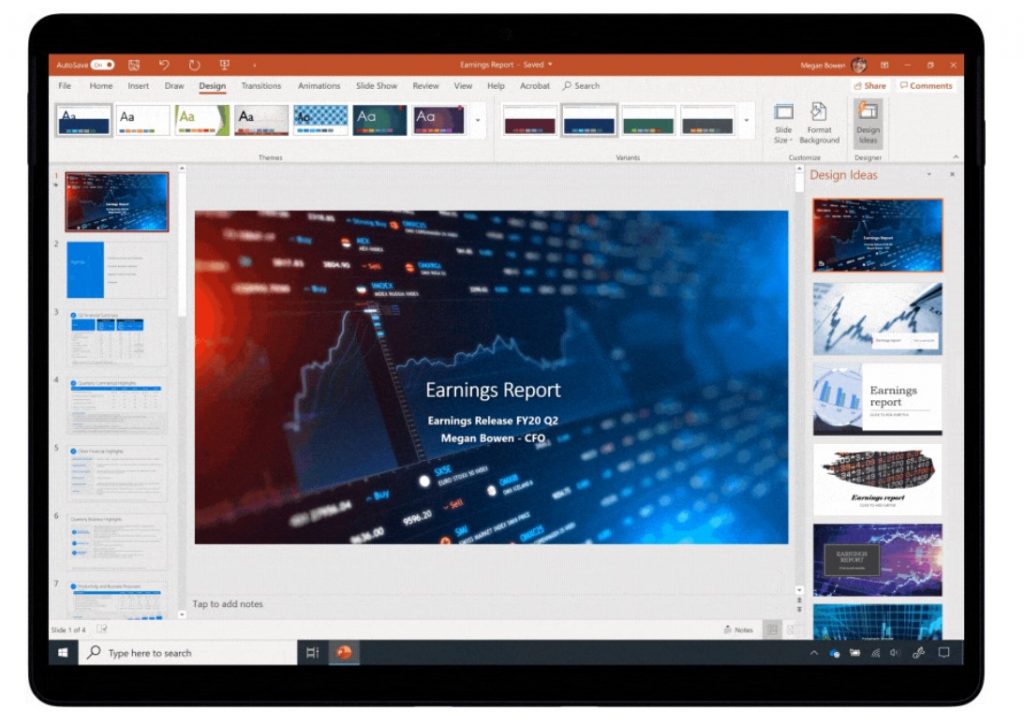
In other areas of Office, a free Microsoft Account also gets you limited access to some of the features Microsoft announced for its new subscription service. You’ll be able to enjoy basic spelling and grammar checks with Microsoft Editor, layout recommendations with PowerPoint Designer, Filter Words and pacing with PowerPoint Presenter Coach, too. As for the creative aspect of PowerPoint, you’ll get access to 2,000 templates, 750 images, 25 loops videos, 82 fonts, and 320 icons.
\n
\n
Now, for OneDrive. A free Microsoft Account gets you access to 5GB of storage, and the same integrations with Windows 10 as a paid Microsoft 365 Plan. You’ll be able to enjoy Files on Demand, PC Folder backup, and Personal Vault. However, you won’t get Ransomware detection and recovery, or password-protected sharing links. You’ll also have to keep that 5GB limit in mind when using the service. There’s also a 3 files limit with Personal Vault, too.
\n
On the emailing side things, in Outlook, you’ll get your own Outlook.com email address, and access to the web app, and mobile app for iOS and Android. You also can use the Play my Emails feature of Cortana on Android. Storage limits on mailboxes, though, will cap out at 15GB, but you will get the Calendar integration with Google Calendar, TeamSnap, and Schools.
\n
Finally, there is Skype. With Skype and a free Microsoft Account, you’ll still be able to enjoy unlimited voice and video calling for up to 50 people. You’ll also get call recording, subtitles and live captions, and guest links.
\n
Microsoft 365 Personal and Microsoft 365 Family
\n

\n
Microsoft 365: A subscription to make the most of your time
\n
If you’ve been following the Microsoft news carefully, you might have heard of the company’s newly renamed consumer subscription services. What was once known as Office 365 Home and Personal are now known as Microsoft 365 Personal and Family. That said, there are still some differences to know about
\n
\n
Now, for Microsoft 365 Personal and Microsoft 365 Family. These two plans are otherwise the same when it comes to features, but the pricing is different once they become available on April 21. Microsoft 365 Personal is $6.99 per month and is best used with one person. Microsoft 365 Family, meanwhile is $9.99 per month and can be used with up to 6 people. There are no other differences between the two, other than price, and how many people can access the plan.
\n
When it comes to Office, though, both Microsoft 365 Personal and Microsoft 365 Family are much different from a free Microsoft Account. In addition to having access to the web versions of the Office apps, these two paid subscriptions get you the desktop versions of Word, Excel, PowerPoint and Outlook for MacOS and/or Windows 10. You’ll also enjoy the same real-time co-authoring and formatting preservation as a free plan. Offline editing is also included, so you don’t have to worry about staying online to edit your files. However, there are some extra features that only subscriptions can offer.
\n
With Microsoft 365 Personal and Microsoft 365 Family, you’ll get access to advanced grammar and style features of Microsoft Editor (Editor only includes spelling and grammar for free). You’ll also get advanced layout recommendations with premium content, and extra monotone pitch, originality, and speech refinement options in PowerPoint Presenter Coach. There is also the added benefit of Money in Excel, which isn’t included with a free Microsoft Account. This feature lets you make spreadsheets to manage your bank accounts, and more. Elsewhere, you’ll also get access to 300 additional templates, 8,000 images, 175 looping videos, 300 fonts, and 2800 icons for creative content in Excel.
\n
\n

\n
Looking at OneDrive, now, these paid plans offer you much more storage space than a free plan. You’ll get access to up to 1TB of space per person. The same integrations with Windows 10 and Office are also here, as well as Files On Demand, PC Folder backup, and Personal Vault. However, you need not worry about limits, as Personal Vault with these paid plans has unlimited storage up to your 1TB quota. You also get extra ransomware detection and recovery, as well as expiring and password protected sharing links.
\n
In terms of emailing, the paid plans also boost your experience quite a bit. In addition to the web and mobile Outlook apps, paid plans give you access to the Outlook desktop app on Windows 10 and MacOS. Storage is also boosted up to 50GB on your mailbox, and you get additional custom email domains, and advanced security features like email encryption and link checking, too.
\n
Finally, there’s Skype. With Skype, you’ll get some extras there, too. In addition to unlimited Skype to Skype voice and video calling, and call recording, subtitles, guest links, you’ll get mobile phone and landline calling too. This has a limit of 60 minutes per month, however.
\n
Other differences
\n
In addition to Office, Skype, Outlook, and OneDrive, a free Microsoft Account and paid Microsoft 365 Home and Family plans have some other differences too. When it comes to support, a free Microsoft account only has account and set up support. Microsoft 365 Home and Family, though, come with ongoing technical support for Windows 10 and all the Microsoft 365 apps. There’s also the Microsoft Family Safety app, too, which comes with paid plans. This app lets families share their locations with each other, and also and manage screen time across Windows, Xbox, and Android. Parents can even use the app to track how their teens are driving.
\n
You’ll also find that these paid plans have access to the Partner Benefits program if you’re in Australia, Canada, the United Kingdom or the United States. Microsoft has a list of these here, some are valued as much as $134 to as little as $27.
\n
Do you think you’ll opt in to the new Microsoft 365 Home or Family plans? Or will you be keeping a free Microsoft Account? Let us know in the comments below.
\n