Skip to content
OnMSFT.com
  • Home
  • About
  • Contact
  • Windows
  • Surface
  • Xbox
  • How-To
  • OnPodcast
  • Edge
  • Teams
  • Gaming
Menu
  • Home
  • About
  • Contact
  • Windows
  • Surface
  • Xbox
  • How-To
  • OnPodcast
  • Edge
  • Teams
  • Gaming
  1. Home
  2. Feature
  3. Check out these Windows 10 Movies + TV apps for binge watchers

Check out these Windows 10 Movies + TV apps for binge watchers

Dave W. Shanahan Dave W. Shanahan
January 4, 2017
4 min read

\n

Windows 10 is built to do a lot more than just build spreadsheets and check email, and watching movies and TV shows on your PC has become a popular way to move beyond your “dumb” TV. Here are some of the most popular Windows 10 apps for movie and TV watching:

\n

Netflix

\n

Windows Netflix app

\n

Netflix is probably the king of all Windows 10 apps for binge watchers. In addition to watching old and new TV episodes, Netflix has thousands of movies available too. Netflix has its own original TV series, including Stranger Things, House of Cards, and Orange is the New Black. Netflix is also developing new movie content and comedy specials for its subscribers all the time.

\n

In addition to Windows 10, Netflix is available on Windows 10 Mobile, Xbox One, as well as other platforms. The Windows 10 Netflix app is free, but you’ll need a subscription. Netflix subscriptions start at $9.99 per month. New subscribers are eligible for a free one-month trial.

\n\n

\n

Netflix

\n

\nNetflix\n

\n

\n

\nDownload\nQR-Code\n

\n

\n

\n

Netflix

\n

Developer: Netflix, Inc.

\n

Price: Free

\n

\n

\n

Hulu

\n

Windows 10 Hulu app

\n

Like Netflix, Hulu offers subscribers the opportunity to watch TV episodes, including Seinfeld and South Park. Hulu offers a cheaper monthly subscription at $7.99 a month with limited commercial interruptions ($11.99, no commercials). Like Netflix, Hulu also offers its own brand of original TV and movie content. Hulu offers an option of adding Showtime for an additional $7.99 a month, which can bring up the overall monthly subscription price substantially, depending on what monthly Hulu base plan you choose.

\n

Another bonus is Hulu [Plus] is available on Windows 10 Mobile, too.

\n

Hulu for Windows 10
\n\n

\n

Hulu

\n

\nHulu\n

\n

\n

\nDownload\nQR-Code\n

\n

\n

\n

Hulu

\n

Developer: ‪Hulu.‬

\n

Price: Free

\n

\n

\n

Hulu Plus for Windows 10 Mobile
\n\n

\n

Hulu Plus

\n

\nHulu Plus\n

\n

\n

\nDownload\nQR-Code\n

\n

\n

\n

Hulu Plus

\n

Developer: ‪Hulu.‬

\n

Price: unknown

\n

\n

\n

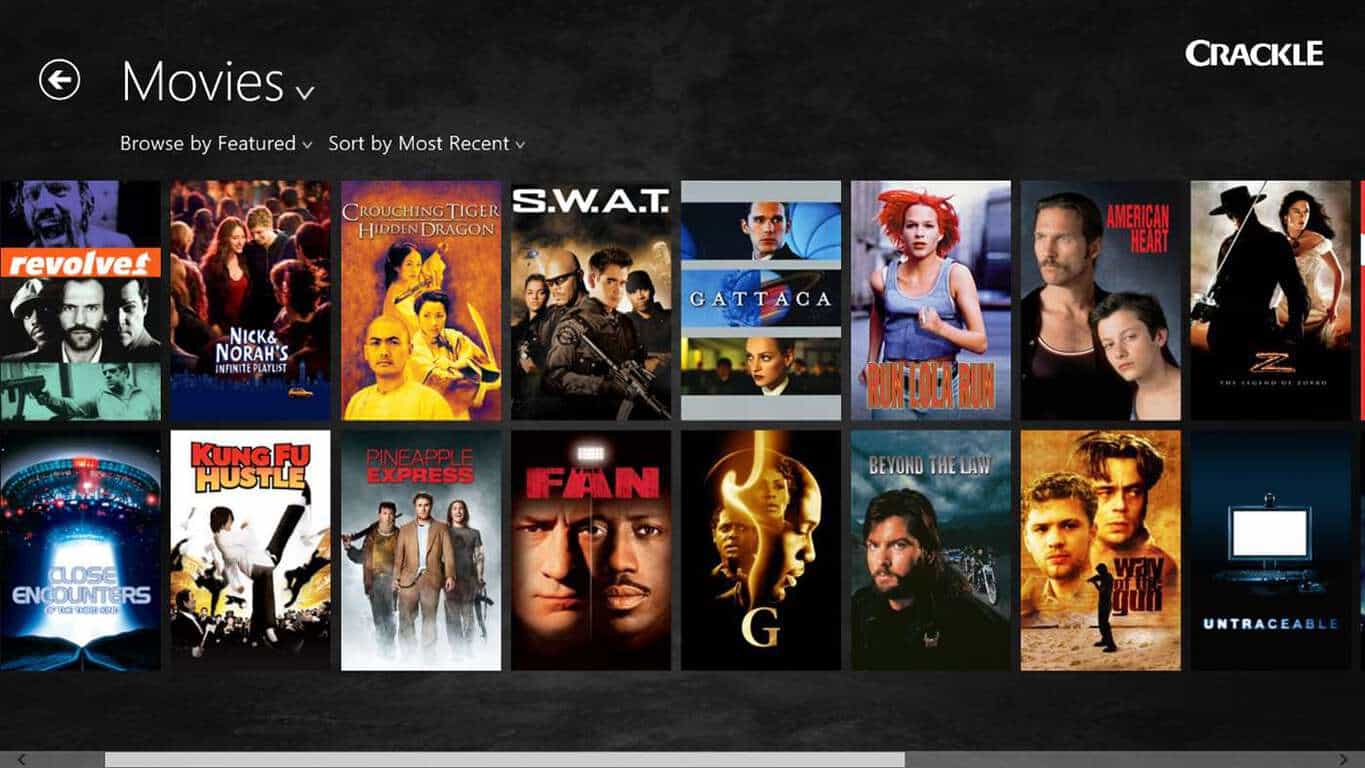
Crackle

\n

Crackle, Windows 10, Microsoft

\n

Crackle is a free way to watch your favorite TV shows and movies. Crackle is completely free; there’s no contract, no monthly fee, and the app is free to download. However, your free streaming content will be interrupted intermittently by advertisements. You may find the ads repetitive. For instance, you are likely to see the same exact ads interrupt whatever movie or TV show that you are watching. But, you can’t really complain because Crackle’s content is offered free with unlimited streaming.

\n\n

\n

Crackle

\n

\nCrackle\n

\n

\n

\nDownload\nQR-Code\n

\n

\n

\n

Crackle

\n

Developer: Crackle Inc

\n

Price: Free

\n

\n

\n

Crunchyroll

\n

Windows 10, Microsoft, Crunchyroll

\n

Crunchyroll is the must-have streaming service any anime, manga or East-Asian cinema fan out there. In addition to Windows 10, Crunchyroll is also offered on Windows 10 Mobile, and Xbox One. Founded in 2006, Crunchyroll started out as a Pirate Bay-inspired website where members would upload content without the original owners’ permission. Now, Crunchyroll has over 5 million members, offering over 200 different anime, manga or East-Asian cinema series.

\n

Most of Crunchyroll’s content is to watch for free (with a short introductory ad) in SD. You can stream full 1080p HD content for $6.95 monthly. New Crunchyroll subscribers are eligible for a 14-day free trial.

\n\n

\n

Crunchyroll

\n

\nCrunchyroll\n

\n

\n

\nDownload\nQR-Code\n

\n

\n

\n

Crunchyroll

\n

Developer: Crunchyroll Inc

\n

Price: unknown

\n

\n

\n


\n

Movies & TV

\n

\n

Microsoft’s own native Windows 10 app is perhaps the best way to watch your favorite movies and TV shows. Access all your movies and TV shows from any of your devices using your Microsoft account. Movies & TV allows you to access your favorite movies and TV shows on your Windows 10 PC or Windows 10 Mobile device. As an added bonus, you can add, manage, and play your own videos from your personal collection. Using the Windows Store, you can buy and add more of your favorite movies and TV shows.

\n

Once purchased, you can play movies and TV shows from any Windows 10 device. Whether it be your Windows 10 PC, Windows 10 Mobile device, or Xbox One, you can download or stream your purchased content to at your leisure.

\n\n

\n

Movies & TV

\n

\nMovies & TV\n

\n

\n

\nDownload\nQR-Code\n

\n

\n

\n

Movies & TV

\n

Developer: Microsoft Corporation

\n

Price: Free

\n

\n

\n

There is one honorable mention, Free Movies HD, although I am not sure whether this app will be in the Windows Store for very long due to possible legal issues from the free content that it streams. Don’t let the Windows 10 app name fool you, Free Movies HD is a great app for those looking to catch up their favorite TV shows too. You can check out the latest Season 7 episode of The Walking Dead, or watch the movie Sausage Party. There are no email or credit cards needed to sign up and the app is free to download. I imagine you may face some problems from your ISP with streaming the content within the app.

\n\n

\n

Free Movies HD

\n

\nFree Movies HD\n

\n

\n

\nDownload\nQR-Code\n

\n

\n

\n

Free Movies HD

\n

Developer: qhteam

\n

Price: Free

\n

\n

\n

There are some other Windows 10 TV and movie apps that are noticeably absent from the Windows Store. HBO GO and HBO NOW would be the obvious two. Although you can view HBO through your browser, the experience is not the same as it would be through an official HBO app on Windows 10. What Windows 10 app do you use to binge watch your favorite movie or TV content? Let us know in the comments.

\n\nFurther reading: Crackle, Crunchyroll, Hulu, Microsoft, Movies, Movies & TV, Netflix, TV, Windows 10, Windows Store, Xbox One


Share this article:
Tags:
Crackle Crunchyroll Hulu Microsoft Movies Movies & TV Netflix TV Windows 10 Windows Store Xbox One
Previous Article Activision snuffed out another title from the Xbox Games Store | On MSFT Next Article Check out the Floodlight Cam controlled by your Windows 10 app | On MSFT

Related Articles

Here is our Xbox 2022 wrap up – OnMSFT.com

December 27, 2022

Xbox classics revisited vol.8: classic racing games – OnMSFT.com

December 20, 2022

Here are some Xbox Christmas gifts for that gamer on your list – OnMSFT.com

December 20, 2022

Leave a Comment Cancel reply

Your email address will not be published. Required fields are marked *

Recent Posts

  • Microsoft is no longer manufacturing the Windows RT powered Surface 2
  • Microsoft treats Windows Phone owners with extra 20GB of free SkyDrive storage for one year
  • Bing now showcases professional and celebrity Klout scores during search results
  • Bing now lets you search and browse for your friends’ Facebook photos
  • Bing now lets you explore free online courses and helps you find books to read

Recent Comments

No comments to show.

Archives

  • February 2026
  • December 2022
  • November 2022
  • October 2022
  • September 2022
  • August 2022
  • July 2022
  • June 2022
  • May 2022
  • April 2022
  • March 2022
  • February 2022
  • January 2022
  • December 2021
  • November 2021
  • October 2021
  • September 2021
  • August 2021
  • July 2021
  • June 2021
  • May 2021
  • April 2021
  • March 2021
  • February 2021
  • January 2021
  • December 2020
  • November 2020
  • October 2020
  • September 2020
  • August 2020
  • July 2020
  • June 2020
  • May 2020
  • April 2020
  • March 2020
  • February 2020
  • January 2020
  • December 2019
  • November 2019
  • October 2019
  • September 2019
  • August 2019
  • July 2019
  • June 2019
  • May 2019
  • April 2019
  • March 2019
  • February 2019
  • January 2019
  • December 2018
  • November 2018
  • October 2018
  • September 2018
  • August 2018
  • July 2018
  • June 2018
  • May 2018
  • April 2018
  • March 2018
  • February 2018
  • January 2018
  • December 2017
  • November 2017
  • October 2017
  • September 2017
  • August 2017
  • July 2017
  • June 2017
  • May 2017
  • April 2017
  • March 2017
  • February 2017
  • January 2017
  • December 2016
  • November 2016
  • October 2016
  • September 2016
  • August 2016
  • July 2016
  • June 2016
  • May 2016
  • April 2016
  • March 2016
  • February 2016
  • January 2016
  • December 2015
  • November 2015
  • October 2015
  • September 2015
  • August 2015
  • July 2015
  • June 2015
  • May 2015
  • April 2015
  • March 2015
  • February 2015
  • January 2015
  • December 2014
  • November 2014
  • October 2014
  • September 2014
  • August 2014
  • July 2014
  • June 2014
  • May 2014
  • April 2014
  • March 2014
  • February 2014
  • January 2014
  • December 2013
  • November 2013
  • October 2013
  • September 2013
  • August 2013
  • July 2013
  • June 2013
  • May 2013
  • April 2013
  • March 2013
  • February 2013
  • January 2013
  • December 2012
  • November 2012
  • October 2012
  • September 2012
  • August 2012
  • July 2012
  • June 2012
  • May 2012
  • April 2012
  • March 2012
  • February 2012
  • January 2012
  • December 2011
  • November 2011
  • October 2011
  • September 2011
  • August 2011
  • July 2011
  • June 2011
  • May 2011
  • April 2011
  • March 2011
  • February 2011
  • January 2011
  • December 2010
  • November 2010
  • October 2010
  • September 2010

Categories

  • Announcements
  • Deals
  • Developer
  • Editorial
  • Feature
  • Feature stories
  • Hero-post
  • Hotdeals
  • How-to
  • Latest news
  • Microsoft / office 365
  • News
  • Office 365
  • Onpodcast
  • Opinion
  • Our featured post
  • Polls
  • Review
  • Reviews
  • Videos
OnMSFT.com

OnMSFT.com covers Microsoft news, reviews, and how-to guides. Formerly known as WinBeta, we have been your source for Microsoft news since 1998.

Categories

  • Windows
  • Surface
  • Xbox
  • How-To
  • OnPodcast
  • Gaming
  • Edge
  • Teams

Recent Posts

  • Microsoft is no longer manufacturing the Windows RT powered Surface 2
  • Microsoft treats Windows Phone owners with extra 20GB of free SkyDrive storage for one year
  • Bing now showcases professional and celebrity Klout scores during search results
  • Bing now lets you search and browse for your friends’ Facebook photos
  • Bing now lets you explore free online courses and helps you find books to read

Quick Links

  • About OnMSFT.com
  • Contact OnMSFT
  • Join Our Team
© 2010–2026 OnMSFT.com LLC. All rights reserved.
About OnMSFT.comContact OnMSFT