Skip to content
OnMSFT.com
  • Home
  • About
  • Contact
  • Windows
  • Surface
  • Xbox
  • How-To
  • OnPodcast
  • Edge
  • Teams
  • Gaming
Menu
  • Home
  • About
  • Contact
  • Windows
  • Surface
  • Xbox
  • How-To
  • OnPodcast
  • Edge
  • Teams
  • Gaming
  1. Home
  2. How-to
  3. How to translate emails in the Outlook app in Windows 10

How to translate emails in the Outlook app in Windows 10

Arif Bacchus Arif Bacchus
January 6, 2020
3 min read

Outlook Windows 10\n

\n

How to translate emails in the Outlook app in Windows 10

\n

Translating emails in the Outlook app in Windows 10 is easy. You don’t need to visit Bing or Google Translate, and can use a built-in Outlook Translator Add-in instead. Here’s how to get started.

\n

    \n

  1. Sign in with your Microsoft or Work and School account and add the Translator for Outlook Add In to Outlook by clicking here.
  2. \n

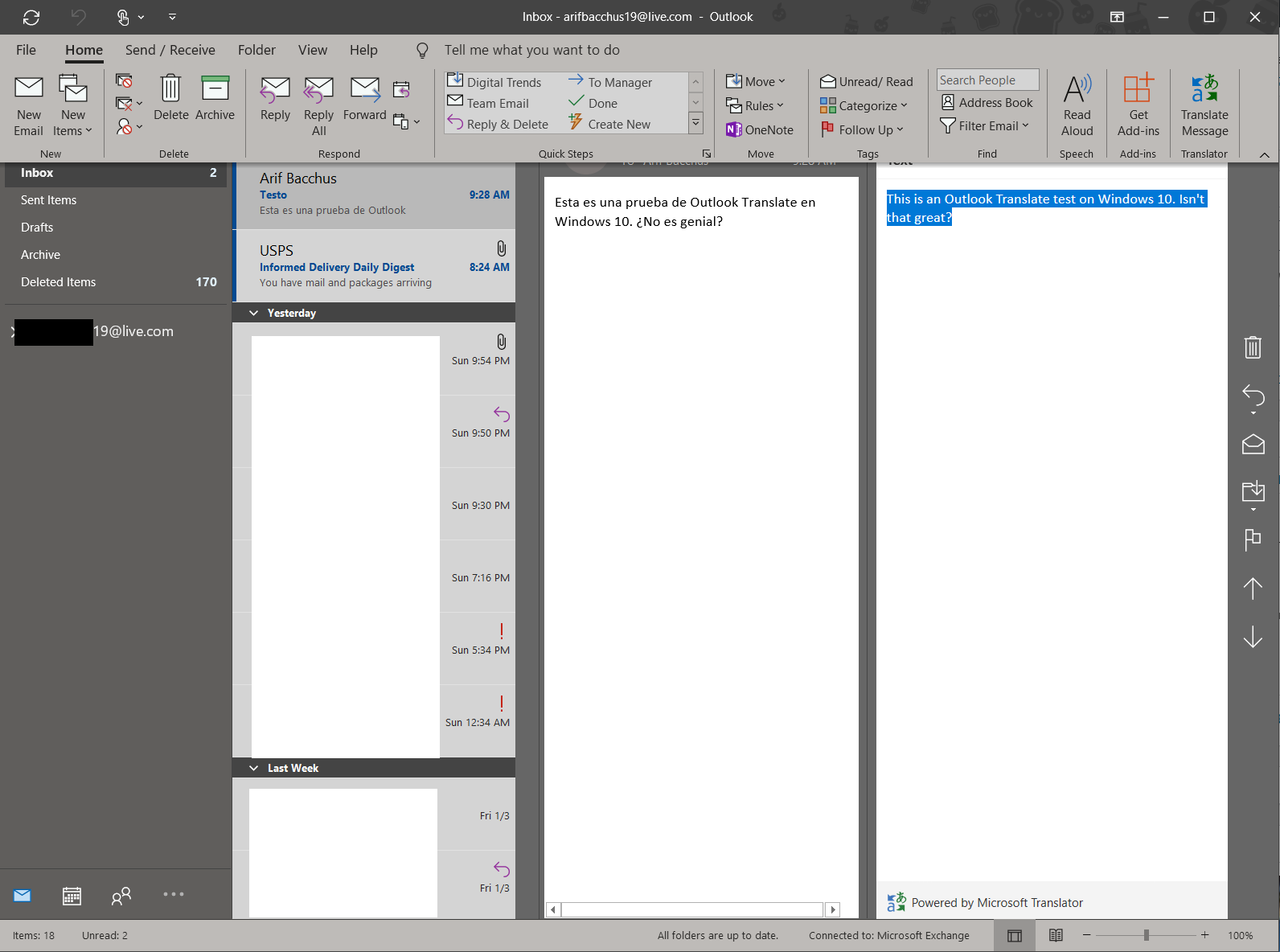
  3. Once added, you can open an email that needs translating and visit the Translate Message option in the Home tab.
  4. \n

  5. When you click this, the message will be auto-translated
  6. \n

\n

\n

Applies to All Windows 10 Versions

\n

\n

Sometimes you might end up in a situation where you could get an email sent to you in a different language from the one you speak. That can be for a variety of reasons, but did you know that you don’t need to visit Google or Bing translate to bring the email over into your own native language? With Translator for Outlook, you can translate emails in a rush, right from the Outlook app in Windows 10. Here’s how to get started.

\n

Install the add-in from the Office Store

\n

The first step in translating emails in the Outlook app in Windows 10 is to install the Translator for Outlook add-in from the Office Store. You’ll need to visit this page and sign in with your work account or the email address you’re using with the Outlook app.  You can also log in with your personal Microsoft Account if you please so you can also add the add-in to your secondary account in the Outlook app in Windows 10.

\n

Once done, you can then check to see if the add-in has been enabled by going to the Outlook app in Windows 10. When the app is open, head up to the main bar along the top. Click the Home tab and then click Get Add-Ins. You can then click My add-ins to check and see if Translator for Outlook has been enabled.

\n

\n

Launch the add-in

\n

Now that you’ve installed the add-in from the Office Store, you can open an email in a foreign language. You should notice a Translate Message option in the Home tab. When you click this, the message will be auto-translated, but you also can switch things up and pick another language by choosing the dropdown menu next to Translated to.

\n

If you like, you can also copy and paste the translated message, just like a normal email. You can then close the translated message by clicking the X at the top of the Translator window.

\n


\n
\n

Other notes

\n

Now that you’re enjoying the Translator for Outlook add-in, there are a few points to note. These translations are all powered by the online Microsoft Translator service. Essentially, this means that your data is secure and no samples are stored. You can learn more about the process here, and you can also check out the Translator app for Outlook on iOS and Android via the links below.

\n\n

\n

Translator

\n

\nTranslator\n

\n

\n

\nDownload\nQR-Code\n

\n

\n

\n

Translator

\n

\nDeveloper: \n‪Microsoft Corporation‬\n

\n

\nPrice: \nFree\n

\n

\n

\n

\n\n

\n

‎Microsoft Translator

\n

\n‎Microsoft Translator\n

\n

\n

\nDownload\nQR-Code\n

\n

\n

\n

‎Microsoft Translator

\n

\nDeveloper: \nMicrosoft Corporation\n

\n

\nPrice: \nFree\n

\n

\n

\n

\n


\n\nFurther reading: Microsoft, Office 365, Outlook, translate

Share this article:
Tags:
Microsoft Outlook translate
Previous Article CES 2020: Lenovo unveils new gaming laptops, eGPUs, monitors & accessories for 2020 Next Article Microsoft sending out invites for Office 2010 and SharePoint 2010 Service Pack 2

Related Articles

How to Fix the Phone Link App Not Working on Windows 11 – OnMSFT.com

December 29, 2022

5 easy ways to make desktop shortcuts on Windows 11 – OnMSFT.com

December 29, 2022

How to customize precision touchpads on Windows – OnMSFT.com

December 22, 2022

Leave a Comment Cancel reply

Your email address will not be published. Required fields are marked *

Recent Posts

  • Microsoft is no longer manufacturing the Windows RT powered Surface 2
  • Microsoft treats Windows Phone owners with extra 20GB of free SkyDrive storage for one year
  • Bing now showcases professional and celebrity Klout scores during search results
  • Bing now lets you search and browse for your friends’ Facebook photos
  • Bing now lets you explore free online courses and helps you find books to read

Recent Comments

No comments to show.

Archives

  • February 2026
  • December 2022
  • November 2022
  • October 2022
  • September 2022
  • August 2022
  • July 2022
  • June 2022
  • May 2022
  • April 2022
  • March 2022
  • February 2022
  • January 2022
  • December 2021
  • November 2021
  • October 2021
  • September 2021
  • August 2021
  • July 2021
  • June 2021
  • May 2021
  • April 2021
  • March 2021
  • February 2021
  • January 2021
  • December 2020
  • November 2020
  • October 2020
  • September 2020
  • August 2020
  • July 2020
  • June 2020
  • May 2020
  • April 2020
  • March 2020
  • February 2020
  • January 2020
  • December 2019
  • November 2019
  • October 2019
  • September 2019
  • August 2019
  • July 2019
  • June 2019
  • May 2019
  • April 2019
  • March 2019
  • February 2019
  • January 2019
  • December 2018
  • November 2018
  • October 2018
  • September 2018
  • August 2018
  • July 2018
  • June 2018
  • May 2018
  • April 2018
  • March 2018
  • February 2018
  • January 2018
  • December 2017
  • November 2017
  • October 2017
  • September 2017
  • August 2017
  • July 2017
  • June 2017
  • May 2017
  • April 2017
  • March 2017
  • February 2017
  • January 2017
  • December 2016
  • November 2016
  • October 2016
  • September 2016
  • August 2016
  • July 2016
  • June 2016
  • May 2016
  • April 2016
  • March 2016
  • February 2016
  • January 2016
  • December 2015
  • November 2015
  • October 2015
  • September 2015
  • August 2015
  • July 2015
  • June 2015
  • May 2015
  • April 2015
  • March 2015
  • February 2015
  • January 2015
  • December 2014
  • November 2014
  • October 2014
  • September 2014
  • August 2014
  • July 2014
  • June 2014
  • May 2014
  • April 2014
  • March 2014
  • February 2014
  • January 2014
  • December 2013
  • November 2013
  • October 2013
  • September 2013
  • August 2013
  • July 2013
  • June 2013
  • May 2013
  • April 2013
  • March 2013
  • February 2013
  • January 2013
  • December 2012
  • November 2012
  • October 2012
  • September 2012
  • August 2012
  • July 2012
  • June 2012
  • May 2012
  • April 2012
  • March 2012
  • February 2012
  • January 2012
  • December 2011
  • November 2011
  • October 2011
  • September 2011
  • August 2011
  • July 2011
  • June 2011
  • May 2011
  • April 2011
  • March 2011
  • February 2011
  • January 2011
  • December 2010
  • November 2010
  • October 2010
  • September 2010

Categories

  • Announcements
  • Deals
  • Developer
  • Editorial
  • Feature
  • Feature stories
  • Hero-post
  • Hotdeals
  • How-to
  • Latest news
  • Microsoft / office 365
  • News
  • Office 365
  • Onpodcast
  • Opinion
  • Our featured post
  • Polls
  • Review
  • Reviews
  • Videos
OnMSFT.com

OnMSFT.com covers Microsoft news, reviews, and how-to guides. Formerly known as WinBeta, we have been your source for Microsoft news since 1998.

Categories

  • Windows
  • Surface
  • Xbox
  • How-To
  • OnPodcast
  • Gaming
  • Edge
  • Teams

Recent Posts

  • Microsoft is no longer manufacturing the Windows RT powered Surface 2
  • Microsoft treats Windows Phone owners with extra 20GB of free SkyDrive storage for one year
  • Bing now showcases professional and celebrity Klout scores during search results
  • Bing now lets you search and browse for your friends’ Facebook photos
  • Bing now lets you explore free online courses and helps you find books to read

Quick Links

  • About OnMSFT.com
  • Contact OnMSFT
  • Join Our Team
© 2010–2026 OnMSFT.com LLC. All rights reserved.
About OnMSFT.comContact OnMSFT

